
Apple shipped container machines at WWDC 2026, a WSL-style way to run persistent Linux VMs on macOS. The tooling is fast and natively integrated, but the default configuration mounts your entire macOS home directory into the Linux guest with read-write access, putting SSH keys and credentials within reach of any package you install.
Apple used WWDC this week to introduce container machines, persistent Linux virtual machines that run on macOS and look a lot like Windows Subsystem for Linux (WSL) on the Microsoft side. The feature is genuinely useful for developers, fast in early testing, and built on open source code. It also ships with a default that hands a running Linux guest read-write access to your entire macOS home directory, and that default deserves more scrutiny than it has received.

What happened
Apple released version 1.0 of its Container project at WWDC 2026, a year after previewing the work. The headline addition is the container machine, a persistent VM running Linux. The name is meant to signal that the feature blends a container and a VM: it uses standard Open Container Initiative (OCI) images, but runs them inside lightweight virtual machines built on Apple's native Virtualization framework, which provides hardware-backed isolation from the host.
The motivation is familiar. Developers on macOS, like those on Windows, write code on one operating system and deploy it to another, almost always Linux. macOS being Unix-like softens the mismatch, but it does not erase it. WSL solved this neatly enough on Windows that it became a standard part of many developers' workflows. Apple is now reaching for the same outcome.
The command line interface integrates cleanly with the shell. container machine run opens a terminal in the default machine, and container machine run uname -a executes a single command in the guest without leaving the macOS prompt. The code is written in Swift, licensed under Apache 2.0, and depends on a separate open source Swift package called containerization. Only macOS 26 is supported.
The default that should give you pause
Here is the part that matters for anyone who cares about how their data is exposed. By default, a container machine mounts the macOS home directory into the Linux guest with read-write permissions.
The convenience is obvious. You can edit code on the Mac side and build it on the Linux side without copying files around. The security cost is just as obvious once you say it out loud. A Linux guest with read-write access to your home directory can read everything in it. That includes your ~/.ssh folder, where private keys and known-hosts files live. It includes shell history, cloud provider credentials cached by CLI tools, browser profile data, and configuration files holding API tokens.
The threat model here is not some exotic VM escape. It is far more mundane. Modern development pulls in enormous dependency trees, and a single malicious or compromised package installed inside the Linux guest could quietly harvest credentials from the mounted home directory and exfiltrate them. The isolation that the VM provides protects the host kernel from the guest, but it does nothing to protect files you have deliberately handed to the guest. Supply chain compromise of an npm, PyPI, or system package is a routine occurrence, and this default puts your most sensitive local files directly in its path.
Apple does provide a control. The --home-mount argument changes the behavior, and setting it to none is the more defensible choice. Mounting only the specific project directory you are working in, rather than the whole home folder, is a reasonable middle ground. The problem is that secure behavior is opt-in and insecure behavior is the default, which inverts the principle that systems handling sensitive data should fail closed. Most developers will accept the default because it works, and many will never read far enough into the documentation to learn what they have exposed.
How the technology actually behaves
Getting a container machine running takes a step that is not obvious. The container machine create command only works with images that include the /sbin/init system initialization program, because a persistent VM needs a real init system to manage long-running services. Most application container images deliberately omit init, since they are built to run a single process and exit. The fix is to build a custom image from a Dockerfile, and the documentation now includes worked examples for this.
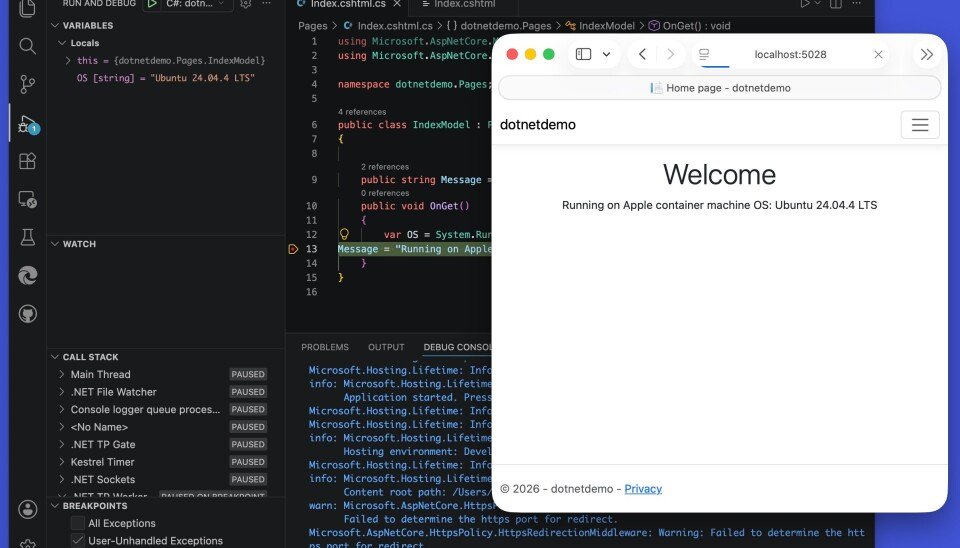
Using a supplied tutorial Dockerfile based on Ubuntu 24.04 with the Swift SDK, it is possible to set up a machine and develop against it using Visual Studio Code on macOS connecting over VS Code Remote. Building on Linux and running through VS Code and Safari on the Mac side worked, though Swift debugging breakpoints were not hit. A .NET project debugged correctly, suggesting the gap is in specific tooling rather than the platform itself.
Memory handling is the other rough edge. A container machine defaults to half the system memory. On a 64 GB machine that is a 32 GB allocation, but actual consumption stays low until needed. After launching a VM and starting PostgreSQL, real usage sat around 1 GB. The catch, documented in Apple's technical overview, is that memory cannot be released back to the host once claimed. Usage only climbs during a session, and the only way to reclaim it is to restart the VM. For long-lived development machines that run for days, that is a meaningful operational wart.
Graphical applications are out of scope. WSL supports GUI apps through X11 and Wayland, but Apple closed an issue requesting the same capability, pointing users toward installing XQuartz and connecting over container-to-host networking instead. GUI support does not appear to be a goal.
What this changes
For developers, the practical advice is short. If you adopt container machines, do not accept the default home mount. Set --home-mount to none or scope it to a single project directory, and treat the Linux guest as you would any environment that runs untrusted code, because installing packages is exactly that. Keep credentials and SSH keys out of any directory the guest can see.
For the broader ecosystem, Apple is entering a crowded field. Mac developers already reach for Docker, Podman, Colima, UTM, VirtualBox, and OrbStack, or simply SSH into a remote Linux box. Container machines are lightweight and performed well, and being native and open source gives them a real claim on developer attention. But the project is tucked away on GitHub rather than presented as part of macOS, the documentation is still thin, and the memory and debugging gaps need work.
The security default is the issue most worth fixing before this sees wide adoption. WSL faced its own scrutiny over file system boundaries between host and guest, and the lesson held: when a tool blurs the line between two environments, the safe configuration has to be the one users get without asking. A WWDC session video and the GitHub documentation cover the rest of the feature set, but the choice of what to expose by default is the one developers should examine first.
Comments
Please log in or register to join the discussion