
Microsoft's Azure SRE Agent addresses critical alert fatigue challenges by providing intelligent consolidation, automated investigation, and data-driven optimization for Azure Monitor alerts.
The proliferation of cloud monitoring tools has created an unexpected challenge for operations teams: alert fatigue. While Azure Monitor has become one of the most widely adopted observability platforms in the cloud, many organizations find themselves drowning in notifications that range from critical incidents to background noise. Microsoft's Azure SRE Agent emerges as a strategic solution to this problem, creating an intelligent layer between monitoring systems and human responders.
The Alert Dilemma in Cloud Operations
Organizations implementing Azure Monitor typically encounter one of two problematic scenarios:
Alert fatigue has set in. Alert rules tend to accumulate over time—CPU thresholds from years past, health probe checks from previous migrations, disk alerts from historical incidents that never got properly cleaned up. These rules fire regularly, most auto-resolve, and receive minimal investigation. Yet buried within this noise are genuine incidents that go unnoticed until they escalate beyond containment.
Teams respond with repetitive effort. Engineers repeatedly triage the same alerts, running identical diagnostic queries, and arriving at the same "transient spike, no action needed" conclusions. They recognize that certain rules are problematic but lack the necessary data to optimize them effectively: What should the appropriate threshold be? What's the auto-resolution rate? Is it safe to modify the rule?
Both scenarios share a fundamental gap: there's no intelligent intermediary between Azure Monitor and the operations team. The Azure SRE Agent fills this void by receiving alert fires in real time, investigating them automatically, consolidating noisy alerts, and surfacing the data needed to improve alert rules at their source.
Intelligent Alert Handling: Cooldown and Response Plans
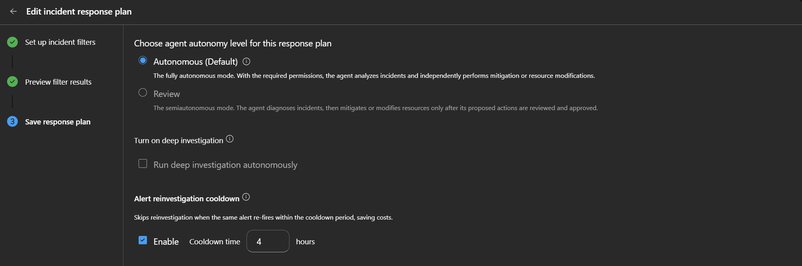
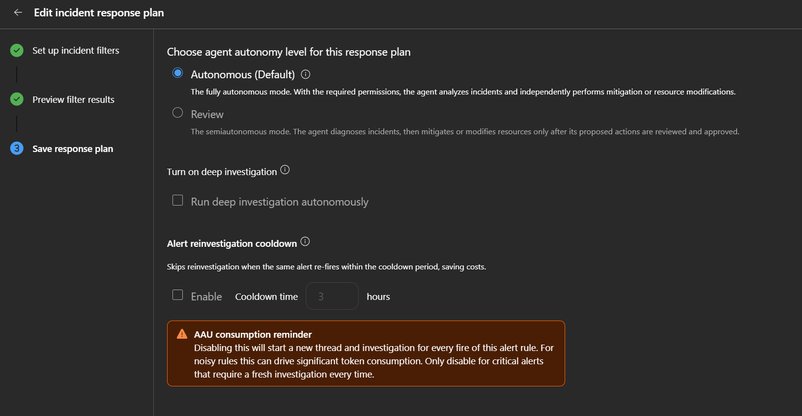
The most impactful capability of the Azure SRE Agent is its alert reinvestigation cooldown mechanism. This per-response-plan setting controls how the agent handles repeated fires from the same alert rule. When an alert rule fires and the agent already has an active thread for that rule, it merges the new fire into the existing thread rather than initiating a duplicate investigation.
What makes this particularly valuable is how the agent handles previously resolved threads: if the previous thread was resolved or closed within the cooldown window, the agent reopens it and appends the new fire instead of starting fresh. This addresses the common pattern where an alert fires, gets resolved, then fires again 30 minutes later—generating maximum duplicate effort for minimal new information.
Configuring the Cooldown
The cooldown is configured in the Azure Monitor response plan's Save step. By default, it's enabled with a 3-hour window—a carefully chosen timeframe that accommodates most noisy alert patterns while ensuring genuinely new issues several hours later receive proper investigation.
For organizations with varying alert patterns, the cooldown window can be adjusted between 1 and 24 hours:
- Frequent polling-based alerts (health probes, heartbeats): 1-2 hours
- Recurring issues tied to daily batch jobs or deployment cycles: 6-12 hours
- Intermittent failures with unpredictable recurrence: 12-24 hours
- Critical alerts where every fire demands fresh investigation: Disable cooldown entirely
Tiered Response Plans for Segmented Alert Handling
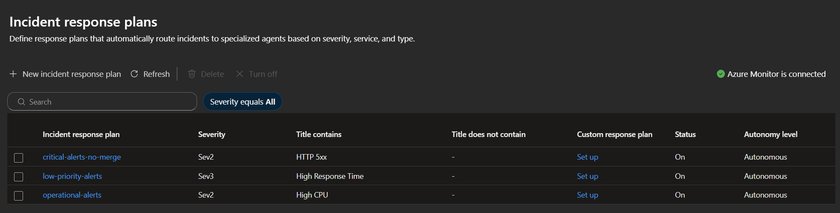
The cooldown mechanism works optimally when paired with tiered response plans that route alerts based on severity and keywords. Rather than using a single catch-all plan for all alert types, organizations should create separate plans that match investigation depth to alert importance.

Critical alerts (Sev0-1, titles containing "failover", "security", "data loss"): Disable cooldown. Every fire receives a fresh investigation because a repeat fire likely indicates the initial remediation didn't hold.
Operational alerts (Sev2, titles containing "high CPU", "memory pressure", "latency"): Set a 6-hour cooldown. These represent real issues, but recurring fires within a few hours typically stem from the same root cause. The agent consolidates them into a single thread while still providing fresh investigation for genuinely new occurrences later in the day.
Low-priority alerts (Sev3-4, titles containing "health probe", "availability test"): Use a short 1-hour cooldown. These rarely require deep investigation, allowing the agent to capture context without redundant analysis.
Informational alerts: Don't create a response plan at all. These are telemetry data points, not incidents requiring response.
Practical Implementation Example
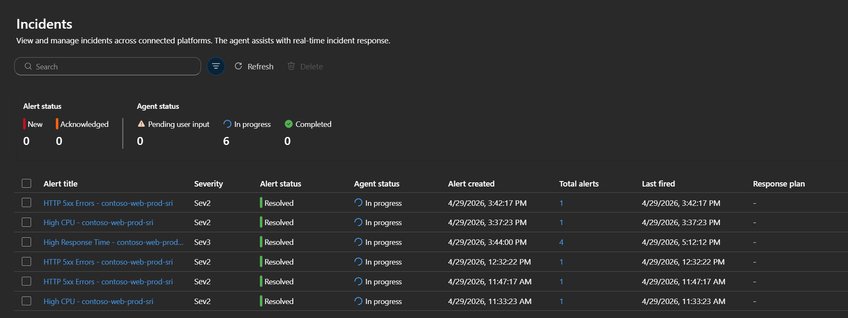
In a test deployment, we observed how these configurations affect alert handling. A web application with Azure Monitor alert rules generated 9 alerts across three rule types. The agent's behavior varied significantly based on each response plan's cooldown settings:
| Alert Rule | Response Plan | Merge Setting | AzMon Fires | Agent Threads | Total Alerts (in thread) | What Happened |
|---|---|---|---|---|---|---|
| High Response Time (Sev3) | low-priority-alerts | Merge ON, 4h cooldown | 3 | 1 | 4 | All 4 fires merged into a single thread — the agent investigated once and appended recurring fires |
| HTTP 5xx Errors (Sev2) | critical-alerts-no-merge | Merge OFF | 3 | 3 | 1 each | Each fire created its own investigation — appropriate for critical alerts where every occurrence matters |
| High CPU (Sev2) | operational-alerts | Merge ON, 1h cooldown | 2 | 2 | 1 each | Fires were >1 hour apart (resolved at 12:05, re-fired at 3:37) — outside the cooldown window, so treated as separate incidents |
This example demonstrates how the same 9 Azure Monitor alerts produced different agent behaviors based on configuration. The High Response Time rule saved 3 redundant investigations through merging. The HTTP 5xx rule maintained separate investigations for critical alerts. The High CPU rule revealed a cooldown window too short for the alert's pattern—a signal to adjust the configuration.
Proactive Noise Monitoring: Data-Driven Alert Optimization
Intelligent alert handling represents the first step in reducing alert fatigue. The second, more transformative step is having the agent proactively analyze alert patterns and provide actionable insights for improving rules at their source.
Weekly Alert Hygiene Report
Creating a weekly scheduled task that analyzes all Azure Monitor alert threads from the past 7 days generates compounding benefits. For each alert rule that fired more than 3 times, the agent produces a ranked report covering:
- High Auto-Resolution Rules: Rules with high auto-resolution rates, with recommendations for threshold adjustments or suppression windows
- Rules with Recurring Root Causes: Rules where the same root cause recurs, with suggestions for permanent remediation actions
- Miscategorized Severity: Rules where investigation concludes low impact but the alert is marked Sev1/Sev2, with recommendations for severity adjustment
- Cost Summary: Estimated effort consumed per alert rule for the week
This creates a feedback loop where teams receive concrete, data-backed recommendations for alert rule adjustments. The information that was previously too time-consuming to gather manually is now generated automatically, enabling systematic improvement of the alert landscape.
Monthly Threshold Audit
For deeper analysis, organizations can implement a monthly threshold audit task that:
- Queries Azure Monitor alert rules across the agent's subscriptions
- Analyzes each rule's metric history over 30 days
- Compares current thresholds against actual P50, P90, and P99 values
- Flags rules with thresholds below P50 (always firing) or above P99 (never firing)
- For high-frequency rules with high auto-resolution, recommends thresholds at P95 to reduce fires while still catching genuine anomalies
The audit produces three critical outputs:
- A threshold optimization table
- Identification of dormant rules (no fires in 30+ days)
- Specific Azure CLI commands to update each rule
This represents the highest-leverage optimization activity, as a single threshold adjustment on one noisy rule can eliminate hundreds of alert fires per month permanently.
Cost Considerations and Optimization
Each alert investigation consumes LLM tokens for reasoning, querying, and analysis. Without thoughtful configuration, high-volume alert pipelines can lead to unexpected costs. The recommended setup naturally controls token usage through:
- Cooldown mechanisms preventing redundant investigations
- Tiered response plans matching effort to alert importance
- Minimal attention for low-priority alerts
For additional control, organizations can implement a PostToolUse hook that encourages the agent to include time-range filters in Log Analytics queries. This prevents large, unbounded result sets from inflating conversation context. Since this hook uses a simple regex check on query text rather than an LLM call, it adds zero token cost.
Implementation Roadmap
Organizations can begin realizing benefits from the Azure SRE Agent with a straightforward implementation sequence:
- Connect Azure Monitor as an incident source in your SRE Agent
- Enable the reinvestigation cooldown on response plans (the 3-hour default serves as an effective starting point)
- Create tiered response plans—at minimum, separate critical alerts (cooldown disabled) from operational alerts (cooldown 6h) and low-priority alerts (cooldown 1h)
- Set up a weekly alert hygiene report as a scheduled task to build visibility into alert patterns
- Add the monthly threshold audit after accumulating a few weeks of data from weekly reports
The first three steps require minimal time but begin working immediately, providing quick wins while more sophisticated optimizations are planned.
Strategic Impact on Cloud Operations
The Azure SRE Agent represents more than just a tool—it's a fundamental shift in how organizations approach alert management. By creating an intelligent intermediary between monitoring systems and human responders, it enables:
- Reduced cognitive load: Teams focus on genuine incidents rather than filtering noise
- Data-driven optimization: Continuous improvement of alert rules based on actual performance data
- Operational efficiency: Elimination of repetitive diagnostic work
- Cost containment: Intelligent resource allocation based on alert severity and actual business impact
For organizations adopting multi-cloud strategies, this approach provides a consistent methodology for alert management regardless of underlying infrastructure. The agent's ability to analyze patterns and provide recommendations helps maintain operational excellence across diverse cloud environments.
As cloud operations continue to evolve, the ability to distinguish signal from noise becomes increasingly critical. The Azure SRE Agent offers a practical path to achieving this distinction, transforming alert management from a burden into a strategic advantage.
For organizations looking to implement this solution, Microsoft provides comprehensive documentation on incident response plans, scheduled tasks, and agent hooks to support the full implementation lifecycle.
Comments
Please log in or register to join the discussion