
GitHub’s experimental accessibility agent, integrated with Copilot CLI and VS Code, has reviewed over 3,500 pull requests, automatically fixing common WCAG issues while surfacing complex problems for human review. The post details the agent’s architecture, token‑efficiency tactics, and the trade‑offs of using LLM‑driven sub‑agents for accessibility work.
Building a General‑Purpose Accessibility Agent – What We Learned
Published on May 15 2026 by Eric Bailey
GitHub Blog post
Service update
GitHub has launched a pilot accessibility agent that works in two places:
- Just‑in‑time assistance for developers using the GitHub Copilot CLI or the Copilot VS Code extension. When a developer asks a question about ARIA roles, focus management, or image alt text, the agent returns a concise, standards‑based answer.
- Automatic remediation that runs on every pull request that touches front‑end code. The agent scans the diff, flags violations, and, when safe, commits a fix.
During the first month the agent examined 3,535 PRs and achieved a 68 % resolution rate. The most frequent issue types were:
| Rank | Issue type | Why it matters |
|---|---|---|
| 1 | Unclear structure for assistive technologies | Screen readers need a reliable DOM hierarchy |
| 2 | Ambiguous control names | Voice‑over users rely on descriptive labels |
| 3 | Missing live region announcements | Users must know when dynamic content changes |
| 4 | No text alternatives for non‑text content | Images and icons must convey meaning |
| 5 | Illogical keyboard focus order | Keyboard‑only navigation must be predictable |
Use cases
1. Real‑time developer help
When a developer types // How should I label this button? in a Copilot‑enabled file, the agent pulls the relevant WCAG success criterion, shows a short code snippet, and links to the official documentation. This reduces context‑switching and speeds up onboarding for engineers new to accessibility.
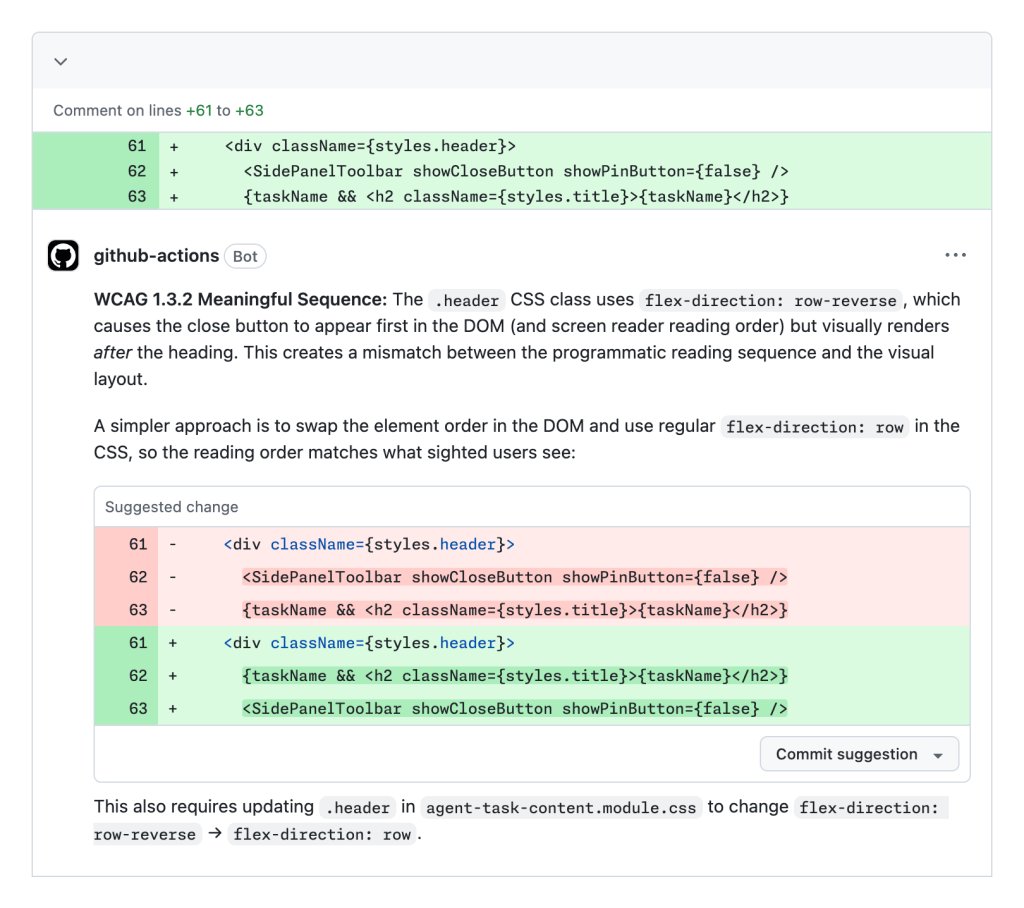
2. Automated PR review
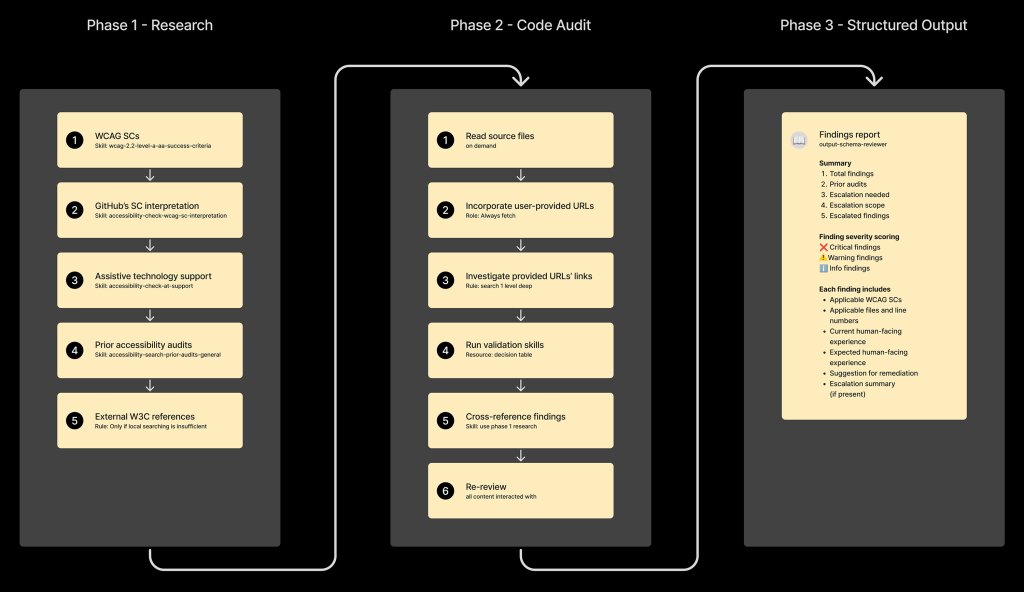
The agent runs as a GitHub Action on every PR that modifies UI code. It performs three steps:
- Research sub‑agent – reads the accessibility issue tracker, extracts prior fixes, and builds a knowledge base for the current diff.
- Complexity filter – a lightweight shell script scores the changed files; if the score exceeds a threshold, the agent aborts automatic changes and prompts a human reviewer.
- Implementation sub‑agent – generates a minimal, test‑covered patch for low‑risk patterns (e.g., missing
altattributes, incorrectroleusage).
The workflow is illustrated in the diagram from the original post:
3. Escalation and audit trail
If the reviewer sub‑agent finds a high‑severity WCAG failure (e.g., a custom data‑grid that lacks proper ARIA attributes), it flags the PR and adds a comment directing the author to the Accessibility team. All decisions are stored in a structured JSON schema, making it easy to audit who approved a change and why.
Trade‑offs and architectural choices
Sub‑agent design
Initially the agent was a monolithic LLM chain. Token consumption skyrocketed, response times slowed, and hallucinations increased. Splitting the work into two sandboxed sub‑agents—a passive reviewer and an active implementer—solved most of these problems:
- Escalation checkpoints keep high‑risk changes under human control.
- Complexity‑based routing prevents the LLM from attempting code it cannot reliably generate.
- Filtering reduces token waste because the implementer only receives vetted findings.
- Traceability is preserved; each sub‑agent writes to a common audit log.
Linear execution order
Running the phases in a fixed sequence mirrors how a human auditor works: research → evaluate → remediate → report. This deterministic flow dramatically lowered the variance in LLM output and made the system easier to test.
Template schemas
Both sub‑agents exchange data via pre‑defined JSON templates. The reviewer schema captures:
- Issue identifier
- WCAG criterion
- Code location
- Severity
The implementer schema contains:
- Suggested diff
- Test coverage checklist
- Validation commands
Having a contract prevents the agents from “talking over each other” and eliminates many token‑heavy back‑and‑forth exchanges.
Limitations
- Coverage gap – Only 64 % of WCAG 2.1 AA criteria are detectable by deterministic checkers; the remaining 36 % rely on contextual reasoning, where the LLM can help but not guarantee correctness.
- High‑risk UI patterns – Drag‑and‑drop, rich‑text editors, and complex data grids are deliberately excluded because current LLMs cannot reliably produce accessible implementations.
- Bias toward action – LLMs tend to generate code even when instructed not to. The team added anti‑gaming prompts that explicitly forbid code generation when the complexity score is high.
Operational costs
Token usage is the primary cost driver. By limiting the reviewer to a concise summary and only invoking the implementer for low‑complexity changes, the average cost per PR dropped from ~0.45 USD to ~0.12 USD.
Practical takeaways for other teams
- Start with a curated issue corpus – GitHub’s pre‑existing accessibility issue repository provided high‑quality training data. Replicate this by exporting your own bug tracker into a structured format.
- Use a two‑step sub‑agent model – A passive reviewer that never writes code and an implementer that only acts on vetted findings keep token spend predictable.
- Enforce a linear phase order – It reduces hallucinations and makes debugging easier.
- Add a complexity gate – A simple heuristic script (e.g., count of changed JSX nodes, depth of component tree) can decide when to hand off to a human.
- Continuously audit LLM output – Capture reviewer sentiment, run periodic manual checks, and feed the results back into the prompt library.
Looking ahead
GitHub plans to open‑source the agent’s orchestration code and the two schema definitions, hoping to give other open‑source projects a head‑start on building accessibility‑aware agents. Until then, the team will keep iterating on the sub‑agent prompts, expand the knowledge base with newly audited PRs, and refine the complexity scoring model.
For a deeper dive into the token‑efficiency techniques used in this pilot, see the related post Improving token efficiency in GitHub Agentic Workflows.
Tags: accessibility GitHub Copilot LLM agents agentic workflows
Comments
Please log in or register to join the discussion