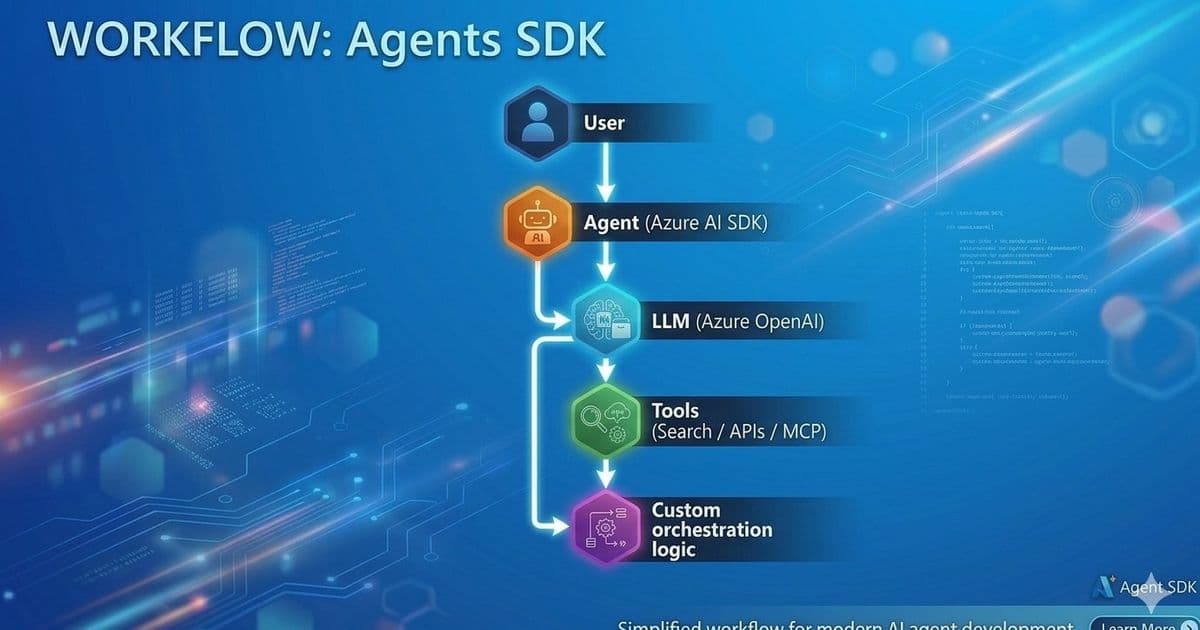
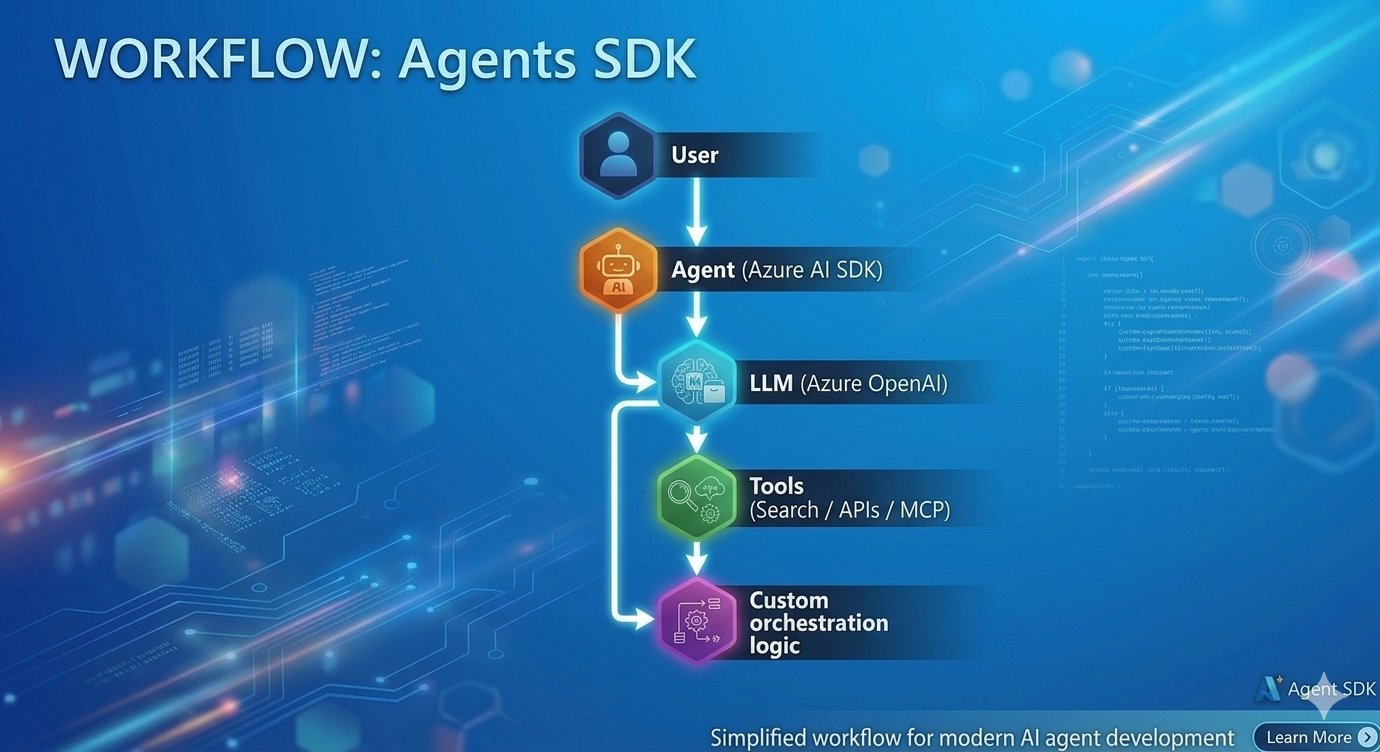
A senior Microsoft consultant compares the low‑level Azure AI Projects (Agents SDK) with the higher‑level Microsoft Agent Framework (MAF), highlighting practical trade‑offs, pricing implications, migration paths, and the business impact of each choice for single‑agent pilots and multi‑agent production workloads.
What changed
Microsoft’s AI platform now offers two distinct ways to build agentic applications on Azure. The Azure AI Projects Agents SDK (often called Agents SDK) gives developers a thin wrapper around Azure OpenAI, AI Search and other services, letting them spin up a single agent with a few lines of code. In parallel, the Microsoft Agent Framework (MAF) introduces a higher‑level abstraction that includes built‑in orchestration, multi‑agent routing, and lifecycle management. Both were released in the last six months, and early adopters are reporting clear differences in developer experience, operational overhead, and cost structure.
Provider comparison
| Feature | Azure AI Projects Agents SDK | Microsoft Agent Framework (MAF) |
|---|---|---|
| Target use case | Quick proof‑of‑concept or single‑agent services (e.g., chat‑assistant, RAG endpoint) | Complex ecosystems where several specialized agents collaborate (research‑writer, triage‑escalation, etc.) |
| Abstraction level | Low‑level API that maps directly to Azure resources (model, tool, run) | High‑level constructs – Agent, WorkflowBuilder, Message – that hide the plumbing |
| Orchestration | Manual; developers must code handoffs, state sharing, and retry logic | Built‑in directed‑graph workflow engine; edges define hand‑off automatically |
| State & memory | Must be persisted by the caller (e.g., Azure Cosmos DB, Blob) | Framework supplies per‑agent memory store and context propagation |
| Deployment model | Agents are persisted in the Foundry portal; execution runs in a managed Azure service | Agents live in‑process; the framework can be hosted on Azure Container Apps, AKS, or Functions |
| Pricing | Pay‑as‑you‑go for underlying services only (OpenAI token usage, AI Search RU, compute for runs) | Additional charge for the orchestration service tier (currently a modest per‑run fee) plus the same underlying service costs |
| Learning curve | Familiar to developers who already use Azure SDKs; minimal ceremony | Requires understanding of workflow graph concepts and the framework’s lifecycle hooks |
| Extensibility | Full control over request/response flow; easy to plug custom tools | Extensible via custom Tool plugins, but the framework enforces a specific pattern |
| Migration path | Agents can be lifted into MAF by wrapping the SDK client inside a Agent object; code changes are limited to orchestration definitions |
|
| Community & support | Official docs on Microsoft Learn, Python/.NET SDK repos, community samples | Dedicated GitHub repo, sample catalog, and a “Getting Started” hub on Microsoft Learn |
Pricing illustration (May 2026 rates)
- Agents SDK: 0.002 USD per 1 K tokens for
gpt‑4o‑preview, plus $0.12 per 1 K search queries. A typical single‑agent chatbot that processes 500 K tokens/month and 10 K searches costs roughly $115. - MAF: Same token and search costs plus $0.001 per workflow run. A multi‑agent pipeline that triggers 5 runs per user request (average 2 K tokens/request) for 10 K requests/month adds $50 in orchestration fees, bringing the total to $165. These numbers illustrate that the extra orchestration cost is modest compared to the value of built‑in routing and state handling.
Business impact
Speed to market
For teams that need to validate an idea within weeks, the Agents SDK wins. The code snippet in the original post shows a fully functional agent in under 15 lines, letting product owners demonstrate value to stakeholders without provisioning extra infrastructure.
Operational complexity
When the solution graduates to production, the manual orchestration required by the SDK can become a hidden liability. Developers must write custom retry, timeout, and hand‑off logic, which often leads to duplicated code across services. MAF centralizes that logic, reducing the number of moving parts and the associated operational burden. Organizations that already run CI/CD pipelines for containerized workloads can treat a MAF workflow as a single deployable artifact, simplifying governance.
Scalability and cost predictability
Because MAF abstracts the orchestration layer, scaling the number of agents is a matter of adjusting the host platform (e.g., increasing Container Apps instances). The per‑run fee is predictable, making budgeting easier for multi‑agent products. In contrast, a DIY orchestration built on top of the SDK may require additional Azure Functions or Logic Apps, each with its own pricing model, potentially inflating costs as usage grows.
Talent and training
Teams with strong Python or .NET backgrounds can adopt the Agents SDK immediately. However, as the organization expands its agent portfolio, the learning curve of MAF pays off by enforcing consistent design patterns. New hires can onboard faster because the framework dictates where to place business logic, memory handling, and error handling.
Migration strategy
If you start with the Agents SDK and later need multi‑agent capabilities, the transition is straightforward:
- Wrap existing SDK clients inside
Agentobjects provided by MAF. - Define a workflow graph that connects the legacy agents.
- Gradually shift state management to the framework’s built‑in store, deprecating custom persistence layers.
- Retire the manual orchestration code once the workflow is stable. This incremental approach avoids a big‑bang rewrite and preserves the investment made in the original SDK implementation.
Recommendation checklist
- Single‑agent, low‑latency use case → Choose Agents SDK.
- Multi‑agent, complex routing, long‑term product → Choose Microsoft Agent Framework.
- Budget constrained, token‑heavy workloads → Start with SDK; add MAF only when orchestration cost is justified.
- Need for strict governance and audit trails → MAF’s structured workflow logs simplify compliance reporting.
References
- Azure AI Projects – Python SDK (GitHub)
- Microsoft Agent Framework – GitHub Repository
- Agent Framework documentation (Microsoft Learn)
- Pricing details for Azure OpenAI and AI Search
- Orchestration pricing for Microsoft Agent Framework
By leveraging the right abstraction at the right time, enterprises can balance rapid experimentation with the operational rigor needed for production‑grade agentic systems.
Comments
Please log in or register to join the discussion