
Anthropic's Claude Code has evolved to handle complex, multi-million-line codebases through a sophisticated harness approach that goes beyond the model itself. This deep dive examines the patterns that make enterprise deployments successful.
Claude Code is now operating in some of the most challenging software environments imaginable: multi-million-line monorepos, decades-old legacy systems, and distributed architectures spanning dozens of repositories. These deployments reveal how the tool has matured beyond simple coding assistance to become a comprehensive engineering system.
The most successful Claude Code deployments share recognizable patterns across configurations, tooling, and organizational structure. These environments present challenges that smaller codebases don't face—build commands that differ across every subdirectory, legacy code spread across folders with no shared root, or codebases in languages not typically associated with AI coding tools like C, C++, C#, Java, and PHP.
How Claude Code Navigates Large Codebases
Unlike AI coding tools that rely on RAG-based retrieval by embedding entire codebases, Claude Code operates more like a software engineer would: it traverses the file system, reads files, uses grep to find what it needs, and follows references across the codebase. This approach works locally on the developer's machine without requiring a centralized codebase index.
RAG-based systems can fail at scale because embedding pipelines can't keep up with active engineering teams. By the time a developer queries the index, it might reflect the codebase as it existed days or weeks ago, returning functions that have been renamed or modules that have been deleted.
The agentic search approach avoids these issues, but comes with a tradeoff: it works best when Claude has enough starting context to know where to look. This means the quality of Claude's navigation depends heavily on how well the codebase is set up, with layered context through CLAUDE.md files and skills.
The Harness Matters More Than the Model
One common misconception about Claude Code is that its capabilities are defined solely by the model. Teams often focus on model benchmarks and test performance, but in practice, the ecosystem built around the model—the harness—determines how Claude Code performs more than the model alone.
The harness consists of five extension points:
CLAUDE.md Files
These context files are read automatically at the start of every session. They provide the codebase knowledge Claude needs to perform well. Teams typically use a layered approach: a root file for the big picture and subdirectory files for local conventions.
Keeping these files lean is crucial. Too much context loaded into every session degrades performance, while too little leaves Claude navigating blind. The most effective deployments treat CLAUDE.md files as pointers and critical gotchas only, with everything else drifting into noise.
Hooks
Hooks are scripts that run at key moments and make the setup self-improving. While teams often think of hooks as preventing Claude from doing something wrong, their more valuable use is continuous improvement.
A stop hook can reflect on what happened during a session and propose CLAUDE.md updates while the context is still fresh. A start hook can load team-specific context dynamically so every developer gets the right setup for their module without manual configuration.
For automated checks like linting and formatting, hooks enforce rules deterministically and produce more consistent results than relying on Claude to remember instructions.
Skills
Skills keep the right expertise available on-demand without bloating every session. In large codebases with dozens of task types, not all expertise needs to be present in every session.
Skills solve this through progressive disclosure, offloading specialized workflows and domain knowledge that would otherwise compete for context space. They load only when the task calls for them. For example, a security review skill loads when Claude is assessing code for vulnerabilities, while a document processing skill loads when documentation needs updating.
Skills can also be scoped to specific paths, activating only in relevant parts of the codebase. A team owning a payments service can bind their deployment skill to that directory, preventing it from loading when someone works elsewhere in the monorepo.
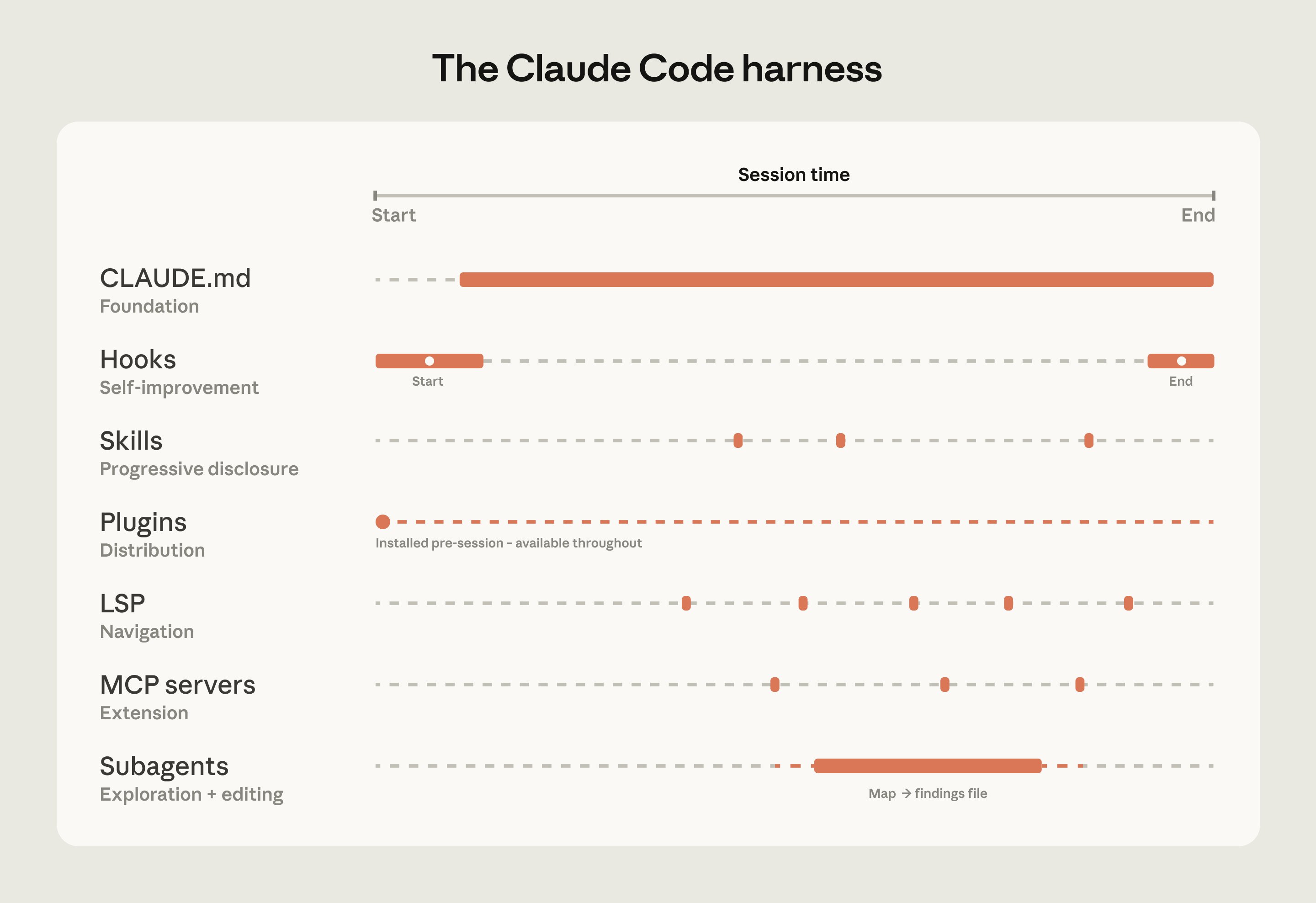
Claude Code's extension layer at a glance
Plugins
Plugins bundle skills, hooks, and MCP configurations into installable packages, allowing organizations to distribute working setups across the team. This prevents good setups from staying tribal and ensures new engineers have the same capabilities as experienced ones from day one.
For example, a large retail organization built a skill connecting Claude to their internal analytics platform, distributed it as a plugin before broad rollout to the business.
MCP Servers
Model Context Protocol (MCP) servers connect Claude to internal tools, data sources, and APIs it can't otherwise reach. The most sophisticated teams build MCP servers exposing structured search as a tool Claude can call directly. Others connect Claude to internal documentation, ticketing systems, or analytics platforms.
Additional Capabilities
Beyond the five extension points, two additional capabilities enhance Claude Code's effectiveness:
Language Server Protocol (LSP) Integrations
LSP integrations give Claude the same navigation developers have in their IDEs. Most large-codebase IDEs already have an LSP running, powering "go to definition" and "find all references." This provides Claude with symbol-level precision, allowing it to follow function calls to their definitions and trace references across files.
Without LSP, Claude pattern-matches on text and can land on the wrong symbol. One enterprise software company deployed LSP integrations org-wide before their Claude Code rollout specifically to make C and C++ navigation reliable at scale.
Subagents
Subagents are isolated Claude instances with their own context windows that take a task, do the work, and return only the final result to the parent. Once the harness is in place, teams can spin up read-only subagents to map subsystems and write findings to files, then have the main agent edit with the full picture.
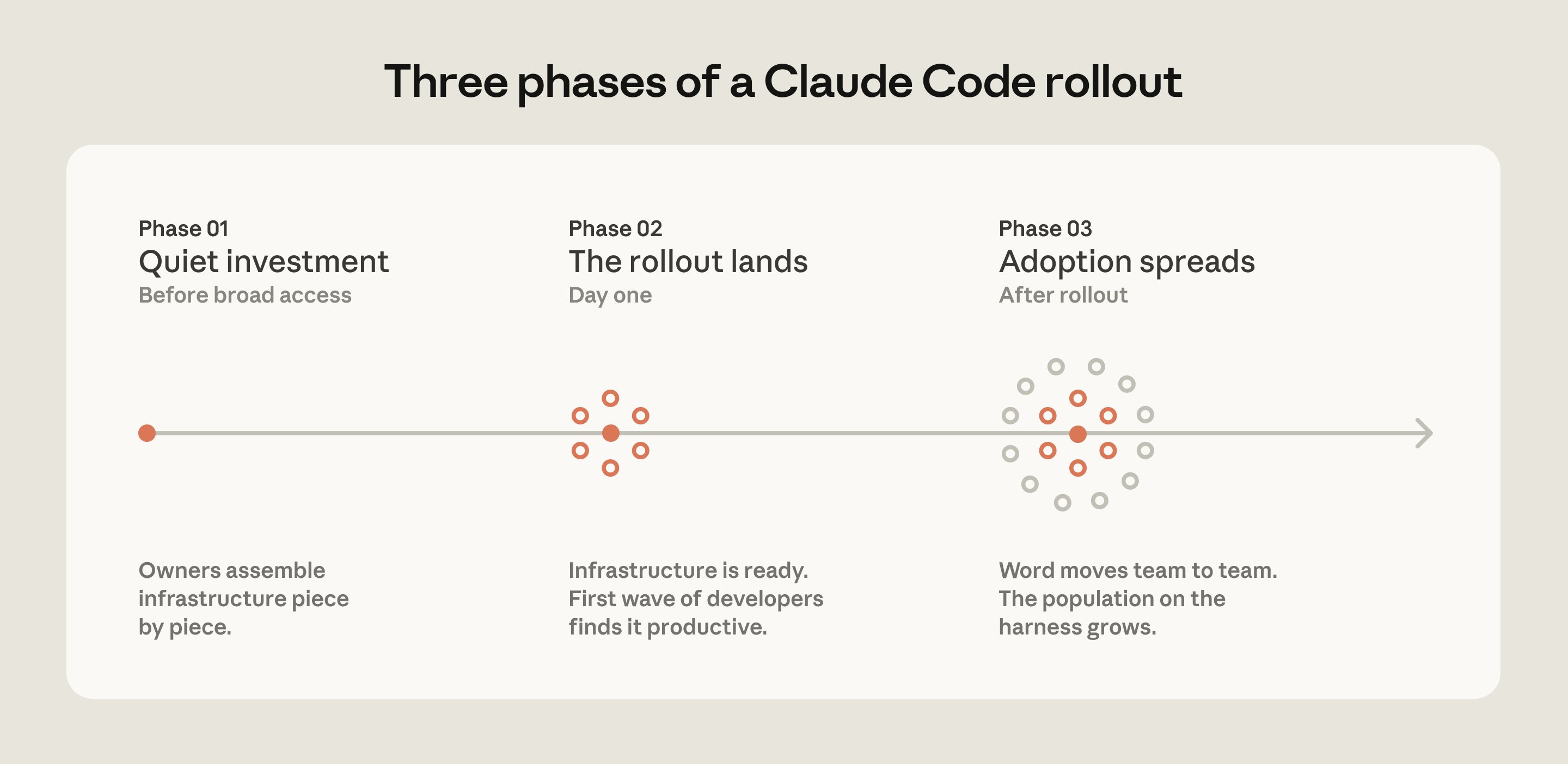
Phases of Claude Code rollout in successful deployments
Three Configuration Patterns from Successful Deployments
Making the Codebase Navigable at Scale
Claude's ability to help in a large codebase is bounded by its ability to find the right context. The most effective deployments invest upfront in making the codebase legible to Claude through several patterns:
- Layered CLAUDE.md files: Root file for the big picture, subdirectory files for local conventions
- Initializing in subdirectories: Claude works best when scoped to the relevant part of the codebase
- Scoped test and lint commands: Running the full suite when one service changes causes timeouts
- Using .ignore files: Excluding generated files, build artifacts, and third-party code
- Building codebase maps: For unconventional directory structures
- Running LSP servers: So Claude searches by symbol, not by string
Actively Maintaining CLAUDE.md Files
As models evolve, instructions written for current models can work against future ones. CLAUDE.md files that guided Claude through patterns it used to struggle with may become unnecessary or constraining when new models ship.
Teams should expect to do a meaningful configuration review every three to six months, or whenever performance plateaus after major model releases. A hook that enforced specific version control workflows, for example, became redundant once Claude Code added native support for those systems.
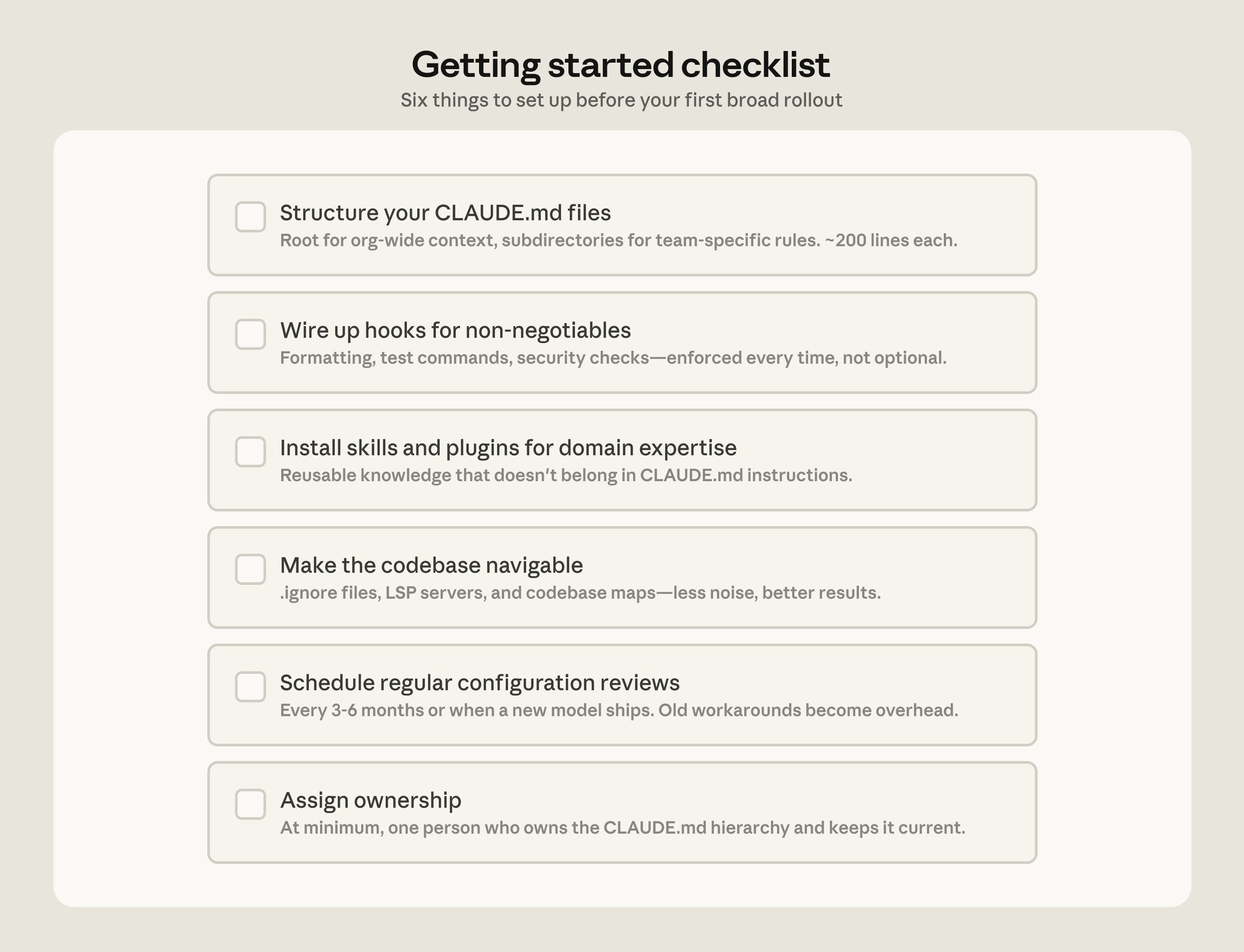
Getting started checklist for Claude Code at scale
Assigning Ownership
Technical configuration alone doesn't drive adoption. Organizations that succeeded invested in the organizational layer as well. The fastest rollouts had a dedicated infrastructure investment before broad access.
A small team, sometimes even just one person, wired up the tooling so Claude already fit developer workflows when they first touched it. In some cases, an entire team focused on managing AI coding tools had infrastructure in place before rollout began.
These teams typically sit under developer experience or developer productivity functions. An emerging role in several organizations is an "agent manager"—a hybrid PM/engineer function dedicated to managing the Claude Code ecosystem.
For organizations without a dedicated team, the minimum viable version is a DRI (Directly Responsible Individual) with ownership over Claude Code configuration, authority to make calls on settings and permissions, and responsibility to keep them current.
Applying These Patterns
Claude Code is designed around conventional software engineering environments where engineers are primary contributors, repos use Git, and code follows standard directory structures. Most large codebases fit this mold, but non-traditional setups require additional configuration work.
For organizations with complex requirements, Anthropic's Applied AI team works directly with engineering teams to translate these patterns into specific requirements. The patterns described have worked across many customer deployments, but remaining complexity requires judgment specific to each codebase, tooling, and organization.
The organizations that see the most success treat Claude Code not as a simple coding tool but as a comprehensive engineering system that requires thoughtful configuration, maintenance, and organizational support. As AI coding tools continue to evolve, this holistic approach will become increasingly important for large-scale deployments.
For organizations looking to get started with Claude Code at scale, Anthropic provides enterprise-level support and resources to help implement these best practices effectively.
Comments
Please log in or register to join the discussion