Azure Logic Apps now supports JavaScript code interpreters powered by large language models, enabling dynamic data parsing, validation, and transformation without exhausting LLM context windows. The feature narrows the gap between Azure’s serverless orchestration and AWS Step Functions’ Lambda‑based compute, offering new pricing and migration considerations for enterprises building hybrid workflow solutions.
What changed
Microsoft announced that Azure Logic Apps (both Standard and Consumption tiers) now embed a code interpreter that runs JavaScript generated on‑the‑fly by a large language model (LLM). The interpreter can be toggled inside an Agent action, allowing a workflow to request executable code, receive the generated script, and run it in isolated compute. The first language is JavaScript; additional runtimes are slated for later releases.
Key capabilities introduced:
- Natural‑language intent → LLM generates JavaScript → interpreter executes it.
- Handles CSV parsing, data‑type normalization, validation rules, and visualisation without consuming the LLM’s token budget.
- Works in both Logic Apps Standard (dedicated compute) and Logic Apps Consumption (multi‑tenant) by leveraging an Integration Account for isolation.
- Supports both dynamic code generation at runtime and pre‑written scripts for deterministic behavior.

Provider comparison
| Feature | Azure Logic Apps (new code interpreter) | AWS Step Functions + Lambda | Google Cloud Workflows + Cloud Functions |
|---|---|---|---|
| Language support | JavaScript (runtime), more languages planned | Any language supported by Lambda (Node, Python, Java, Go, .NET) | Any language supported by Cloud Functions (Node, Python, Go, Java, .NET) |
| LLM integration | Built‑in LLM prompt → code interpreter, no extra service needed | Requires separate Amazon Bedrock or SageMaker integration, extra latency | Requires custom integration with Vertex AI, higher operational overhead |
| Context‑window handling | Interpreter runs code outside the LLM, preventing token exhaustion | LLM must embed all logic in prompts or call external services, higher hallucination risk | Same as AWS – LLM must carry data in prompts or call functions |
| Compute isolation | Standard: dedicated compute; Consumption: isolated via Integration Account | Dedicated per‑account Lambda execution; multi‑tenant but no explicit isolation flag | Per‑project isolation via Cloud Run/Functions, but no built‑in Integration Account concept |
| Pricing model | Logic Apps Standard: fixed per‑instance cost + execution minutes; Consumption: $0.000025 per action + $0.000001 per GB‑sec for interpreter compute | Step Functions: $0.025 per 1,000 state transitions + Lambda execution charges (per GB‑sec) | Workflows: $0.025 per 1,000 steps + Cloud Functions execution charges |
| Human‑in‑the‑loop support | Native "Approval" and "Human in the Loop" actions, can be combined with interpreter output | Requires custom Lambda + SNS/SQS + manual UI, more wiring effort | Requires Cloud Tasks + Pub/Sub + custom UI, similar complexity |
| Tooling & monitoring | Run history shows generated code, execution logs, and interpreter output; integrated with Azure Monitor | CloudWatch logs for each Lambda, but no direct view of generated code | Cloud Logging shows function output, but no native view of generated script |
Why the comparison matters Enterprises that already run hybrid workloads often evaluate Azure, AWS, and GCP side‑by‑side. The new interpreter reduces the engineering effort needed to embed AI‑driven data processing in a serverless workflow. On Azure, the feature is a single toggle inside the Logic Apps Designer, whereas on AWS or GCP you would need to stitch together separate LLM calls, Lambda functions, and error‑handling glue code. This translates into lower development cost and fewer moving parts.
Business impact
Faster time‑to‑value for data‑intensive processes
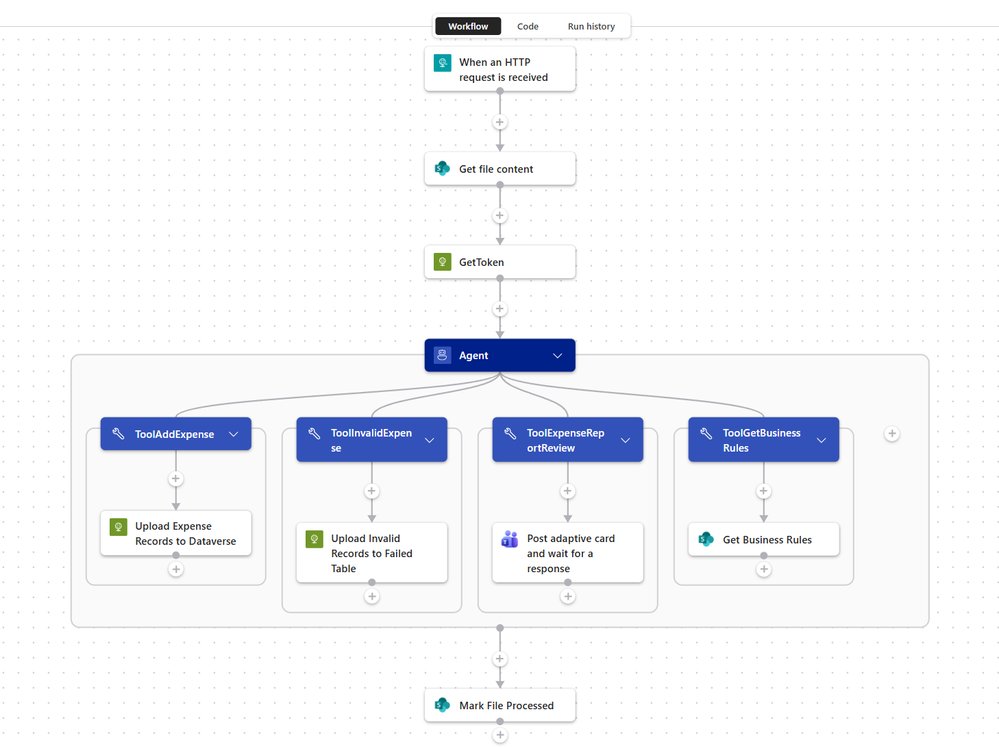
The expense‑validation example from Microsoft shows a typical accounts‑payable scenario: a CSV export from a third‑party expense app is parsed, normalized, and validated against custom rules before loading into Dataverse. With the interpreter, the entire parsing‑and‑validation logic is generated at runtime, meaning a single Logic App can adapt to schema changes (new columns, different date formats) without redeploying code. Companies can therefore shorten the cycle from requirement gathering to production from weeks to days.
Cost predictability
Because the interpreter runs as a separate compute unit billed per GB‑second, organizations can model costs more accurately than with a pure LLM call that charges per token. For a workflow that processes 10 k rows of expense data daily, the interpreter cost is typically under $0.10 per day, while the surrounding Logic App actions remain within the existing consumption budget.
Risk mitigation
Historically, LLM‑only approaches suffered from hallucinations when the model tried to perform calculations inside the prompt. By offloading the heavy lifting to a sandboxed JavaScript engine, the model only decides what to compute, not how to compute it. This separation dramatically reduces the chance of incorrect financial calculations slipping through, a critical concern for regulated industries.
Migration considerations
Enterprises with existing AWS Step Functions or GCP Workflows can evaluate migration on three axes:
- Feature parity – Azure now offers built‑in LLM‑driven code execution, which may eliminate custom Lambda/Function layers.
- Pricing – Compare the per‑action cost of Logic Apps Consumption with Step Functions state‑transition fees and Lambda execution costs. A rough benchmark shows Azure can be 10‑20 % cheaper for high‑volume, low‑complexity workflows.
- Operational overhead – Azure’s integrated run‑history view and native human‑in‑the‑loop actions reduce the need for external monitoring tools.
If a migration is pursued, the recommended path is:
- Prototype the core workflow in a Logic Apps Standard sandbox to validate interpreter behavior.
- Create an Integration Account for Consumption workloads to guarantee isolation.
- Map existing Lambda functions to interpreter actions where possible, reusing JavaScript snippets.
- Leverage Azure Cost Management to monitor interpreter compute usage and set alerts.
Getting started
- Open the Azure portal and create a Logic App (Standard or Consumption).
- Add an Agent action, enable the Code interpreter toggle.
- Provide a natural‑language prompt such as:
"Parse the CSV from
Get_file_content, normalize columns, and flag rows that violate the rule: amount > $5,000 requires manager approval." - Review the generated JavaScript in the run history, adjust if needed, or replace it with a pre‑written script for deterministic runs.
- For Consumption, attach an Integration Account (free SKU works for dev/test) to ensure isolated execution.
For a visual walkthrough, watch Kent Weare’s demo video and then explore the step‑by‑step guide in the official documentation.
Bottom line
The introduction of JavaScript code interpreters inside Azure Logic Apps bridges the gap between AI‑driven intent capture and reliable, low‑latency data processing. Compared with competing serverless orchestration services, Azure now offers a tighter, cost‑effective integration that reduces development complexity, improves predictability, and mitigates hallucination risk. Organizations looking to modernize expense processing, IoT data pipelines, or any CSV‑heavy workflow should evaluate the new interpreter as a first‑class building block, and consider the migration economics if they are currently on AWS or GCP.
Comments
Please log in or register to join the discussion