
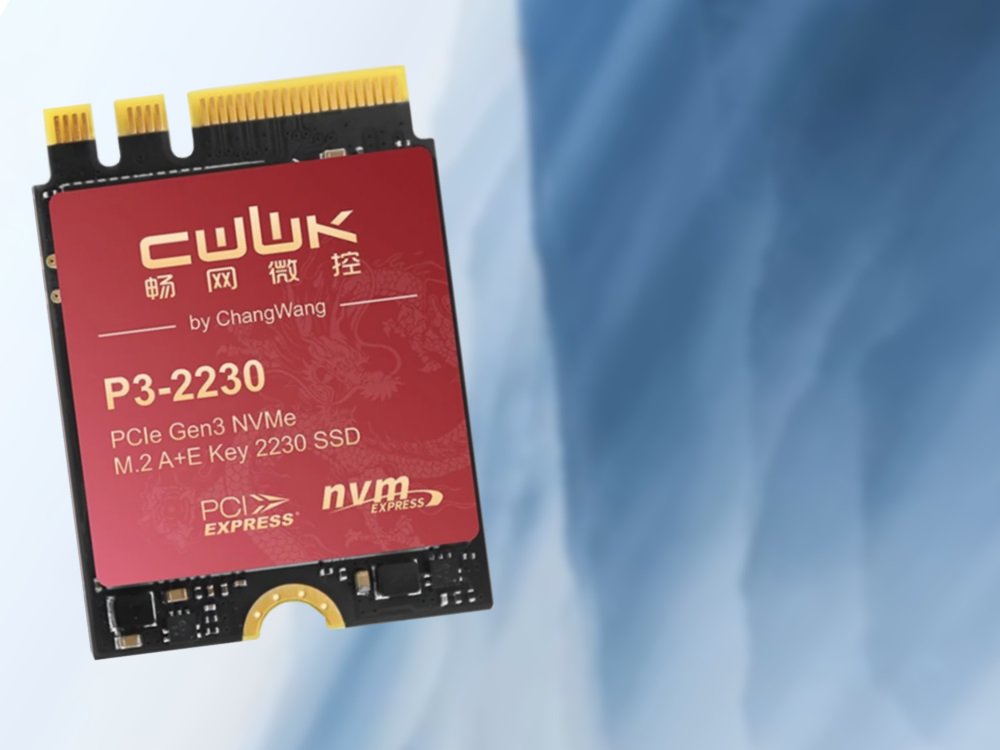
The CWWK/Oaknode P3‑2230 is a single‑lane PCIe 3 × 1 NVMe drive for the often‑overlooked A/E‑key M.2 slot found in many laptops and mini‑PCs. It offers up to 890 MB/s read, but its price—$80 for 256 GB, $200+ for 1 TB—far exceeds the performance it can deliver, especially on platforms limited to PCIe 2 × 1 or SATA‑III speeds.
What’s new?
The CWWK P3‑2230 (also sold as the Oaknode OAK‑2230) finally puts a usable SSD into the tiny M.2 2230 A/E‑key slot that most modern ultrabooks, mini‑PCs and some compact laptops keep for Wi‑Fi/Bluetooth modules. It ships in three capacities—256 GB, 512 GB and 1 TB—and uses a Maxio MAP1202 controller that speaks NVMe over a single PCIe 3 × 1 lane, delivering a claimed sequential read speed of 890 MB/s and write speeds around 650 MB/s. The drive is capped with a “graphene‑copper” heat‑dissipation pad, a nice touch for a form factor that often runs hot in cramped chassis.
How it compares to what you already have
| Feature | CWWK P3‑2230 | Typical PCIe 4 × 4 SSD (e.g., Samsung 990 Pro) | SATA‑III 2.5" SSD (e.g., Crucial MX500) |
|---|---|---|---|
| Interface | PCIe 3 × 1 (NVMe) | PCIe 4 × 4 (NVMe) | SATA‑III (AHCI) |
| Max Read | 890 MB/s | 7,900 MB/s | 560 MB/s |
| Max Write | ~650 MB/s | 6,900 MB/s | 510 MB/s |
| Capacity Options | 256 GB / 512 GB / 1 TB | 1 TB / 2 TB | 500 GB / 1 TB |
| Price (USD) | $80 / $130 / $210+ | $130 / $250 | $55 / $95 |
| Power Draw (typical) | 2.5 W | 5‑7 W | 2‑3 W |
On paper the P3‑2230 sits comfortably between a SATA‑III SSD and a full‑blown PCIe 4 drive. In practice, the single‑lane PCIe 3 bandwidth (≈1 GB/s) is only a modest step up from SATA‑III’s 560 MB/s ceiling. For most workloads—OS boot, office apps, media playback—the difference will be barely noticeable.
Platform constraints
- Intel Celeron/N4100‑class CPUs (common in budget laptops and stick PCs) often expose PCIe 2 × 1 in the A/E slot, capping throughput at ~500 MB/s. In that scenario the P3‑2230 can’t even reach its rated 890 MB/s.
- Older Wi‑Fi modules using the same slot mean you must physically replace the wireless card. That involves:
- Removing the antenna cables.
- Insulating the connectors to avoid shorts.
- Adding a USB‑C or USB‑A Wi‑Fi dongle for wireless connectivity.
- CNVi‑based Wi‑Fi (found in many 2018‑2022 Intel laptops) uses a proprietary interface that may not accept a standard NVMe drive. Compatibility must be verified per model.
- Bootability: Pre‑2012 platforms often lack NVMe support in BIOS/UEFI, so the drive may be usable only as secondary storage.
Who should consider it?
| User type | Verdict |
|---|---|
| Enthusiasts with a spare A/E slot | Maybe – If you already plan to replace the Wi‑Fi card and need a tiny SSD for a secondary OS or cache, the P3‑2230 works, but cheaper SATA‑III options provide similar real‑world performance. |
| Mini‑PC owners (e.g., Intel NUC, ASUS PN series) | Conditional – Some models expose the A/E slot as PCIe 3 × 1. If you need a compact drive and can live without built‑in Wi‑Fi, the SSD is a viable, albeit pricey, choice. |
| Budget laptop users | Not recommended – The price per gigabyte is double that of a regular 2.5" SATA SSD, and the performance gain is marginal on PCIe 2 × 1 platforms. |
| Linux power users needing a tiny boot drive | Cautious – Linux kernels support NVMe on these slots, but you’ll have to manage Wi‑Fi via USB and verify that your distro’s installer recognises the drive as bootable. |
| OEMs or system integrators | Potential – The form factor fits tightly into space‑constrained designs where a 2230 SSD is the only option, but the cost may push them toward cheaper eMMC or UFS solutions. |
Bottom line
The CWWK/Oaknode P3‑2230 proves that the neglected A/E‑key M.2 slot can host a functional NVMe SSD, which is a nice technical win. However, the price‑to‑performance ratio is poor: you pay a premium for a drive that can’t fully exploit modern PCIe 4 × 4 speeds and often runs on hardware that throttles it back to SATA‑III levels. If you already need to sacrifice your Wi‑Fi card and can afford a USB dongle, the drive can serve as a compact secondary storage device. For most users, a standard 2.5" SATA SSD or a low‑cost PCIe 3 × 4 drive (when the slot exists) will deliver better value.
Sources: product listings on Amazon US, AliExpress, CWWK official page, Maxio MAP1202 datasheet, Notebookcheck internal testing archives.
Comments
Please log in or register to join the discussion