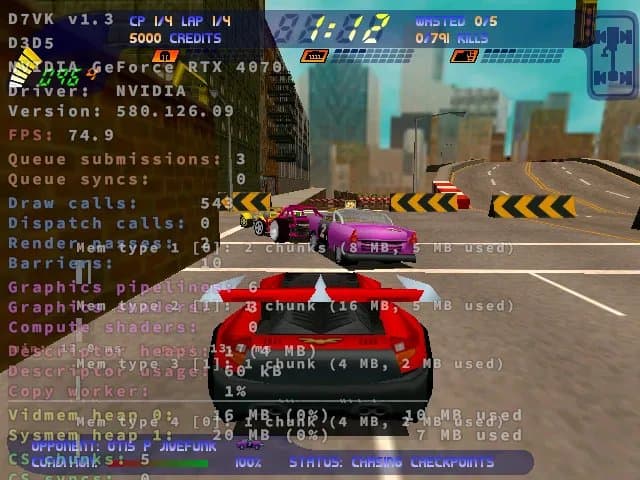
D7VK 1.3 adds Direct3D 5 support to the Vulkan-based compatibility layer, enabling classic Windows games like Carmageddon II and Tomb Raider II to run on Linux.
D7VK 1.3 has arrived with a significant milestone for Linux gaming enthusiasts: native Direct3D 5 support implemented atop the modern Vulkan API. This open-source project, which began as a fork of DXVK, continues to push the boundaries of Windows game compatibility on Linux platforms.
The Evolution of D7VK
The journey of D7VK has been methodical and focused. Starting with its original goal of implementing Direct3D 7 on Vulkan, the project has systematically expanded its capabilities. D7VK 1.1 marked the introduction of experimental Direct3D 6 support, and now with version 1.3, the project reaches back even further to embrace Direct3D 5.
This progression makes technical sense when you consider the architecture of DirectX. Each version built upon its predecessors, so implementing support for older APIs often provides a foundation for newer ones. By targeting Direct3D 5, D7VK is essentially filling in the historical gaps that would allow even earlier Windows titles to function properly under Linux through Steam Play and Proton.
Direct3D 5 Support: What It Means
Direct3D 5 was introduced with Windows 95 OEM Service Release 2 in 1996, representing an important step in Microsoft's 3D graphics API evolution. Games developed during this era, particularly those from the mid-to-late 1990s, relied heavily on this API. With D7VK 1.3's implementation, titles that were previously challenging or impossible to run on Linux now have a viable path forward.
Tested Games and Compatibility
The development team has already verified Direct3D 5 support across a diverse range of classic titles. Early testing has shown promising results with games including:
- Carmageddon II: Carpocalypse Now - The vehicular combat classic runs with improved stability
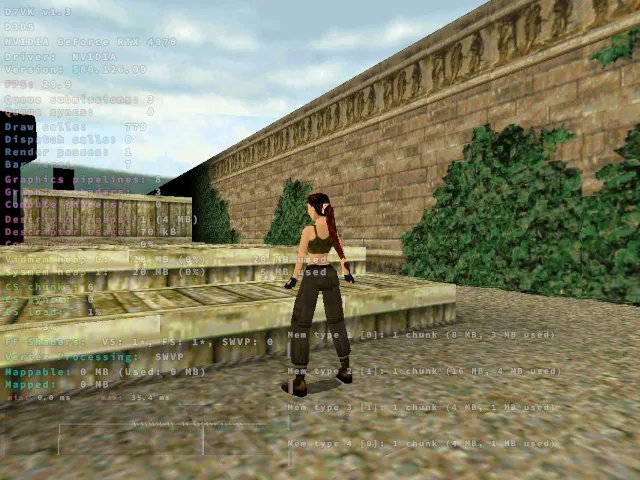
- Tomb Raider II - Lara Croft's second adventure benefits from the enhanced compatibility
- Mortal Kombat 4 - The fighting game franchise's 3D transition works smoothly
- NICE 2 - The off-road racing title shows good performance
- Nightmare Creatures - The gothic action game runs without major issues
- Deathtrap Dungeon - The fantasy adventure title is fully playable
- Lands of Lore III - The RPG benefits from the improved rendering pipeline
These games represent just the beginning, as the Direct3D 5 implementation opens doors for hundreds of other titles from this era.
Technical Improvements Beyond D3D5
While Direct3D 5 support is the headline feature, D7VK 1.3 includes several other important enhancements:
Full-Screen Anti-Aliasing (FSAA) Emulation The new release introduces opt-in FSAA emulation, giving users more control over visual quality. This feature is particularly valuable for older games that may not have built-in anti-aliasing options, allowing for smoother edges and improved visual fidelity on modern high-resolution displays.
Enhanced Logging System Developers and advanced users will appreciate the improved logging capabilities. The enhanced logging provides more detailed diagnostic information, making it easier to troubleshoot compatibility issues and optimize performance for specific games.
General Bug Fixes and Optimizations The release includes numerous under-the-hood improvements that contribute to overall stability and performance. These optimizations ensure that the Direct3D 5 implementation works seamlessly alongside the existing Direct3D 6 and 7 support.
The Bigger Picture: Linux Gaming Compatibility
D7VK's continued development represents a crucial piece of the Linux gaming ecosystem. While projects like Wine and Proton handle a broad range of Windows applications, specialized forks like D7VK focus on specific compatibility challenges that require deeper integration with graphics APIs.
The significance of Direct3D 5 support extends beyond just running older games. It demonstrates the viability of implementing legacy graphics APIs on modern graphics architectures like Vulkan. This approach not only preserves gaming history but also provides insights into how graphics APIs have evolved over the decades.
Getting Started with D7VK 1.3
For users eager to try out the new Direct3D 5 support, D7VK 1.3 is available for download through the project's GitHub repository. The installation process typically involves replacing the DXVK libraries in your Steam Play configuration with the D7VK equivalents.
Advanced users may want to experiment with the new FSAA options and logging features to fine-tune their experience. The project's documentation provides detailed instructions for configuring these settings based on individual game requirements.
Looking Ahead
The successful implementation of Direct3D 5 support suggests that D7VK may continue pushing further back in DirectX history. While the practical benefits of supporting even older APIs may be limited, the technical achievements demonstrate the project's capabilities and commitment to comprehensive Windows game compatibility on Linux.
As the Linux gaming landscape continues to mature, projects like D7VK play an essential role in ensuring that gamers aren't forced to maintain separate Windows installations just to enjoy their classic game libraries. The combination of technical innovation and preservation-focused development makes D7VK 1.3 a noteworthy release for anyone interested in the intersection of gaming history and open-source software.
Comments
Please log in or register to join the discussion