
Microsoft has announced cross-tenant group synchronization for Microsoft Entra ID, with a planned rollout in April 2026. This article explores the technical implementation using Microsoft Graph API, detailing how to configure group object mapping and the implications for multi-cloud identity management.
Microsoft's roadmap update in November 2025 signaled a significant expansion of cross-tenant synchronization capabilities. While user synchronization has been available, the upcoming group synchronization feature represents a critical evolution for organizations managing complex multi-tenant environments. The announcement indicated an April 2026 rollout, but recent changes to the documentation suggest Microsoft may be accelerating development.
Cross-tenant synchronization fundamentally operates through attribute mapping—rules that define how objects and their properties flow between source and destination tenants. The core mechanism involves creating synchronization jobs that translate directory objects from one tenant's schema to another's. For months, these jobs have been limited to user objects, but the schema evolution now supports group synchronization.
The Technical Foundation: Attribute Mapping
The synchronization schema defines what can be synchronized and how. When you query the synchronization API, you receive a comprehensive schema that includes synchronization rules and directory definitions. The object mappings within these rules determine which object types are available for synchronization.
By default, the group object type exists in the schema but remains disabled and lacks essential attributes. This is where the technical implementation begins. Using Microsoft Graph Explorer provides the most direct way to interact with the synchronization API, offering full visibility into API responses and enabling precise configuration changes.
The initial step involves retrieving the current schema through a GET request to the synchronization job endpoint. The response includes the complete synchronization configuration, revealing that while group objects are present in the schema, they require modification to become functional.
Configuring Group Synchronization
To enable group synchronization, you must modify the schema JSON to activate the group object type and define its attribute mappings. The process involves:
- Retrieving the current schema via the Graph API
- Modifying the JSON to enable the group object type
- Adding required attributes that were previously missing
- Updating the schema with a PUT request
The critical modification involves setting "enabled": true for the group object type and defining the flowTypes as "Add,Update,Delete" to allow full synchronization operations. The object mapping must specify both source and target object names as "Group" to establish the bidirectional relationship.
Essential Attribute Mappings
The attribute mapping section defines how individual properties flow between tenants. For groups, several attributes require explicit mapping:
- displayName: The primary identifier, mapped directly from source to target
- description: Optional metadata field
- mailNickname: The email alias, crucial for mail-enabled groups
- mailEnabled: Boolean flag indicating whether the group receives email
- securityEnabled: Boolean flag indicating whether the group is a security principal
Each mapping uses a simple expression syntax ([attributeName]) to reference source attributes. The flowBehavior set to "FlowWhenChanged" ensures efficient synchronization by only transmitting updates when values change, reducing unnecessary API calls and bandwidth usage.
Directory Schema Extensions
Beyond the object mapping, the directories array within the schema requires updates to include the new attributes. This section defines the schema for each attribute, including:
- Data types (String, Boolean, etc.)
- Mutability (ReadWrite, ReadOnly)
- Required status (true/false)
- Flow behavior for null values
The mailEnabled attribute is particularly important, as it's marked as required: true. This means any group synchronized must have this property explicitly set, either from the source directory or through a default value in the mapping configuration.
Verification and Monitoring
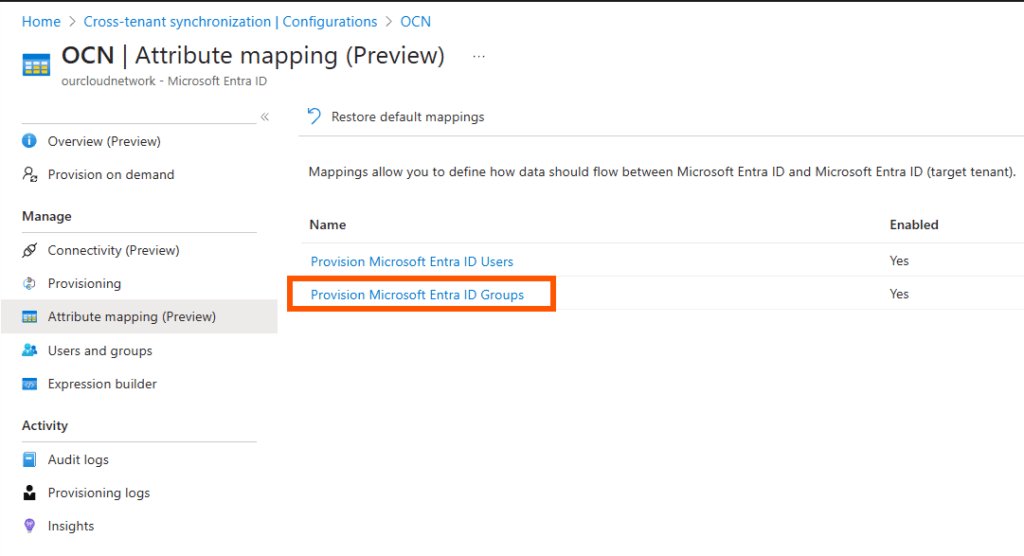
After successfully updating the schema, the new group synchronization rule appears in the Microsoft Entra admin center. The interface allows further configuration adjustments, but the core functionality is now established.
When a group is synchronized to the destination tenant, it's identified as being created by the synchronization service rather than a user. This is visible in the createdByAppId property, which shows "00000014-0000-0000-c000-000000000000". This identifier corresponds to Microsoft.Azure.SyncFabric, the underlying service responsible for identity synchronization within Azure.
Business and Technical Implications
This capability fundamentally changes how organizations approach multi-tenant identity management. Previously, group synchronization required complex workarounds, often involving custom scripts or third-party identity management tools. Native support within Microsoft Entra ID provides several advantages:
- Reduced complexity: Eliminates the need for custom synchronization solutions
- Improved security: Leverages Microsoft's built-in security controls and audit trails
- Better performance: Native synchronization is optimized for Azure's infrastructure
- Simplified management: Centralized configuration through the Microsoft Entra admin center
However, organizations must consider several factors before implementation:
- Attribute compatibility: Not all group attributes may be supported in cross-tenant scenarios
- Member synchronization: Group membership synchronization remains a separate consideration
- Permission boundaries: Synchronized groups may have different permission models in the destination tenant
- Lifecycle management: Group deletion and archival policies need coordination between tenants
Future Considerations
The current implementation focuses on group object synchronization, but member synchronization represents the next logical evolution. While the author hasn't yet attempted to map group members, this capability would complete the group synchronization story, enabling full group-based access control across tenants.
Organizations planning to adopt this feature should begin preparing their directory structures now. This includes:
- Auditing existing groups to identify those requiring cross-tenant synchronization
- Standardizing attribute values to ensure compatibility between tenants
- Reviewing group naming conventions to avoid conflicts in the destination tenant
- Planning for potential conflicts where groups with the same name exist in both tenants
Implementation Timeline and Recommendations
With the planned April 2026 rollout, organizations have time to prepare, but early testing using the Graph API provides valuable insights. The technical approach demonstrated here—using Graph Explorer to modify the synchronization schema—offers a preview of the capabilities and helps identify potential issues before the official release.
For organizations with complex multi-tenant requirements, this feature represents a significant step toward simplified identity management. However, careful planning and testing remain essential to ensure smooth implementation and avoid unintended consequences in production environments.
The ability to synchronize groups natively between Microsoft Entra ID tenants will likely become a cornerstone of multi-cloud identity strategies, particularly for organizations with hybrid environments or those undergoing mergers and acquisitions where identity consolidation is a critical requirement.
Comments
Please log in or register to join the discussion