
GitHub says Copilot now uses prompt caching, deferred tool loading, and Auto model selection to reduce wasted context in long coding sessions.
GitHub detailed new Copilot efficiency work June 17 that targets two common costs in agent sessions: repeated prompt context and oversized model choices.
The update covers GitHub Copilot in VS Code, Auto model selection across Copilot surfaces, and HyDRA, GitHub’s task-aware routing model. The original GitHub post describes the work in Getting more from each token.

New in Copilot
GitHub wants Copilot to spend more of each request on the task you gave it. Long sessions carry instructions, repo context, chat history, tool definitions, and task state. Copilot needs some of that context, and GitHub now caches or defers more of the rest.
Prompt caching lets Copilot reuse repeated prompt prefixes across turns. Tool search lets Copilot load tool definitions on demand instead of sending each schema into context at the start of each turn.
That change matters for MCP-heavy setups. A developer might expose file tools, terminal access, workspace search, product actions, and custom MCP servers in one session. Copilot may need one or two of those tools for a given turn. Deferred tool loading cuts fixed context cost while keeping the full tool set reachable.
GitHub points developers to the VS Code technical deep dive for implementation details, including cache-control breakpoints, provider-specific tool search, and long agent sessions.
Auto routes by task
GitHub also expanded Auto, Copilot’s model selection mode. Auto uses task intent and model health to pick a model after your first prompt. GitHub said quick explanations, focused edits, and multi-file changes benefit from different reasoning budgets.
GitHub’s evaluations found no single model won across all task types. Stronger models helped on tasks that required deeper reasoning. More efficient models matched them on other work.
Auto combines two signals. GitHub tracks model availability, speed, errors, utilization, and cost. HyDRA then estimates the reasoning depth, code complexity, debugging difficulty, and tool needs of the task.
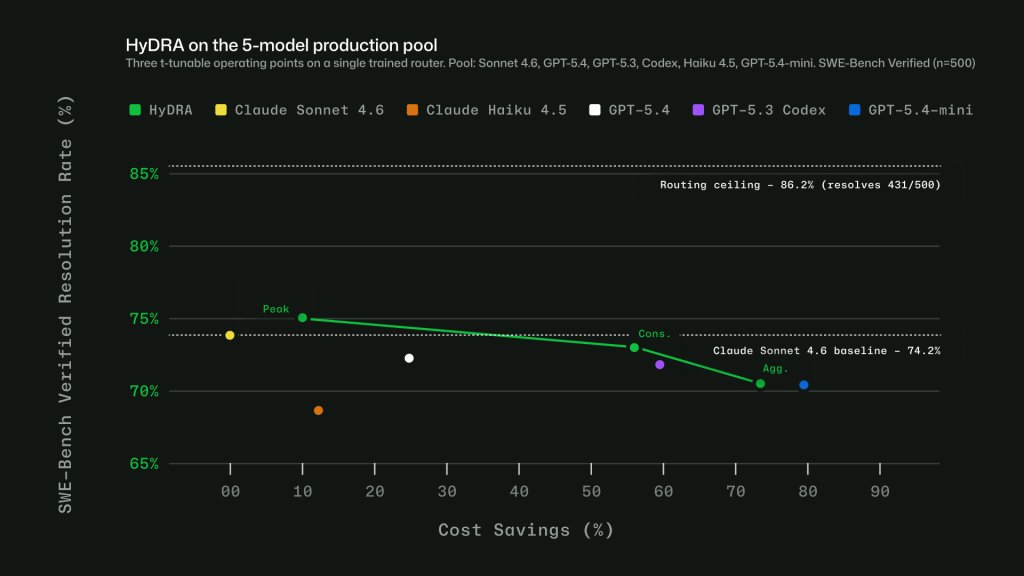
GitHub said HyDRA can tune for different operating points. One operating point beat Sonnet quality with 12.9% savings. Another balanced quality with 72.5% savings.
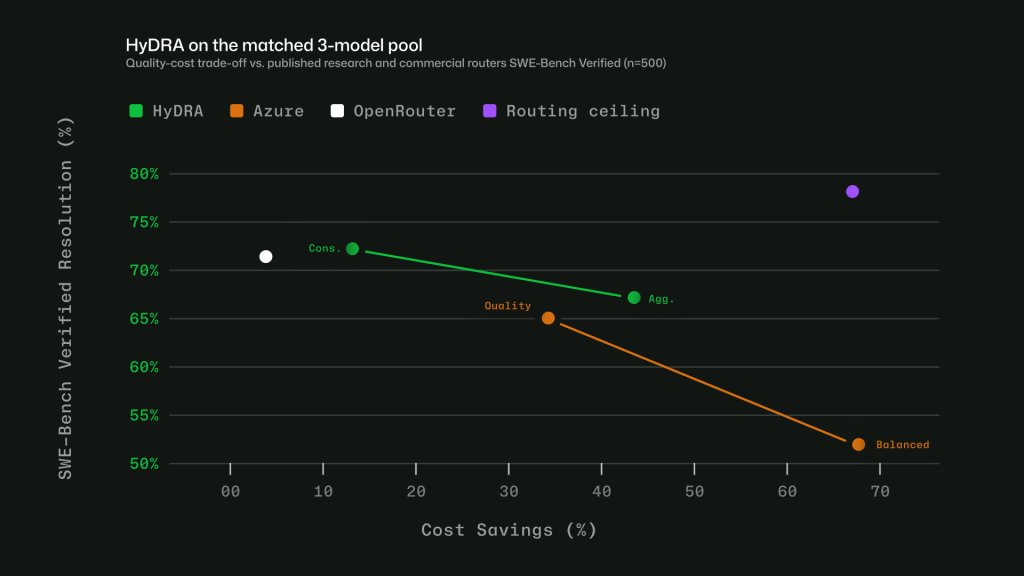
GitHub also compared HyDRA with published routers and commercial systems on SWE-bench-style workloads. HyDRA Cons. matched OpenRouter Auto at a 70.8% resolution rate with 3.3 times the savings, according to GitHub.
Routing has session costs
Model switching can waste credits in a long session. Copilot gets cache reuse when a conversation stays on the same model. A mid-session model change breaks that cache and forces Copilot to rebuild context.
GitHub routes Auto at cache boundaries to avoid that cost. Copilot chooses on the first turn, then keeps that choice until compaction resets the prompt prefix.
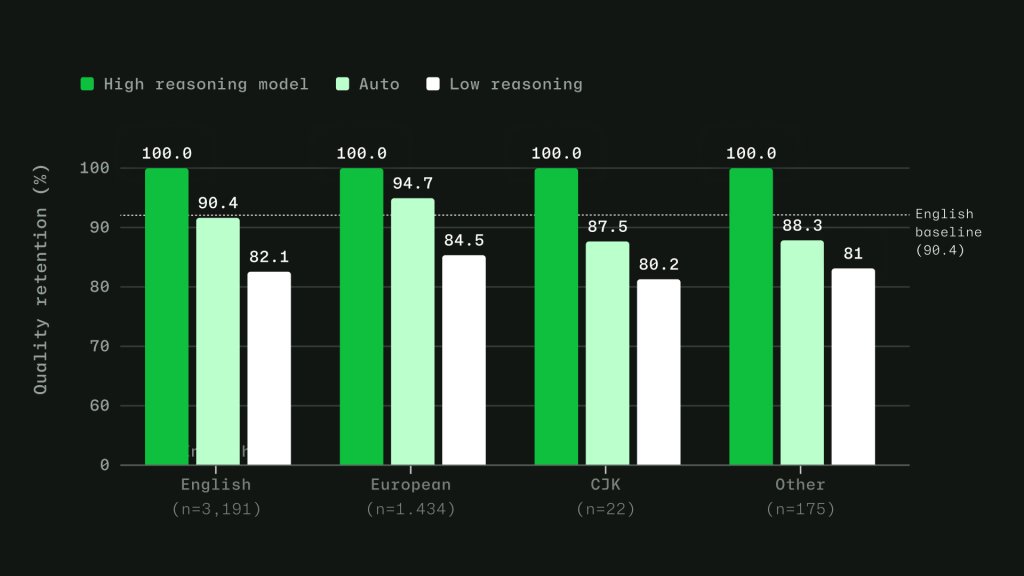
GitHub also trained the router across 16 language families. Its evaluation set drew from production VS Code chat telemetry across 19 languages. GitHub said routing accuracy stayed within four points of its English baseline, with no meaningful quality gap.
Use it in practice
Developers can start with Auto in supported Copilot experiences. GitHub says Auto with task intent runs in Visual Studio Code, github.com, and mobile, with Copilot CLI, GitHub App, and more IDEs next.
Teams should keep sessions focused. Start a new chat when you change tasks. Compact long sessions after the thread grows. Name the files that matter when you know the code path.
Avoid changing models, reasoning settings, context size, or tool configuration mid-session. Those changes can break cache reuse and spend credits on rebuilt context.
For larger changes, ask Copilot for a plan before you run parallel agents. Parallel work can help when engineers can split the task into independent pieces, but each agent spends credits at the same time.
Keep MCP servers scoped to the job. Tool search reduces schema cost, but broad tool sets still add overhead. GitHub also points teams to agent finder in Copilot for tool selection.
Admins will get more control as GitHub expands Auto. GitHub said organizations will be able to set Auto as the default or require Auto as the model choice. Copilot Free and Student plans will use Auto as the model selection option.
Developers can review spend through the AI usage page and Copilot CLI session usage. GitHub’s broader guidance lives in its guide to getting more out of AI credits. For setup details, use the Auto model selection documentation and share feedback in Copilot discussions.
Comments
Please log in or register to join the discussion