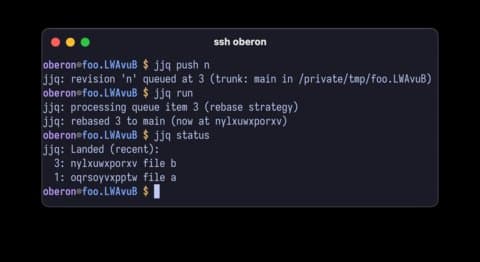
jjq is a CLI tool that brings merge queue functionality to jj repositories, enabling coding agents to submit changes for automated testing and integration while maintaining a 'green' trunk.
The landscape of version control is evolving, and with it, the tools we use to manage collaborative development. While Git has long dominated the field, alternatives like Mercurial and its modern successor jj are gaining traction, particularly in environments where agentic coding patterns are becoming the norm. Enter jjq, a new CLI tool that addresses a critical need in this emerging paradigm: managing concurrent changes from multiple agents attempting to land their work on a shared trunk.
The Problem: Concurrent Agent Development
In modern development workflows, especially those involving AI coding agents, we're seeing an explosion of parallel work. Agents are constantly creating spikes, refactoring code, writing plans, and exploring different approaches to problems. This creates a chaotic but productive environment where multiple changes are being prepared simultaneously for integration into the main codebase.
The challenge arises when these agents attempt to land their changes on the trunk. Traditional approaches often lead to stale pull requests, merge conflicts, and failing tests. When the trunk moves forward while a change is being prepared, the risk of integration failure increases dramatically. This is where merge queues come in - they provide a systematic way to test and integrate changes while maintaining the integrity of the main branch.
Why jjq Instead of Forge Merge Queues?
While hosted forges like GitHub and GitLab offer merge queue functionality, there are compelling reasons to use a local solution like jjq:
Context preservation: In high-volume development environments, the probability of merge failures increases. When a merge fails due to conflicts or failing tests, having the original agent's context window available for quick resolution is invaluable. A local merge queue keeps this context within the development environment rather than losing it in a centralized system.
Flexibility and control: Not all development environments use hosted forges, and not all forges offer merge queue features. jjq provides a solution that works regardless of your hosting setup.
Performance: Local processing can be faster than waiting for remote systems, especially when dealing with large repositories or complex test suites.
How jjq Works
jjq operates as an advisory pre-submit hook for jj repositories. Here's the workflow:
Initialization: Run
jjq initto configure the trunk bookmark (defaults tomain), the check command (likemake testorcargo clippy), and the landing strategy (rebase or merge).Submission: When a change is ready, use
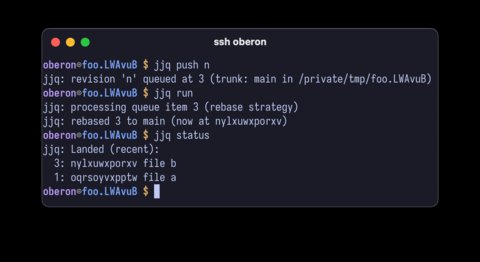
jjq push <REVSET>to queue it for processing. The tool will automatically test whether the change can be cleanly rebased or merged onto the trunk.Processing: Use
jjq runto process the queue. jjq will attempt to rebase or merge each queued change onto the trunk, run the configured check command, and if successful, move the trunk bookmark to the new revision.Monitoring: Use
jjq statusto inspect the state of the queue at any time.
The jj Advantage
jj's architecture makes it particularly well-suited for agent-driven development. Unlike Git, where the working copy is not always committed, jj's model ensures that the working copy is always committed. Revisions in jj are mutable and easily reordered, rebased, and modified - perfect for the iterative nature of agent development.
jj workspaces provide another significant advantage. Agents can work in isolated working copies in separate directories, inheriting all the benefits of jj without the frustrations of Git worktrees. This isolation allows agents to experiment freely without affecting other ongoing work.
Technical Implementation
The development of jjq itself is an interesting story. It began as a Bash script that drove the jj CLI and parsed its output. The author notes that jj's templating feature for CLI output essentially provides a custom stable API, which is particularly useful for tools like jjq that need to parse structured output.
After refining the interface through practical use (primarily by observing how agents interacted with the tool), the script was ported to Rust using Claude Code. Interestingly, the author created an RFC-style specification document before the port, treating jjq as an abstract interface. While the effectiveness of this approach is uncertain, it demonstrates a thoughtful approach to tool development that could inform future projects.
Practical Impact
For teams using jj with agentic coding patterns, jjq provides a crucial piece of infrastructure. It enables a workflow where:
- Agents work independently in their own workspaces
- Changes are submitted to jjq when ready
- A supervisor agent or human can periodically run the queue
- Failed changes can be quickly reassigned to the responsible agent for resolution
- The trunk remains in a known-good state
This approach maximizes parallel development while minimizing the risk of breaking the build. It's particularly valuable in environments where multiple agents are working on different features, bug fixes, and refactorings simultaneously.
Getting Started
jjq is available via Homebrew (brew install paulsmith/tap/jjq) or from GitHub releases. The tool is designed to be simple enough for agents to use effectively, with jjq quickstart typically providing sufficient guidance for automated use.
As development workflows continue to evolve with the increasing role of AI agents, tools like jjq represent an important step in adapting our version control practices to new paradigms. By providing a local merge queue solution specifically designed for jj and agent-driven development, jjq helps teams maintain code quality while embracing the productivity benefits of parallel, automated development.
Comments
Please log in or register to join the discussion