
Microsoft's June 2026 Exchange Server security updates patch the actively discussed CVE-2026-42897 cross-site scripting flaw and tighten the screws on aging deployments. The release also draws a hard line: only organizations enrolled in the Period 2 Extended Security Update program will receive fixes for Exchange 2016 and 2019, while everyone else gets a clear push toward Exchange Server Subscription Edition or the cloud.
Microsoft has shipped its June 2026 Security Updates (SUs) for Exchange Server, covering Exchange Server Subscription Edition (SE), Exchange Server 2019, and Exchange Server 2016. On the surface this is a routine patch cycle. Read closer, and it functions as a decision point for anyone still running mailbox infrastructure on premises. The update folds in the fix for CVE-2026-42897, the cross-site scripting vulnerability Microsoft disclosed in May, and it changes the support math for two product versions that are now formally out of support.

What changed
The headline item is the permanent fix for CVE-2026-42897, the XSS vulnerability that Microsoft addressed with interim mitigations earlier in the spring. Installing the June 2026 SU resolves the underlying issue and clears the known problems that the temporary mitigations introduced. There is a catch worth flagging for operations teams: the update does not automatically remove mitigations you already applied. Microsoft's current guidance is to keep the CVE-2026-42897 mitigation in place even after patching, treating it as a second layer of defense while further hardening ships.
If you do decide to pull the mitigation after updating, the path depends on how you applied it. For servers that used the Exchange Emergency Mitigation (EM) Service, you have to block mitigation M2 from re-applying before you remove its IIS rules, because Microsoft has not yet updated the mitigation logic to skip patched servers. For environments that used the downloadable Unified EOMT script, you roll the mitigation back directly.
There is a second, easy-to-miss operational deadline buried in this release. Because of a service-side change, the Exchange Emergency Mitigation and Exchange Flighting services will reject configuration files released in July 2026 or later unless the server is on the June 2026 update or newer. Mitigations already downloaded keep working, but the server cannot pull anything new. In practice that means skipping this update quietly disables your ability to receive future emergency mitigations starting next month. That is the kind of dependency that does not announce itself until you need a mitigation and discover the pipe is closed.
Provider and version comparison
This is where the strategic picture sharpens. The June 2026 release treats the Exchange family as three distinct tiers, and the gap between them is widening.
Exchange Online customers are already protected. There is no server-side action for the vulnerabilities themselves, beyond patching any on-prem servers or management tools workstations that still exist in a hybrid footprint. This is the recurring advantage of the SaaS model: the provider absorbs the patch cycle, and the XSS class of issue is remediated before most administrators read the bulletin. For hybrid organizations, the one caveat is that the SU still needs to land on any Exchange server used purely for management, and if you rotate the auth certificate after installing, you re-run the Hybrid Configuration Wizard.
Exchange Server SE is the supported on-prem destination. SE RTM receives the update through the normal channel with no special enrollment. This is the version Microsoft wants you on, and the structure of this release makes that preference explicit.
Exchange Server 2016 (CU23) and 2019 (CU14/CU15) are out of support. Updates for these versions exist only for organizations enrolled in the Period 2 Extended Security Update (ESU) program, which is valid for updates released between May and October 2026. If you are not enrolled, June 2026 is simply unavailable to you, and your only supported route forward is migrating to Exchange SE. Organizations that bought Period 2 ESU but need help accessing the bits can reach Microsoft at [email protected].
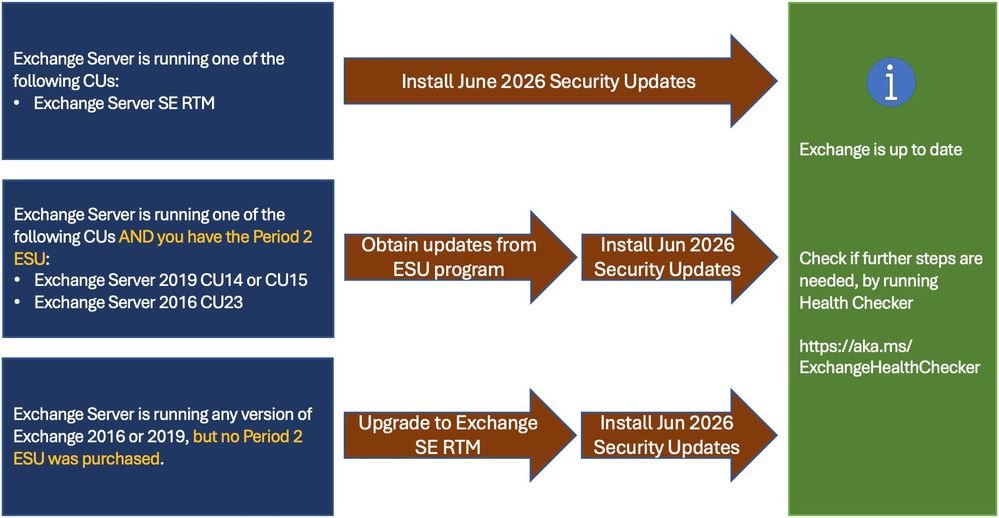
The practical comparison for a consultant advising a client looks like this. Staying on 2016 or 2019 without ESU means running known-vulnerable software with no patch path, which is a posture most security and compliance frameworks will not tolerate. Buying Period 2 ESU buys time, but it is a finite runway: October 2026 is the back wall, and the program is a bridge, not a destination. Migrating to Exchange SE keeps you on premises with full support. Moving to Exchange Online removes the patch burden entirely but commits you to the subscription model and the cloud operational posture. Each option carries a different cost curve and a different amount of internal labor.
Business impact and migration considerations
The ESU cutoff is the part that belongs in front of a budget owner. Period 2 ESU is a paid program with a hard expiration in October 2026. Any organization treating it as a long-term holding pattern is paying for a temporary reprieve while the migration clock runs. The cost of ESU plus the eventual migration project is, in most cases, higher than committing to the migration now. The financial argument and the security argument point the same direction.
For environments that cannot update every server at once, Microsoft confirms that a mixed state is acceptable: unpatched servers can keep running the CVE-2026-42897 mitigations, and SUs are cumulative, so you install only the latest one rather than every intermediate update. Two integration caveats apply during a phased rollout. Office Online Server integration may misbehave until all Exchange servers in the organization are updated, and any server still on mitigations inherits the known issues those mitigations carry. That argues for compressing the rollout window rather than letting a half-patched estate linger.
The operational checklist Microsoft recommends has not changed in shape, and it is worth following precisely. Run the Exchange Server Health Checker script to inventory which servers are behind, install the latest CU using the Exchange Update Wizard to map your current-to-target path, then re-run Health Checker afterward to catch any remaining manual actions. Reboot after setup and verify every Exchange service started; services stuck in a disabled state signal an interrupted installation. If setup throws errors, the SetupAssist script and Microsoft's guidance on repairing failed CU and SU installations are the recovery tools.
The through-line of this release is that Microsoft is using the security update cadence to enforce a migration timeline. The XSS fix is the urgent reason to patch this month. The EM and Flighting service cutoff is the quieter reason you cannot defer it. And the ESU gating on 2016 and 2019 is the structural reason that, for a growing number of organizations, the right response to a patch bulletin is no longer "apply the update" but "finish the migration." For teams still weighing on-prem SE against Exchange Online, this cycle is a useful forcing function: the version you are running now determines how much of this work you own versus how much your provider absorbs.
Comments
Please log in or register to join the discussion