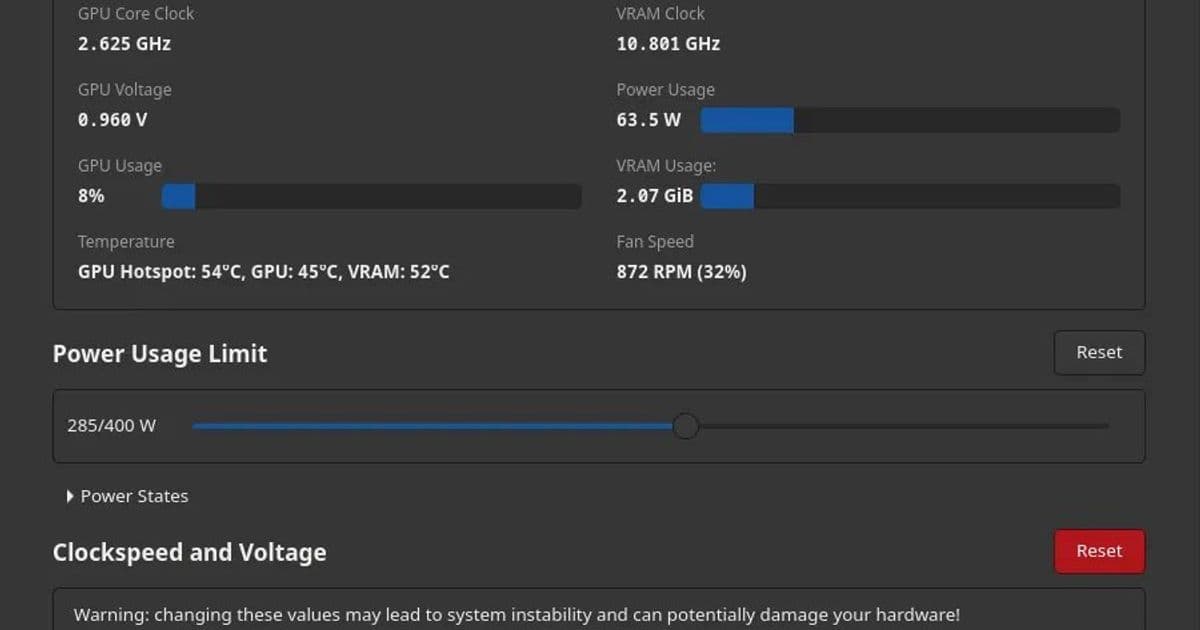
The latest release of LACT, an open-source GPU control panel for Linux, focuses on improving the overclocking interface and expanding hardware support, particularly for AMD Radeon cards where official GUI tools are absent.
The Linux graphics ecosystem has long lacked a unified, official GUI control panel from major GPU vendors like AMD and Intel. While NVIDIA provides its nvidia-settings utility, AMD and Intel users on Linux have historically relied on command-line tools like rocm-smi or vendor-specific utilities for GPU management. This gap is where LACT, an open-source project, has carved out a significant niche. Today's release of LACT 0.8.4 further refines this third-party solution, delivering a more polished and functional interface for overclocking, monitoring, and managing GPU parameters across Linux systems.
LACT's primary value proposition is its comprehensive, user-friendly interface that consolidates functions typically scattered across multiple tools. It supports AMD Radeon, Intel Arc, and NVIDIA GPUs, though its utility varies by vendor. For NVIDIA users, nvidia-settings already offers robust overclocking and configuration, making LACT a complementary tool. For AMD and Intel, where official GUI tools are scarce, LACT serves as a critical alternative. AMD Radeon Linux gamers and enthusiasts, in particular, have adopted LACT to manage fan curves, power limits, and overclocking without resorting to terminal commands. Intel GPU users benefit similarly, especially as Intel's Linux driver support matures.
The centerpiece of LACT 0.8.4 is a significant overhaul of the GPU overclocking page. This section, which handles core and memory clock adjustments, voltage control, and power limit tuning, has been redesigned for better usability and clarity. Prior versions offered functional but sometimes clunky controls; the new interface streamlines these interactions, reducing the cognitive load for users tweaking their hardware. This improvement is especially relevant for AMD cards, where overclocking has traditionally required editing configuration files or using scripts. With LACT, users can now apply and test overclocks in real-time through a graphical dashboard, lowering the barrier to entry for performance tuning.
Beyond the overclocking UI, LACT 0.8.4 introduces Docker packaging, a notable addition for developers and system administrators managing GPU workloads in containerized environments. Docker support allows LACT to be deployed as a container, simplifying installation and isolation from host system libraries. This is particularly useful in cloud or HPC settings where GPU resources are shared across containers. The package is available via the project's GitHub repository, enabling easy integration into existing workflows.
For AMD hardware, the release expands power sensor exposure. Modern AMD GPUs include sensors for real-time power consumption, temperature, and clock speeds, but accessing this data programmatically can be challenging. LACT now surfaces more of these metrics, providing users with granular visibility into GPU behavior. This is critical for overclocking, as power draw directly impacts stability and thermal limits. Coupled with more efficient statistics fetching—reducing CPU overhead when polling sensor data—LACT 0.8.4 offers a smoother experience for monitoring AMD cards during intensive tasks like gaming or rendering.
The update also includes a suite of fixes and minor enhancements across the UI, addressing bugs reported by the community. These range from layout adjustments to improved error handling when interacting with GPU drivers. LACT's development is driven by open-source collaboration, and the project's GitHub page serves as the hub for downloads, issue tracking, and contributions. Users can find the latest binaries and source code at LACT on GitHub, where detailed release notes and installation instructions are maintained.
Market implications of LACT's evolution are subtle but meaningful. As Linux gaming gains traction with platforms like Steam and Proton, the demand for GPU management tools grows. AMD's focus on open-source driver support (e.g., AMDGPU) has fostered a community around tools like LACT, which fill gaps left by vendor priorities. Intel's entry into discrete graphics with Arc GPUs adds another layer, as their Linux driver support is still evolving. LACT's cross-vendor approach positions it as a versatile tool in a fragmented landscape. For enterprise users, Docker support could integrate LACT into GPU resource management pipelines, though it remains primarily a desktop-oriented utility.
Technically, LACT interacts with Linux kernel interfaces like sysfs and DRM (Direct Rendering Manager) to read and write GPU parameters. For AMD, it leverages the amdgpu kernel module, which exposes controls via /sys/class/drm. Overclocking on AMD requires careful handling to avoid voiding warranties or causing instability, and LACT includes safeguards like voltage limits and temperature-based throttling. Intel GPUs use the i915 driver, with similar sysfs-based controls. NVIDIA support is more limited due to proprietary driver constraints, but LACT can still monitor basic metrics. The project's open-source nature allows for community-driven extensions, such as adding support for new GPU models or integrating with other monitoring tools like lm-sensors.
In summary, LACT 0.8.4 represents a step forward in making GPU management on Linux more accessible and efficient. Its improved overclocking UI directly addresses a pain point for AMD users, while Docker packaging and enhanced sensor support broaden its appeal. As Linux graphics continue to mature, tools like LACT will remain essential for enthusiasts and professionals alike. For those interested in exploring LACT, the official GitHub repository is the best starting point, offering comprehensive documentation and community support.
Comments
Please log in or register to join the discussion