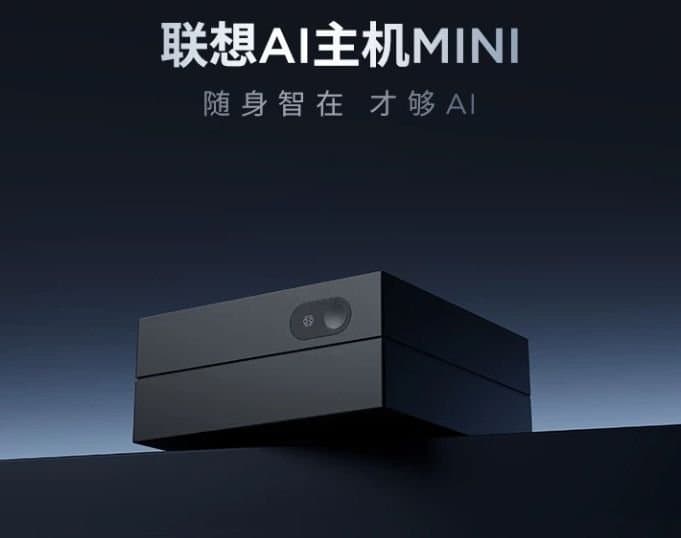
Lenovo's $440 AI Host swaps the usual x86 silicon for a 12-core Cix CD8180 Arm chip with a 30 TOPS NPU. It runs Ubuntu, targets 24/7 local AI workloads, and adds another data point to the slow but steady spread of native Arm desktops that mobile developers increasingly need to care about.
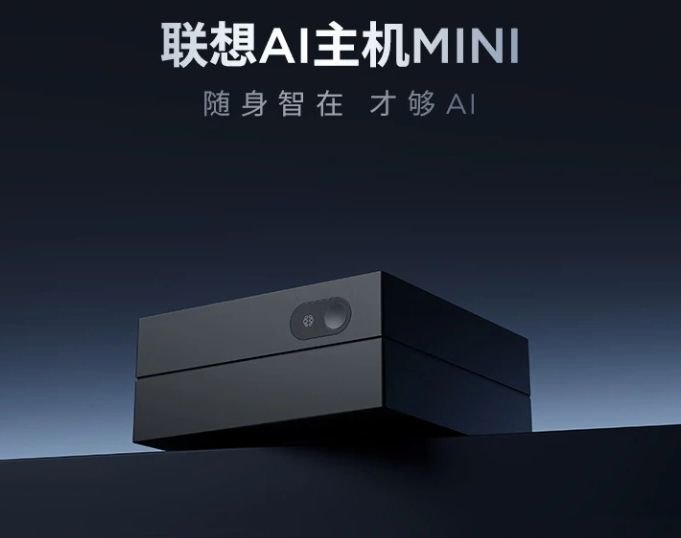
Lenovo just put an unusual machine up for pre-order in China. The Lenovo AI Host is a tiny 100 x 100 x 48mm box, but the notable part isn't the size. It ships with a Cix CD8180, a 12-core Arm-based processor, instead of the Intel, AMD, or Qualcomm silicon you'd normally find inside a Lenovo mini PC. It sells for 2,999 CNY, roughly $440, and comes with Ubuntu plus Lenovo's Tianxi AI Claw assistant software.
For anyone shipping iOS and Android apps, a cheap, native Arm Linux desktop is more relevant than the "mini PC for China" framing suggests. The mobile toolchain has been quietly converging on Arm for years, and devices like this one are part of why.
What's actually in the box
The CD8180 is the same chip used in the Radxa Orion O6 and the Orange Pi 6 Plus, so it already has a track record outside of Lenovo's product line. The CPU is a three-tier big.LITTLE-style layout:
- 4 x Arm Cortex-A720 @ 2.8 GHz
- 4 x Arm Cortex-A720 @ 2.4 GHz
- 4 x Arm Cortex-A520 @ 1.8 GHz
Graphics come from an Arm Immortalis-G720 MC10, and there's a 30 TOPS NPU on board. Lenovo advertises "up to 45 TOPS" of AI performance, which only adds up if you count the GPU and CPU contributions alongside the dedicated neural unit. That's a common bit of marketing math now, and it's worth reading TOPS figures with that in mind: the NPU number is the one that matters for accelerated inference, and here it's 30.
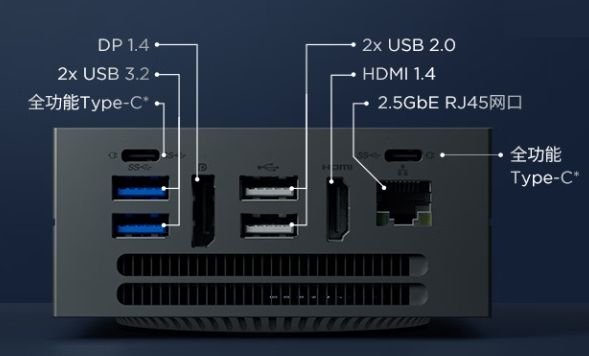
The rest of the spec sheet is modest. There's 8GB of LPDDR5-6000 memory, a 256GB SSD, and a reasonable port selection for the size: two USB Type-C, two USB 3.2 Type-A, two USB 2.0 Type-A, DisplayPort 1.4, HDMI 1.4, and 2.5 GbE networking. Lenovo pitches it as a system you can leave running around the clock for local AI tasks, with more than 20 pre-installed "skills" in the bundled assistant.
That 8GB ceiling is the obvious limit. You're not running large local models comfortably, and it's nowhere near what an NVIDIA RTX-class or AMD Strix Halo machine offers. But those cost several times as much, and that gap is the entire point of a $440 box.
Why a mobile developer should care
The interesting thread here isn't this specific product, which may never leave China. Lenovo hasn't committed to a global release, and the realistic guess is that it stays domestic. The thread is the platform underneath it.
Apple moved its entire Mac line to Arm with Apple Silicon, and most iOS development now happens on arm64 hardware natively. Android's story is similar from the device side: nearly every phone and tablet you target runs on an Arm core, and Android Studio has shipped arm64 emulator system images and native tooling to match. A growing share of the build and test infrastructure mobile teams depend on, including CI runners on Arm cloud instances, now executes on the same architecture as the apps themselves.
What's been missing is a cheap, general-purpose Arm Linux desktop that isn't a Raspberry Pi or a Mac. A machine like the AI Host fills part of that gap. For cross-platform work, having native arm64 Linux hardware on your desk changes a few practical things:
- Android builds and emulation run on matching silicon. Running an arm64 Android system image on an arm64 host avoids the translation overhead you hit when emulating Arm guests on x86. Gradle builds, NDK compilation, and CI parity all benefit when your local box matches your target architecture.
- Native libraries get tested where they'll actually run. If your app ships C or C++ through the Android NDK, or you maintain a shared Rust or C++ core between iOS and Android, building and exercising that code on real Arm Linux catches arm64-specific behavior that an x86 dev machine quietly hides.
- On-device AI features have a closer analog. Both platforms now push inference onto the device through Core ML on iOS and NNAPI's successors and the various NPU delegates on Android. A desktop with a real NPU and Arm GPU is a more honest place to prototype quantized models than a discrete-GPU x86 workstation that no phone resembles.
The migration angle
If you've been treating Arm Linux as an edge case, the trend line says it's becoming a baseline. The migration work is mostly the same discipline you already apply to keeping a codebase portable: don't assume x86 in build scripts, make sure your container images have arm64 variants, and verify that every third-party native dependency publishes arm64 binaries or compiles cleanly from source.
Docker's multi-arch images and the buildx tooling have made a lot of this routine. The friction that remains tends to live in older native dependencies, proprietary SDKs distributed only as x86 binaries, and CI configurations that hard-code an architecture. Each of those is worth auditing now rather than during a rushed port later, because the hardware that exposes the assumption is getting cheaper and more common.
The Lenovo AI Host itself is a niche product aimed at a single market, and most developers outside China won't buy one. But it's another sign that native Arm computing is spreading past phones and Macs into the affordable desktop tier. For teams maintaining apps on both platforms, that's the kind of shift that's easy to ignore right up until a build breaks on architecture you never tested.
Comments
Please log in or register to join the discussion