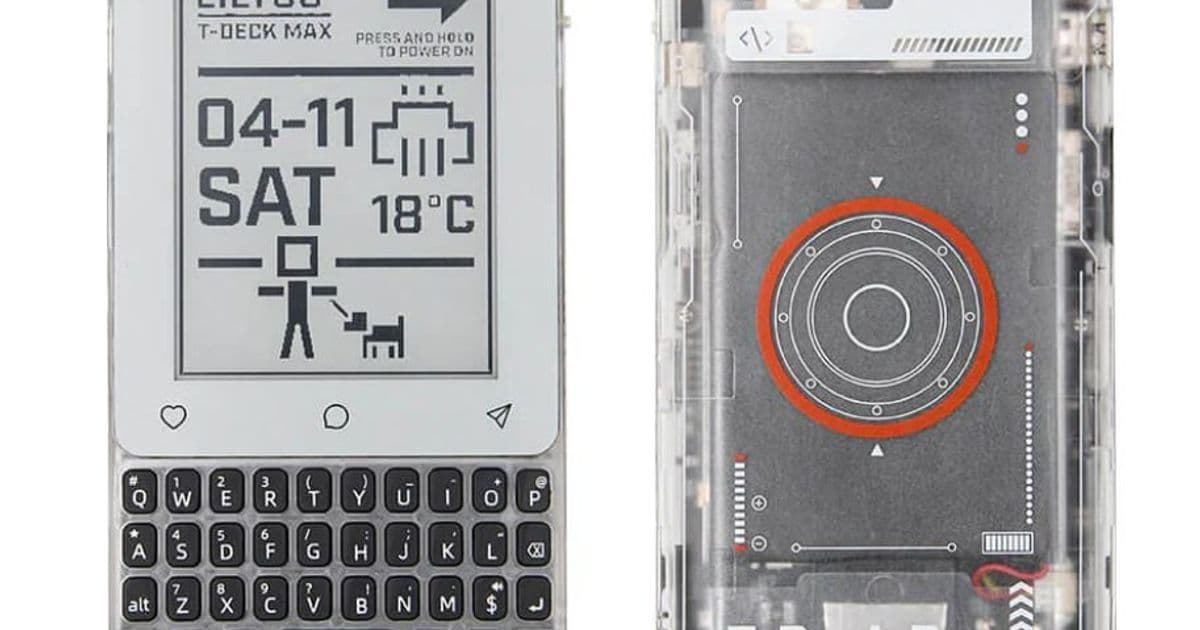
LILYGO’s new T‑Deck MAX adds standard 4G LTE, an E‑Ink screen and a full QWERTY keyboard to the ESP32‑S3‑based T‑Deck line, giving mobile developers a single board that can handle cellular, LoRa, Wi‑Fi and Bluetooth while still fitting in a pocket‑sized chassis.
New hardware spec sheet
LILYGO has just released the T‑Deck MAX, an upgraded version of its ESP32‑S3 development board that looks like a tiny smartphone. Key specs are:
- Processor: ESP32‑S3 dual‑core, 240 MHz, with native USB‑OTG
- Display: 3.1‑inch 320 × 240 px greyscale E‑Ink panel (low power, readable in bright sunlight)
- Keyboard: full‑size QWERTY layout with back‑lit keys
- Connectivity: Wi‑Fi 802.11b/g/n, Bluetooth 5.0, integrated 4G LTE (Cat‑M/NB‑IoT compatible), SX1262 LoRa transceiver, optional LoRa antenna switch
- Expansion: XL9555 I/O expander (adds 16 extra GPIO pins), DRV2605 haptic driver, audio channel selector, vibration motor output
- Power: 1500 mAh Li‑Po battery, USB‑C charging, power‑management IC for deep‑sleep E‑Ink mode
- Storage: microSD slot (up to 32 GB) and 8 MB of on‑board flash
- Price: US $110 (about $15 more than a 4G‑enabled T‑Deck Pro)
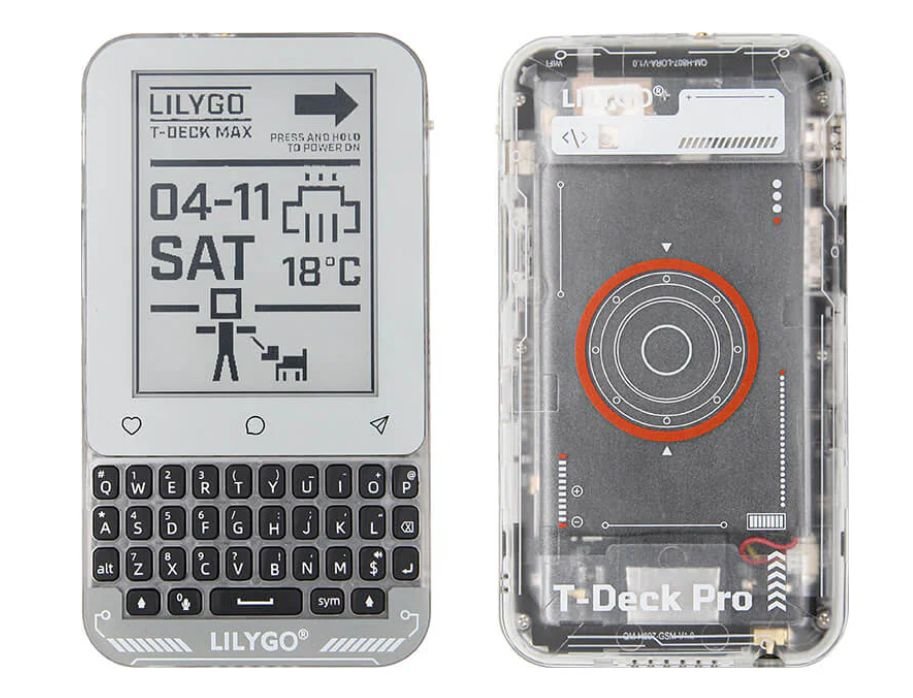
The board is sold as a ready‑to‑program kit; LILYGO provides a GitHub repository with schematics, a BSP for ESP‑IDF and Arduino, and a set of example projects covering LTE, LoRa, and E‑Ink UI rendering.
Impact on mobile‑focused developers
1. One‑board cellular + LoRa
Previously, developers who needed both LTE and LoRa had to wire two separate modules together, dealing with mismatched voltage levels and antenna placement. The T‑Deck MAX consolidates those radios on a single PCB and adds a hardware antenna switch, letting you toggle between LTE and LoRa without firmware changes. This reduces BOM cost and board‑space, which is especially valuable for prototypes that must fit in a pocket or be mounted on a drone.
2. Low‑power UI with E‑Ink
The 3.1‑inch E‑Ink screen consumes power only when the frame updates, making it ideal for status dashboards, sensor readouts, or simple menus that stay static for minutes or hours. Compared with an OLED, the E‑Ink panel can run for weeks on the 1500 mAh battery when the device spends most of its time in deep‑sleep. The board’s firmware includes a partial‑update driver that lets you refresh just the changed rows, saving both time and energy.
3. Physical input without a touch layer
A full QWERTY keyboard eliminates the need for on‑screen keyboards, which are cumbersome on tiny touch displays and add latency. For field‑work applications—such as configuring LoRa parameters, entering APN credentials, or sending SMS‑style messages over LTE—the tactile keys provide a familiar experience and reduce typing errors.
4. Expanded GPIO and haptics
The XL9555 I/O expander adds 16 extra pins, exposing more PWM, ADC, and UART lines for sensor integration. The DRV2605 driver gives developers access to programmable vibration patterns, useful for alerts in noisy environments or for creating a simple haptic UI on the keyboard.
Migration path from T‑Deck Pro to MAX
If you are already using a T‑Deck Pro, moving to the MAX involves a few straightforward steps:
- Update the board definition – Pull the latest
boards.jsonfrom the LILYGO GitHub repo and select T‑Deck MAX in the Arduino IDE or ESP‑IDF menuconfig. - Adjust pin mappings – The XL9555 expander uses I²C address
0x20; any code that accessed the Pro’s extra pins directly will need to be redirected through the expander’s API (xlnx_i2c_write/read). - Switch antenna configuration – The MAX adds a hardware switch on GPIO 22. Set the switch to LTE for cellular operation or LoRa for low‑power wide‑area networking. Firmware can read the switch state at startup and configure the radio accordingly.
- Port the display driver – The E‑Ink driver is largely the same, but the MAX’s panel supports partial updates. Replace full‑screen
display.drawBitmap()calls withdisplay.partialUpdate()where possible to preserve battery life. - Test LTE connectivity – Because LTE is now soldered on, you no longer need an external shield. Insert a SIM, set the APN in
lte_config.h, and calllte.begin(). The library automatically powers down the LoRa radio when LTE is active, avoiding RF conflicts.
When to choose the T‑Deck MAX
- Edge‑gateway prototypes that must report sensor data over both LoRa (for local mesh) and LTE (for cloud back‑haul).
- Field‑service tools where an operator needs a keyboard and a readable screen under sunlight.
- IoT education kits that demonstrate multiple radio stacks on a single, affordable board.
- Rapid‑deployment devices where minimizing part count and assembly time is critical.
If your project only needs Wi‑Fi/Bluetooth and a small OLED, the original T‑Deck Pro or a cheaper ESP32‑S3 board may still be the better economic choice. The MAX shines when you need cellular connectivity as a default, combined with low‑power display and tactile input.
Final thoughts
LILYGO’s T‑Deck MAX consolidates a surprising amount of hardware into a $110 package. By making 4G LTE a standard feature and pairing it with an E‑Ink UI and a real keyboard, the board bridges the gap between hobbyist prototyping and production‑grade mobile IoT devices. For developers who have been juggling separate LTE modules, LoRa shields, and external keyboards, the MAX offers a cleaner, more integrated development experience.
For the full hardware reference, firmware examples and the bill of materials, see the official GitHub repository.
Comments
Please log in or register to join the discussion