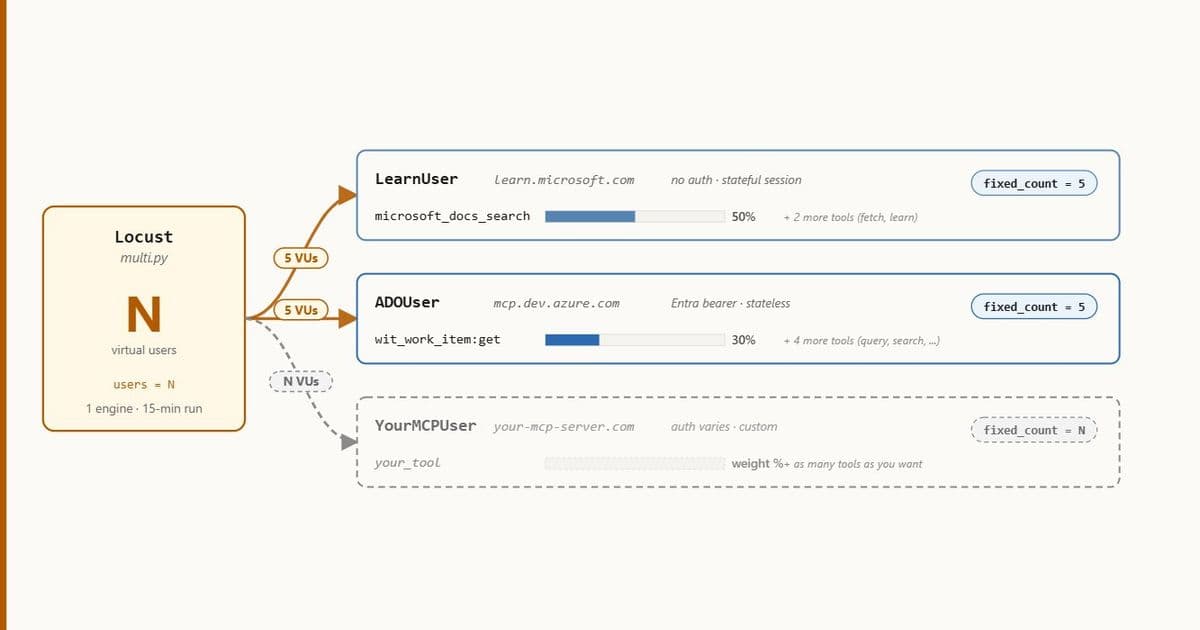
A step‑by‑step guide shows how to build a portable Python harness on top of Locust that exercises the Model‑Context‑Protocol (MCP) over Streamable HTTP, run it locally, and ship the same files to Azure Load Testing. The 15‑minute cloud run against four production MCP endpoints generated 2,293 requests, exposing distinct latency signatures and failure patterns that help teams size, tune, and gate agent‑driven workloads.
What changed
Microsoft’s Model‑Context‑Protocol (MCP) is moving from local subprocesses to hosted HTTP endpoints that serve many tenants. That shift introduces a new operational question: how does a server behave when an AI agent opens dozens of parallel sessions, calls tools repeatedly, and tears the session down?
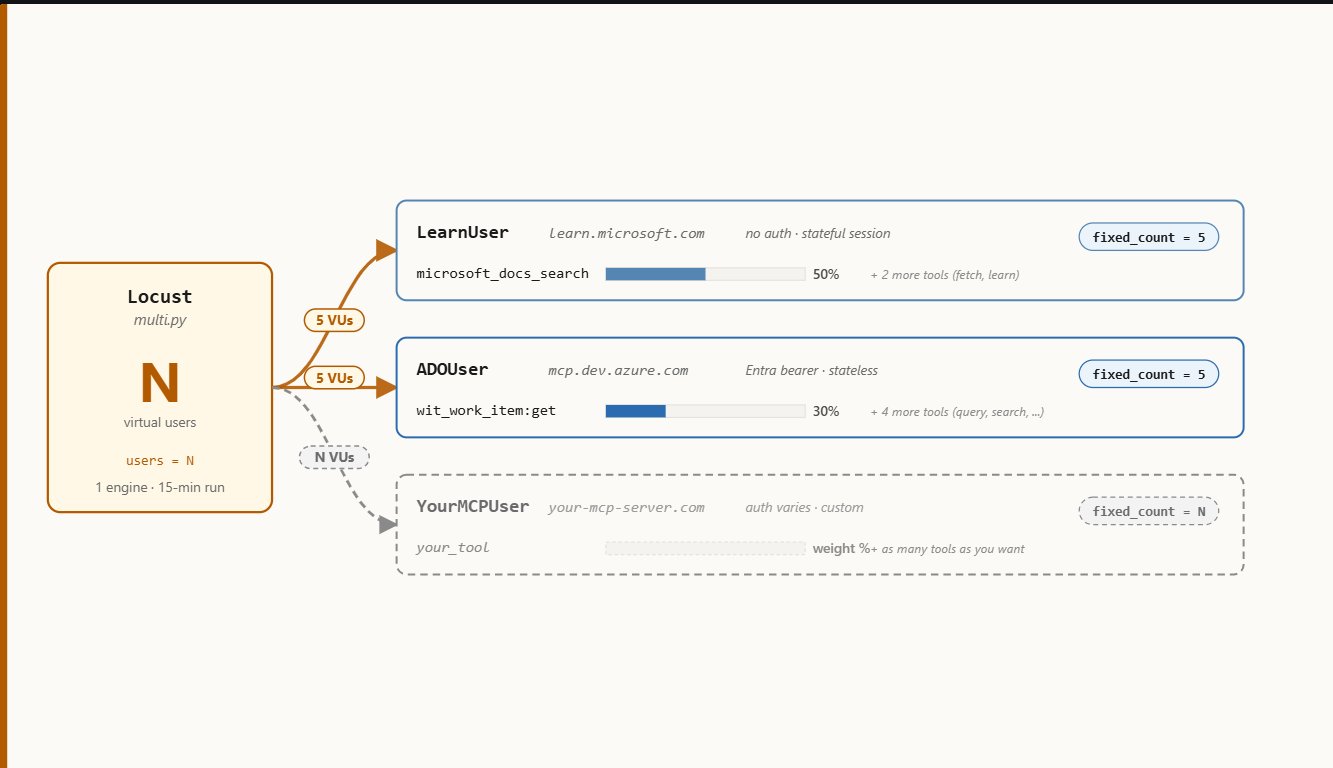
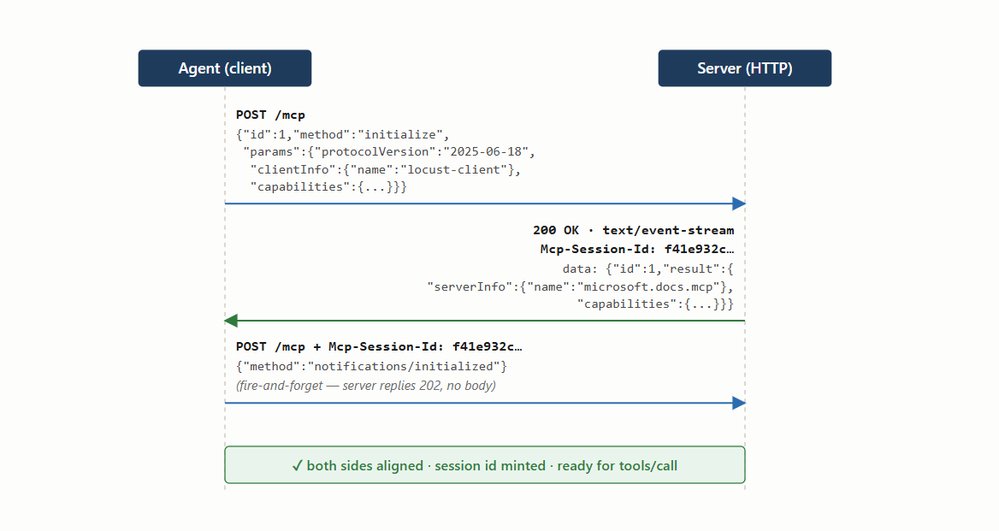
The article introduces a portable Locust harness that mimics a real agent’s full MCP life‑cycle – handshake, tool discovery, tool invocation, and graceful session termination – against any MCP server that implements the Streamable HTTP transport. The same Python files run unchanged on a developer laptop and on Azure Load Testing, allowing teams to validate performance early and enforce release‑pipeline gates with Azure’s failure‑criteria feature.
Key updates:
- A single base class (
MCPUserBase) encapsulates the MCP protocol, handling both JSON and Server‑Sent Events responses. - Three auth patterns (no auth, static bearer, dynamic token) are expressed as tiny class overrides, keeping the harness agnostic to the target.
- A flat‑file project layout (
_base.py, per‑server user classes,multi.py,locust.conf) lets Azure Load Testing ingest the code without packaging steps. - The harness records latency signatures for each endpoint, exposing differences in handshake cost, tool‑call tail latency, and error rates.
Provider comparison
| Feature | Locust (open‑source) | Azure Load Testing (managed service) |
|---|---|---|
| Execution model | Runs as a single Python process (or a small cluster when you start multiple workers). | Spins up one or more engine VMs, each running the same Locust script under Azure‑managed scaling. |
| Cost model | Free, only your compute resources. | Pay‑as‑you‑go for engine instances and data egress; includes built‑in reporting and secret injection. |
| Secret handling | You must inject tokens yourself (environment variables, .env files). | Azure can pull secrets from Key Vault via a managed identity, eliminating credential leakage. |
| Result visualisation | Console table, optional HTML report, CSV export. | Full Azure portal dashboard with time‑series charts, error explorer, and downloadable HTML/CSV bundles. |
| Failure criteria | Manual script checks or external CI logic. | Native failureCriteria section in the YAML that can fail a pipeline automatically. |
| Scalability | Limited by the number of workers you start; requires manual coordination. | Engine count can be increased with a single property (engineInstances) and Azure handles load distribution. |
| Integration with CI/CD | Works with any runner that can invoke locust. |
Direct Azure CLI/DevOps task integration; results can be consumed as pipeline artifacts. |
The harness demonstrates that both providers can execute the exact same test code, but Azure Load Testing adds operational benefits (managed scaling, secret injection, built‑in pass/fail gates) that are valuable for production release pipelines.
Business impact
- Predictable agent latency – By measuring the full MCP handshake and tool‑call flow, product teams can quantify the cost of opening a new session (44 ms on Learn vs 335 ms on Azure DevOps Remote). This informs decisions about session reuse in the agent runtime and helps set realistic SLA expectations for end‑users.
- Tiered performance insight – The run revealed three latency tiers across the four servers:
- Fast (Microsoft Learn) – sub‑900 ms p90, ideal for public‑facing docs.
- Consistent (Azure DevOps Remote) – tight average‑to‑p90 gap, suitable for internal tooling.
- Heavy (Context7) – >1 s average, indicating synchronous embedding look‑ups. Knowing these tiers lets product owners allocate the right MCP server for each workload (e.g., cache‑heavy doc search on Learn, compute‑intensive semantic search on a dedicated Context7 instance).
- Risk mitigation through automated gates – Embedding the
failureCriteria(average response time > 8 s or error > 25 %) into the Azure Load Testing YAML means a failed performance test automatically blocks a release. This reduces the chance of shipping an agent version that overloads a newly‑hosted MCP endpoint. - Cost‑effective capacity planning – Because the same Locust script can be run locally for quick smoke checks and then scaled in Azure for larger loads, teams avoid the expense of maintaining separate test suites. The baseline of 2.9 RPS with 17 VUs provides a reference point for future scaling experiments.
- Security compliance – Dynamic token handling (Azure DevOps) and Key Vault secret injection keep credentials out of source control, satisfying audit requirements for regulated environments.
Overall, the approach gives engineering leaders a repeatable, low‑maintenance methodology to validate that their hosted MCP services can sustain the bursty, parallel traffic generated by AI agents, while providing clear metrics to guide architectural and budgeting decisions.
Quick start checklist
- Clone the repo:
git clone https://github.com/kroy92/azure-load-test-mcp-server.git - Install dependencies:
uv pip install -r requirements.txt - Run locally:
locust -f multi.py --config locust.conf --run-time 2m - Prepare Azure resources (Key Vault secrets, Load‑Testing resource).
- Deploy the YAML with Azure CLI (see article for exact commands).
- Review the Azure dashboard or download the HTML report for latency signatures.
Further reading
Comments
Please log in or register to join the discussion