
Microsoft has transformed Clipchamp from a standalone video editor into a cohesive, AI-powered platform integrated across Microsoft 365. The 2025 updates focus on enterprise workflow integration, precision editing tools, brand customization, and AI-driven productivity features including OpenAI's Sora 2 model availability.
Microsoft's video editing platform Clipchamp has undergone a significant strategic transformation in 2025, evolving from a standalone creative tool into an integrated, AI-powered video solution within the Microsoft 365 ecosystem. This evolution reflects Microsoft's broader strategy to consolidate its video offerings and leverage artificial intelligence to streamline enterprise video creation and consumption workflows.
The Strategic Integration: Clipchamp and Stream Convergence
In 2025, Microsoft addressed a critical gap in its enterprise video strategy by merging the capabilities of Clipchamp and Stream into a unified experience. Previously, organizations faced friction when navigating between these two platforms—Clipchamp for creation and Stream for enterprise video management. The integration creates a single video solution that maintains the strengths of both products while eliminating workflow discontinuities.

Videos continue to be stored in SharePoint, Teams, and OneDrive, preserving existing organizational data structures. This approach allows enterprises to enhance productivity without disrupting established file management practices. The unified platform improves video playback capabilities and maintains familiar experiences for sharing, searching, and commenting across Microsoft 365 applications.
For IT administrators, this consolidation reduces the complexity of managing multiple video services and simplifies licensing and deployment. For end users, it means creating a video in Clipchamp and immediately making it available for enterprise consumption through Stream's discovery and playback infrastructure without manual transfer processes.
Precision Editing Tools: Transcript-Based Trimming and Timeline Innovations
Microsoft's 2025 updates to Clipchamp's editing interface focus on reducing the technical barriers to professional video editing. The most significant addition is transcript-based video trimming, which allows users to edit video by manipulating the automatically generated transcript rather than working directly with the timeline. This approach is particularly valuable for content creators working with interview footage, presentations, or any content where the spoken word drives the narrative structure.
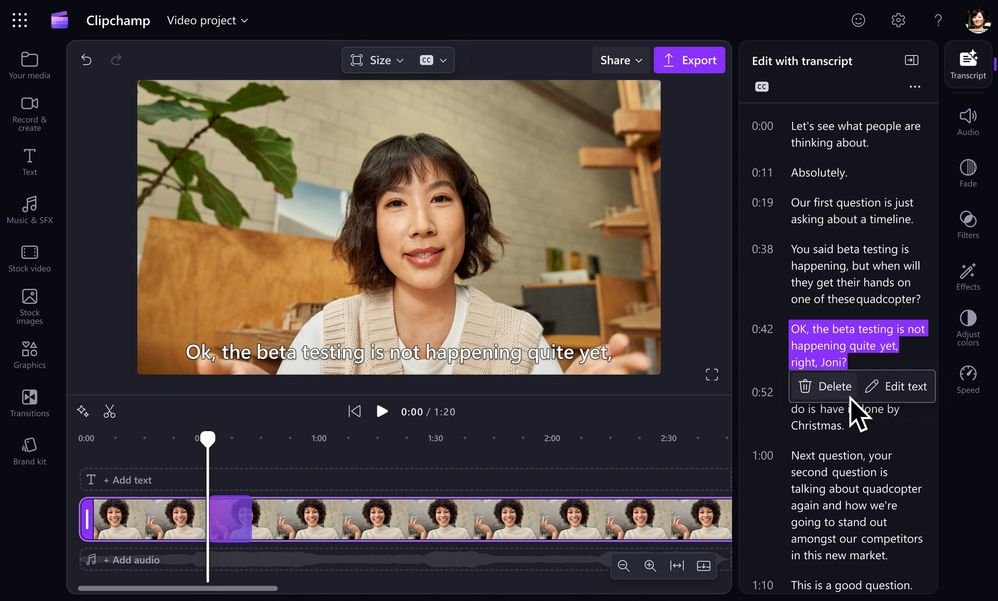
The timeline interface received substantial improvements, including hover-over displays that show timestamps and clip duration, making precise editing more intuitive. Microsoft also introduced multi-item editing capabilities, allowing users to group elements and apply effects or adjustments simultaneously. This feature addresses a common pain point in video editing where repetitive tasks across multiple clips consume disproportionate time.
Audio editing capabilities expanded with tools to remove unwanted audio, adjust clip speed, and transcribe audio to text for subtitle generation. The platform now supports creating and adding AI-generated subtitles in minutes, significantly reducing the time required to make videos accessible and compliant with accessibility standards.
Brand Customization and Creative Assets
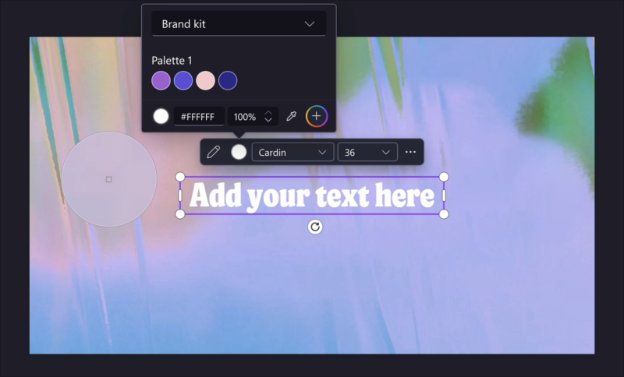
For enterprise users, maintaining brand consistency across video content presents ongoing challenges. Microsoft addressed this with an enhanced brand kit system that stores logos, fonts, and other brand elements for organization-specific content creation. The new color picker allows designers to extract exact colors from media files for precise brand matching, eliminating the guesswork in color reproduction.
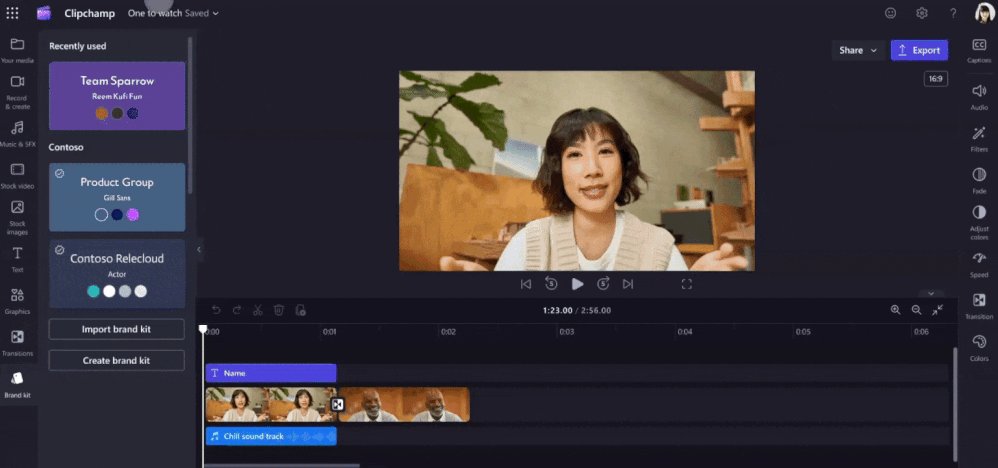
The platform expanded its creative asset library substantially, adding stock images, text styles, vector shapes, and gradient backgrounds. These additions support organizations in creating professional-looking content without requiring external design resources or stock media subscriptions. The template system enables teams to create and share video templates, facilitating collaboration and ensuring consistency across departments.
AI-Powered Productivity with Microsoft 365 Copilot
The integration of Microsoft 365 Copilot represents the most transformative aspect of Clipchamp's 2025 evolution. The Copilot Create experience allows users to generate video storyboards from text prompts, dramatically reducing the initial creative barrier. Users can add files and apply their organization's brand kit automatically, creating dynamic, on-brand content from simple descriptions.
At Ignite 2025, Microsoft announced the availability of OpenAI's Sora 2 video generation model through Frontier, bringing advanced video creation capabilities to Microsoft 365 Copilot licensed users. This integration enables text-to-video generation directly within the Clipchamp ecosystem, allowing organizations to create custom video content without filming or traditional editing workflows.
Copilot's capabilities extend beyond creation to video consumption and analysis. Users can leverage transcripts to summarize videos and ask questions about content, making it easier to extract value from meeting recordings, training materials, and presentations. The ability to remove background noise and silences using AI further streamlines the post-production process.
Interface Refinements for Improved User Experience
Microsoft recognized that the creative process requires an interface that feels natural and unobtrusive. The 2025 interface refresh introduced dark and light modes to accommodate different working preferences and environments. A collapsible sidebar and timeline maximize screen real estate for the actual editing workspace.
Common actions like zooming in and out of the timeline, undoing and redoing edits, and changing video aspect ratios have been made more intuitive. These refinements reduce the cognitive load on users, allowing them to focus on creative decisions rather than navigating the interface.
Strategic Implications for Enterprise Video Strategy
Microsoft's approach to video in 2025 reflects a broader trend toward platform consolidation and AI integration. By embedding video creation directly into the productivity suite where work already happens, Microsoft reduces context switching and increases the likelihood that video becomes a standard communication medium rather than a specialized format requiring dedicated tools and expertise.
The integration with SharePoint, Teams, and OneDrive means videos become discoverable assets within existing enterprise search and governance frameworks. This addresses compliance and information management concerns that have historically limited video adoption in regulated industries.
For organizations considering their video strategy, Microsoft's approach offers several advantages:
- Reduced tool fragmentation: Single platform for creation, management, and consumption
- Lower learning curve: Familiar Microsoft 365 interface patterns
- AI-assisted workflows: Automated transcription, summarization, and generation
- Brand consistency: Centralized brand kit management
- Enterprise governance: Integration with existing data storage and access controls
Looking Ahead: The Video-First Enterprise
Microsoft's vision for Clipchamp extends beyond editing functionality toward making video a first-class citizen in enterprise communication. The company aims to tighten the loop between video creation, discovery, sharing, and reuse within Microsoft 365, accelerating learning, collaboration, and the impact of video across organizations.
This strategy positions Microsoft to compete with specialized video platforms by leveraging its existing enterprise relationships and integration depth. While dedicated video platforms may offer more advanced creative features, Microsoft's approach prioritizes accessibility, integration, and workflow efficiency—factors that often matter more to enterprise users than creative sophistication.
The availability of Sora 2 through Microsoft 365 Copilot Frontier represents Microsoft's commitment to bringing cutting-edge AI capabilities to its enterprise customers. As video generation models continue to improve, the line between traditional video production and AI-assisted creation will blur, potentially democratizing video production at an unprecedented scale.
For organizations evaluating their video strategy, Microsoft's 2025 evolution of Clipchamp presents a compelling option that balances creative capability with enterprise practicality. The platform's strength lies not in replacing specialized video editing software for high-end production, but in making video creation accessible, efficient, and integrated into daily workflows for millions of knowledge workers.
The transformation of Clipchamp from a standalone editor to an AI-powered, integrated platform demonstrates Microsoft's strategic approach to product development: identify workflow friction points, leverage existing ecosystem advantages, and apply AI to reduce barriers to adoption. As video continues to dominate digital communication, this integrated approach may well define the future of enterprise video creation and consumption.
Resources and Further Learning
For organizations and individuals interested in exploring these capabilities, Microsoft provides extensive documentation and learning resources:
- Microsoft 365 Copilot documentation for AI-powered features
- Clipchamp help center for detailed tutorials
- Microsoft Community Hub for peer discussions and support
- Ignite 2025 announcements for latest platform developments
The evolution of Clipchamp represents more than feature additions—it reflects a strategic vision where video becomes an integral part of the enterprise productivity stack, powered by AI and seamlessly integrated into the tools where work already happens.
Comments
Please log in or register to join the discussion