Microsoft Defender's multitenant portal now includes Tenant Groups in public preview, enabling security teams to create custom tenant views for focused threat investigation and posture management. The feature replaces the former 'Tenant groups' (now Deployment profiles) and requires specific Entra ID permissions, offering MSSPs and CSPs a way to organize tenants by workflow without altering access controls.
Managing security across numerous Entra ID tenants often forces analysts to sift through irrelevant data when investigating incidents or reviewing posture. Microsoft Defender addresses this operational friction with Tenant Groups, a new capability now in public preview within the multitenant (MTO) portal. This feature lets security teams create logical tenant groupings—such as by customer tier, geographic region, or onboarding stage—and instantly switch the Defender MTO view to display data only from the selected group.
The introduction clarifies a naming shift: what was previously called 'Tenant groups' for content distribution is now termed 'Deployment profiles'. The 'Tenant Groups' label exclusively refers to this new viewing experience. This distinction is critical for administrators familiar with the older terminology, ensuring they understand the feature’s purpose is strictly organizational for portal navigation, not policy distribution.
To use Tenant Groups, administrators navigate to Multitenant Management > Tenant Groups in the Defender portal after signing in with administrative credentials. A default 'My private group' appears, containing all tenants from prior configurations and serving as a non-deletable starting point. Creating a new group involves selecting '+ Create tenant group', providing a descriptive name (e.g., 'EMEA Critical Infrastructure' or 'Phase 3 Pilot Tenants'), adding an optional description, and choosing specific tenants to include. The process requires no complex configuration beyond tenant selection.

Switching between groups occurs via the portal’s top-left multitenant management dropdown. Once a group is selected, all subsequent navigation—whether reviewing incidents, executing hunting queries, or checking device compliance—displays data exclusively from tenants within that group. Permissions remain strictly enforced: even if a group includes tenants where the user lacks B2B or GDAP access, only accessible tenants appear in the view. This ensures Tenant Groups function as a filtering layer rather than an access escalation tool, preserving existing Entra ID role-based controls (Security Administrator, Security Operator, etc.) and any custom RBAC configurations.
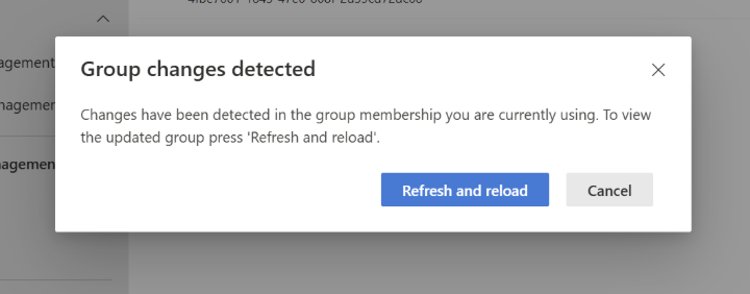
Live collaboration safeguards prevent outdated views. If a colleague modifies a Tenant Group while it’s actively displayed, the portal triggers a notification alerting users to the scope change, eliminating risks of stale data during investigations. Best practices recommended by Microsoft include aligning group names with actual triage workflows (e.g., 'On-Call Tier 1' rather than vague labels), maintaining small, purpose-driven groups to avoid overlap, and pairing Tenant Groups with Deployment profiles for complementary viewing and content distribution tasks. Regular access audits are advised since group membership operates independently of underlying permissions.
The feature targets MSSPs, CSPs, and enterprise security teams managing heterogeneous tenant environments. By reducing noise in the security console, Tenant Groups aim to accelerate incident response cycles and improve operational clarity during routine posture assessments. Public preview availability begins immediately, with feedback solicited through the Microsoft Community Hub to refine the experience before general availability.
For setup guidance, refer to the Microsoft Defender multitenant management documentation. Permissions requirements align with standard Entra ID admin roles.
Comments
Please log in or register to join the discussion