Microsoft's Privileged Identity Management now supports custom extensions that hand approval decisions to your own REST API, letting a ticketing system or HR platform validate access requests instead of a human. The catch is licensing: this lives behind Entra ID Governance or Entra Suite, not the Entra P2 tier where PIM itself sits.
What changed
Privileged Identity Management has always carried a workflow tax. A user requests elevation, waits for the service to process the request, and then frequently waits again for a colleague to approve it manually. That second wait is the one organizations complain about most, because it inserts a human into a path that runs at all hours and stalls whenever the approver is in a meeting, asleep, or on leave.
Microsoft's answer is custom extensions for PIM, which let you inject your own logic into the activation workflow through a standard REST API. Instead of routing an approval to a person, PIM can call out to an external endpoint, your endpoint, which evaluates the request against whatever system of record you choose and returns an approved or denied verdict. For ticket-validated elevation, this removes manual approval entirely for most roles, with Global Administrator being the obvious exception you would keep gated behind a human.
How the flow actually works
When a user submits an activation request, the central PIM controller intercepts the process before applying its normal internal checks. If you have configured a pre-approval custom extension on that role, PIM pauses and pushes an HTTP payload outward to your API. Your code then owns the decision. It runs whatever logic you wrote, checking a ticketing provider, querying an HR system, confirming the user is on call this week, and returns a definitive response. PIM takes that response and executes or blocks the access change automatically.
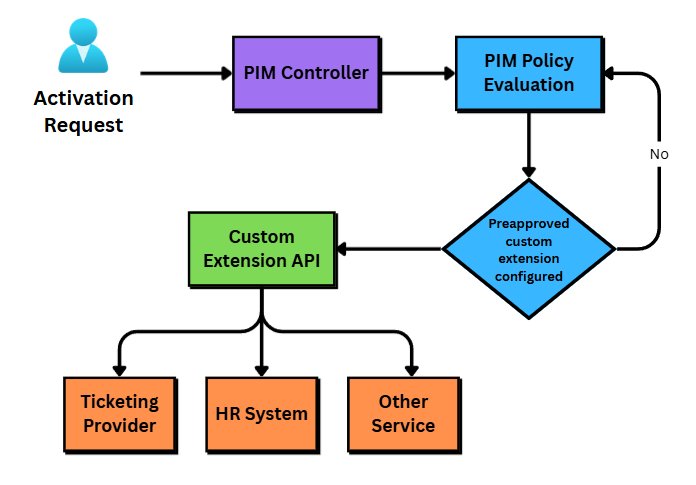
The ordering is configurable. A pre-approval extension fires before PIM's built-in activation process, which is the common case for gating elevation on external validation. A post-approval extension runs after the built-in process completes, which suits scenarios where you want to record or trigger downstream actions once access is granted rather than block it. You set this per role in Role Settings, and you can run it in Audit mode first so you can watch the calls happen without letting a misconfigured endpoint lock anyone out.
The licensing problem worth weighing
Here is the part that shapes whether this is viable for you. Custom extensions require Entra ID Governance or Entra Suite licenses for every user who benefits from them. PIM itself ships in Entra ID P2. So the base product sits in one tier and the automation that makes it genuinely hands-off sits in a more expensive one. For a feature whose entire pitch is reducing operational friction, putting it above the tier where the product already lives is a hard sell, and it is fair to flag that as a gap rather than a clean upsell.
That pricing reality changes who should care. If your PIM rollout is new or lightly adopted, and most are, the built-in features already cover far more than most teams use. Custom extensions are not where you start. They earn their cost only when you have a mature PIM process running well and the remaining pain is the manual approval bottleneck and request validation. At that point the Governance license buys back real administrator and end-user time. Below that maturity line, you are paying for automation you have not yet designed the process to need.
Building and linking the extension
The work splits into two halves: the backend that holds your logic, and the PIM configuration that calls it.
For the backend, you can integrate with systems that already accept web requests and run logic, such as Workday, ServiceNow, or Dynamics, or build a service from scratch. Building from scratch is the option to avoid if an existing platform can carry the logic, because you then own the availability and security of an endpoint that gates privileged access. Microsoft's guidance on securing the custom extension service covers the authentication model in detail.
To create the extension in the portal, sign in to the Entra Admin Center as at least a Privileged Role Administrator, then go to ID Governance > Privileged Identity Management > Custom Extensions and select Create a custom extension. Name it, describe it, and choose the resource type it will activate. On the Endpoint configuration page you supply the URL of your approval endpoint. On the API authentication page you select the App Registration tied to your backend, then review and create.
One configuration detail catches people: you may need to manually set requestedAccessTokenVersion to 2 in the App Registration before the portal will let you assign the Application ID URI. That is the kind of step that is easy to lose an afternoon to if you do not know it in advance.
Linking the extension to a resource is separate. In the Admin Center, expand ID Governance > Privileged Identity Management, choose Manage > Roles (Groups and Azure Resources work the same way), open the role, and edit Role Settings. Select Require pre-approval custom extension to activate, pick Audit or Enabled, and choose your extension from the pop-out. The same screen offers the post-approval variant.
Business impact
The value here is operational, not security posture. Custom extensions do not make PIM more secure on their own; they make a well-designed approval process faster and more consistent by replacing human latency with a programmatic check against your authoritative systems. An elevation tied to an open ServiceNow change record, automatically validated, is both quicker for the user and more auditable than a colleague clicking approve based on a Teams message.
The trade-off is concrete. You are taking on a production dependency: an endpoint that, if it fails to resolve or returns an error, blocks legitimate activation. In testing without a working backend, the activation simply errors out, which at least confirms PIM is calling outward rather than running its built-in path. In production that same failure mode is an availability concern you need to design around, which is another argument for hanging the logic off a platform your organization already runs at high availability rather than a bespoke service.
For cloud teams weighing this, the decision comes down to three questions. Is your PIM process mature enough that manual approval is the genuine bottleneck? Do you have a system of record worth validating against? And can you absorb the Entra ID Governance licensing for every affected user? If all three are yes, custom extensions close a real gap. If any is no, the built-in features remain the better return.
Comments
Please log in or register to join the discussion