Microsoft is folding its Modern Print Platform into a new banner called Windows Ready Print and, starting July 2026, will default new printer installations to the inbox IPP driver rather than third-party OEM drivers. For IT teams managing mixed fleets, the change introduces a Settings toggle and a Group Policy control that decide how Windows picks drivers, with a hard dependency on whether Windows protected print mode is in play.
Microsoft has renamed its Modern Print Platform to Windows Ready Print and attached a concrete deadline to a transition that has been quietly underway for years. The headline for IT decision-makers is not the name. It is the date: starting July 2026, new printer installations on supported hardware will default to the Windows inbox IPP (Internet Printing Protocol) driver instead of vendor-supplied OEM drivers.
What changed
Two things moved at once. First, the branding. "Modern Print Platform" becomes "Windows Ready Print," a marketing change that signals Microsoft wants this to be the default mental model for printing on Windows rather than a parallel option admins opt into.
Second, and more consequential, the default behavior of printer installation flips. Today, plugging in or adding a network printer typically pulls down a third-party driver, either from Windows Update or a vendor package. Under Windows Ready Print, Windows will instead use its built-in IPP driver whenever the printer supports the standard. IPP is an established, vendor-neutral protocol for talking to printers over the network, and the inbox driver removes the need to source, package, and patch per-model driver binaries.
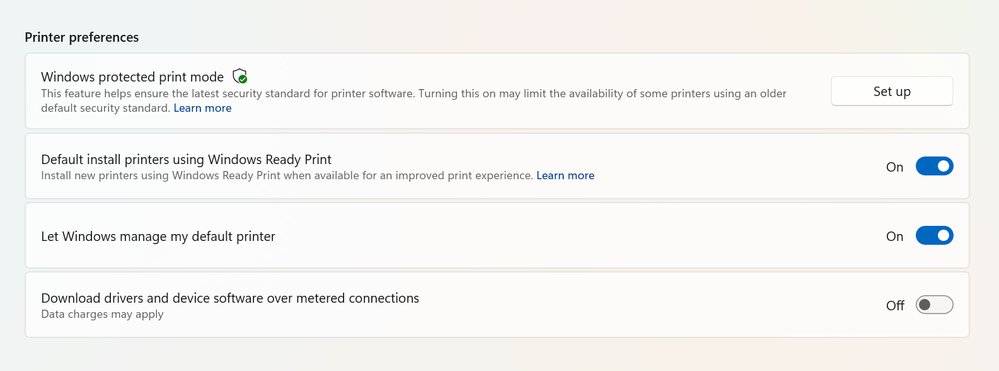
Microsoft has added a user-facing control to manage the cutover. Under Settings > Bluetooth & Devices > Printers & Scanners, a new option called Default install printers using Windows Ready Print decides the behavior. When enabled, Windows prefers the IPP path. When disabled, Windows falls back to its existing driver selection logic. The setting applies only to new installations and leaves already-installed printers untouched.
For managed environments, the same control exists in Group Policy. Open the Group Policy Editor, navigate to Local Computer Policy > Administrative Templates > Printers, and configure Configure Windows Ready Print driver ranking. Setting it to Enabled forces the IPP-first ranking; Disabled explicitly opts out.
There is an important interaction with Windows protected print mode. When protected print mode is on, printers install exclusively through Windows Ready Print, and any device that does not support it simply cannot be installed. In that configuration you also lose the ability to turn off the Ready Print default. Protected print mode and Ready Print are effectively coupled, so security-driven deployments inherit the driver policy whether or not they intended to.
How this compares to where printing has been
The legacy model put the printer vendor at the center. Each manufacturer shipped its own driver stack, its own update cadence, and its own quirks, and IT carried the cost of testing and distributing those packages across the fleet. That model is also where a long run of print-related security incidents originated, since third-party drivers run with significant privilege and have been a recurring exploit target.
The IPP-based approach shifts the center of gravity to Windows itself. Microsoft owns the driver, patches it through standard servicing, and reduces the per-model surface area. This mirrors a broader pattern across the platform: replace bespoke vendor components with a standards-based, OS-owned implementation, trading some device-specific capability for predictability and a smaller attack surface. Apple and various Linux distributions made similar moves toward driverless IPP printing earlier, so Microsoft is converging on an industry direction rather than charting a new one.
The trade-off is the familiar one with any standards-based consolidation. IPP covers core printing and many common features well, but advanced or vendor-specific finishing options, specialized media handling, and certain device management hooks may not map cleanly to the inbox driver. Environments that depend on those capabilities are exactly the ones Microsoft is leaving an opt-out for, at least until protected print mode is mandated.
Business impact
The practical question for IT leaders is not whether to adopt Windows Ready Print but when, and how to stage it. Because the change affects only new installations, existing printer estates keep working as-is through the July 2026 transition. That gives teams a window to inventory their fleet and sort devices into two buckets: those that support IPP cleanly and those that rely on OEM driver features.
The Group Policy control is the lever that matters at scale. Organizations that want to pace the rollout can leave it disabled and continue with current driver selection while they validate IPP behavior against their hardware. Organizations ready to reduce driver management overhead can enable it now and start realizing the operational savings: fewer driver packages to maintain, fewer print-spooler patches to chase, and a more uniform support model across machines.
For security-conscious shops, the coupling with protected print mode is the strategic detail to plan around. If the goal is to enforce protected print mode for its security benefits, accept that Ready Print becomes mandatory and that non-IPP printers will not install. That argues for hardware refresh planning now, so that incompatible devices are retired or replaced before the policy is locked in rather than discovered as failures during deployment.
The net direction is clear. Microsoft is reducing the role of third-party print drivers, aligning Windows with a standards-based model that lowers maintenance cost and tightens security, and giving administrators a defined runway and explicit controls to manage the move. The teams that benefit most will be the ones that treat the next year as a validation and migration window rather than waiting for the default to flip underneath them. Documentation and the full announcement are available through the Microsoft Partner Community blog.
Comments
Please log in or register to join the discussion