Microsoft has released a refreshed Hardware Lab Kit (HLK) for Windows 11 version 25H2 and Windows Server 2025, introducing ARM64 testing improvements, new driver validation checks, and updated test playlists while maintaining compatibility with existing certification workflows.
Microsoft has announced the availability of a refreshed Hardware Lab Kit (HLK) for Windows 11 version 25H2 and Windows Server 2025, starting February 17, 2026. This update replaces the RTM version currently available on the HLK download site, with the VHLK version expected to follow within a week.
Key Improvements in the February Refresh
The refreshed HLK introduces several significant changes aimed at streamlining the driver certification process and improving test accuracy.
ARM64 Testing Enhancement
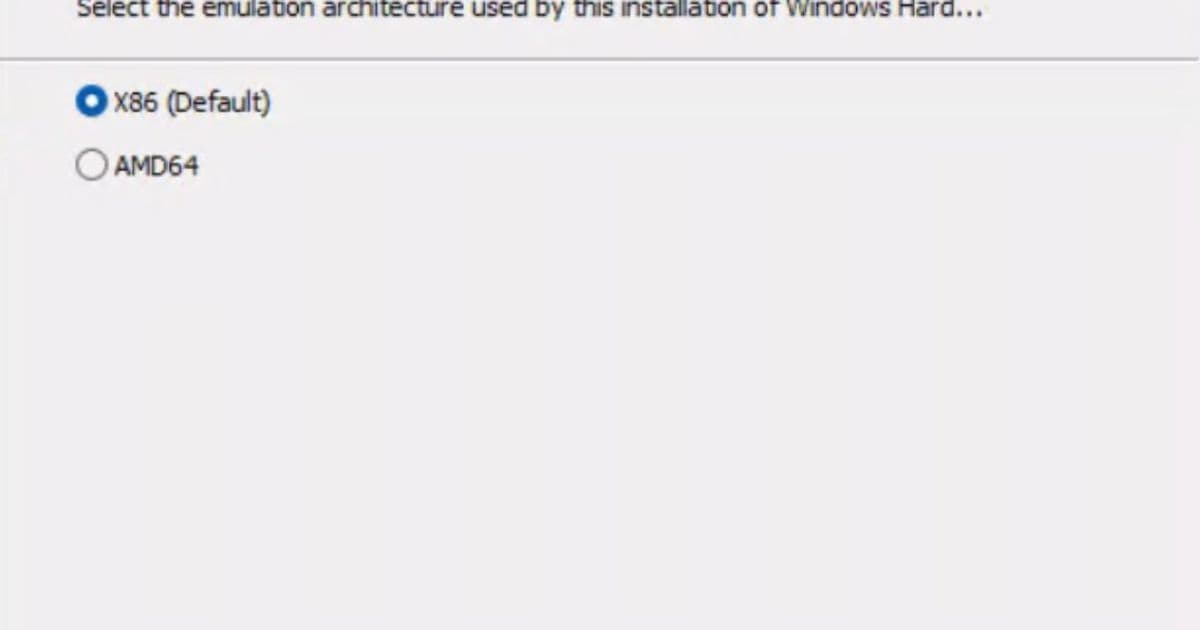
One of the most notable changes is the update to the ARM64 client setup experience. The emulation test setting now defaults to x86, aligning ARM64 client testing more closely with the existing AMD64 workflow. This change allows partners to use a single, unified playlist for ARM64 testing, covering both full and emulation scenarios.
The practical impact is substantial: partners can now minimize playlist configuration overhead and focus more on validating driver quality rather than managing multiple architecture-specific playlists. This unified approach is expected to accelerate the setup of ARM64 emulation test environments.
The default UI change for this feature will be available in the following quarterly refresh, while partners can already point to x86 as the default emulation during automated script setup in this February release.
Enhanced Driver Package Validation
The refresh introduces a new validation check for unreferenced files in driver packages. If a driver package includes files that aren't referenced by an .inf file, a warning will display at the end of the packaging process. This enhancement helps ensure cleaner driver packages and better compliance with Microsoft's packaging standards.
The PackageWriter class in the Microsoft.Windows.Kits.Hardware.ObjectModel.Submission namespace has been updated to provide access to this new information through the HLK API.
Playlist Updates
The refresh includes several playlist modifications across different test categories:
Removed Tests
Several Bluetooth LE Audio tests and display-related tests have been removed, including:
- Bluetooth LE Audio VSAP (Broadcast) tests
- DXGI Hybrid WDDM 3.0 tests
- Display capture tests
- Various NDIS and BitLocker tests
Added Tests
New tests have been introduced to enhance validation capabilities:
Driver Attribute Test - Reports the version of the WDK used to build the driver package. While this test doesn't currently cause failures, it provides valuable metadata for driver analysis.
GRFX Adapter - Unreleased Features Block - Prevents graphics drivers from showing full support for unreleased features, ensuring that only properly validated features are exposed to users.
Wlan Test - Connect to an enterprise network using MLO - Adds support for existing WHCP requirements for enterprise network connectivity.
BitLocker Tests - Several new BitLocker-related tests have been added, including Device Encryption Test and updated TPM and Recovery Password tests for various device configurations.
Technical Considerations and Troubleshooting
Schema Compatibility
A critical consideration for users upgrading to the refreshed HLK: submission packages generated from this release use a new schema. This means that opening HLKX files generated from the refreshed version requires a newer version of HLK Studio.
Solution: Install or update to the latest version of HLK or HLK Studio. Existing HLK Controller installations don't need to be reinstalled, but an HLK Studio-only instance from the latest HLK can be installed on a separate system to open these HLKX files.
Wi-Fi Test Regression
The removal of TestNetv2.0 dependencies from the HLK test infrastructure has caused regressions in several Wi-Fi tests. Affected tests include various Wi-Fi Direct discovery, pairing, and service discovery tests. Microsoft has indicated this issue will be addressed in a future refresh of the 25H2 Hardware Lab Kit.
Migration and Compatibility
Installation Requirements
The refreshed HLK cannot be installed on a system that already has the RTM version installed, whether as Controller or Client. Microsoft strongly recommends starting with a clean OS installation for both Controller and Client systems.
Version Identification
Users can distinguish between versions by checking the HLK Studio version:
- RTM HLK Studio version: 10.1.26100.1
- Refresh HLK Studio version: 10.1.26100.X
The version information is accessible through the 'About' section in the upper right corner of the Studio interface.
Certification Workflow
Partners can continue submitting to WHCP using either the RTM or refreshed HLK version, provided passing results can be obtained. Waivers remain acceptable for either version.
However, results from RTM and refreshed test runs cannot be merged for submission purposes. Partners should complete their submissions using either the RTM or refreshed HLK exclusively.
Future Roadmap
Microsoft has outlined its commitment to regular HLK updates, transitioning to a servicing model that maintains overall test quality while reducing dependency on errata. The current plan calls for evaluating a refreshed HLK release each quarter.
The refresh applies to both client and server platforms, and the VHLK will also receive updates to maintain consistency across the certification ecosystem.
This February refresh represents Microsoft's ongoing effort to streamline the driver certification process while maintaining rigorous quality standards for Windows 11 and Windows Server 2025 compatibility.
Comments
Please log in or register to join the discussion