Microsoft has rolled out significant updates to Teams Admin Center that introduce trust-based filtering and certification visibility directly into the app governance workflow, allowing IT administrators to make faster compliance decisions without leaving their management dashboard.
Microsoft has updated Teams Admin Center (TAC) with new trust-based features that fundamentally change how IT administrators evaluate and approve Teams apps. These updates surface Microsoft 365 Certification status and compliance attributes directly within the admin interface, replacing manual verification processes with automated trust signals.
What Changed in Teams Admin Center
The updates build on existing security features while adding new layers of trust visibility. Previously, TAC provided basic publisher information and compliance documentation links through its Security & compliance tab, but admins needed to manually review and cross-reference these details across multiple sources.
The new implementation introduces three core enhancements:
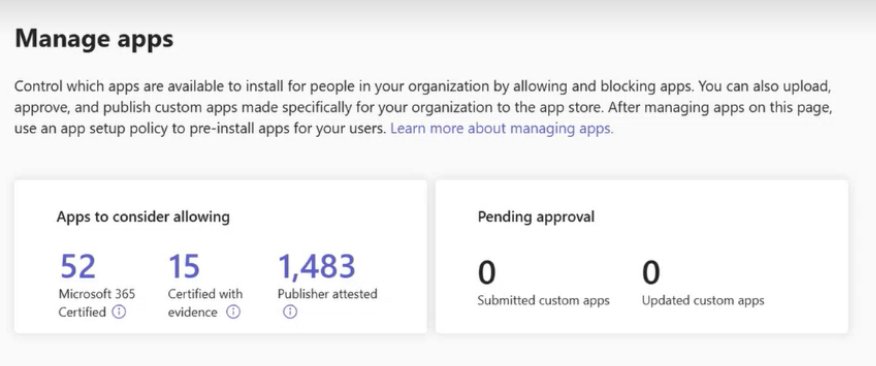
1. "Apps to Consider Allowing" Tile This new dashboard element automatically surfaces apps that meet organizational trust thresholds. It categorizes applications into three tiers:
- Certified apps: Those that have completed Microsoft 365 Certification
- Publisher-attested apps: Applications where publishers have provided self-attested compliance information
- Apps with compliance evidence: Solutions that have submitted third-party audit results or security documentation
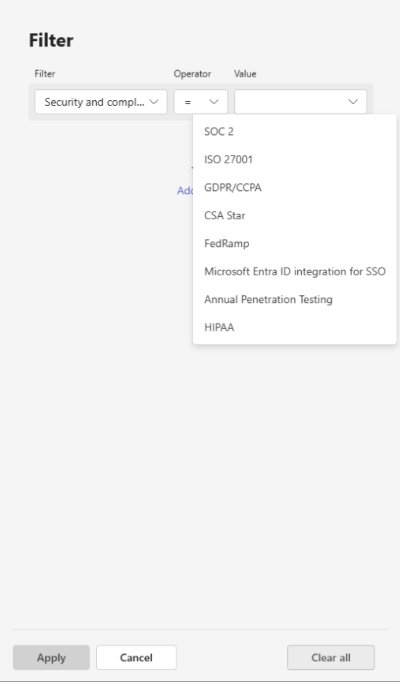
Admins can filter this view by specific compliance frameworks, instantly narrowing the selection to apps meeting their organization's requirements.
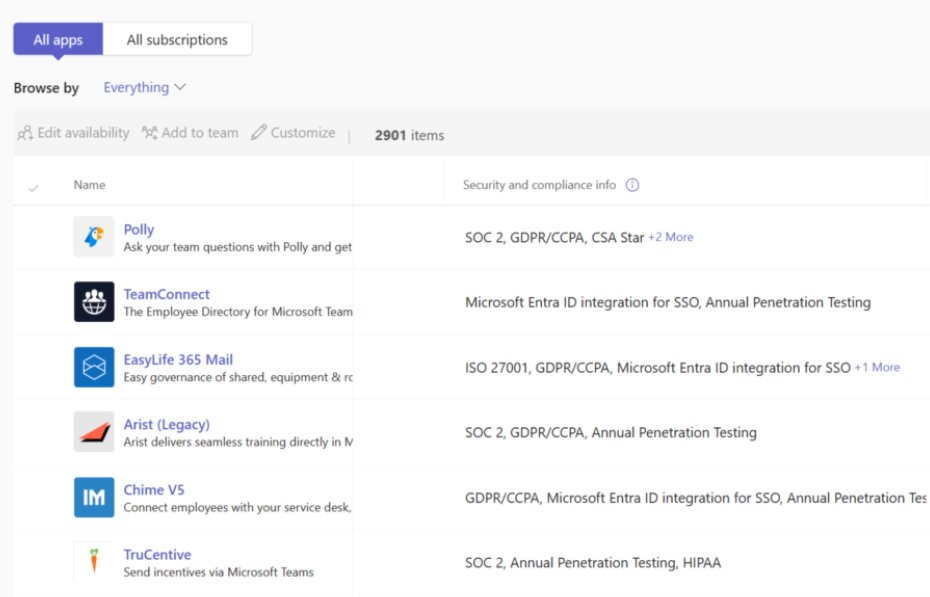
2. In-Line Compliance Attributes The Security & Compliance column now displays specific compliance certifications directly within TAC's app lists. Instead of clicking through to external documentation, admins see badges for:
- SOC 2 Type II
- FedRAMP Moderate/HIGH
- Penetration testing status
- ISO 27001
- HIPAA
- GDPR compliance
This eliminates the need to verify claims by opening separate browser tabs or requesting documentation from vendors.
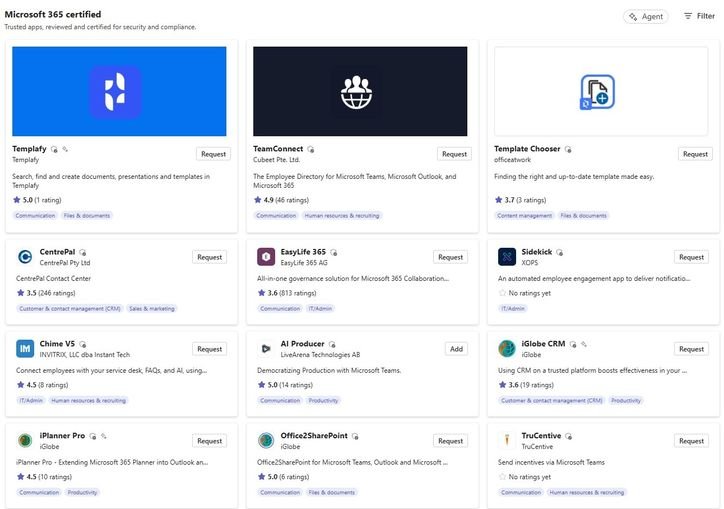
3. Dedicated Collections Microsoft has introduced curated collections that group certified apps and agents by use case or compliance level. These collections function as pre-vetted app libraries, allowing organizations to quickly deploy trusted solutions without individual review cycles.
How the Trust Filters Work
The trust-based filtering system operates on metadata that Microsoft collects during the Microsoft 365 Certification process. When an Independent Software Vendor (ISV) completes certification, they submit evidence including:
- Security audit reports
- Penetration test results
- Data handling policies
- Compliance attestations
Microsoft validates this information and assigns trust attributes that TAC now displays. The filtering engine allows admins to create complex queries such as "Show me all apps with SOC 2 certification that also handle customer data" or "List FedRAMP-authorized apps for our government division."
This represents a shift from reactive governance to proactive trust management. Rather than reviewing every app from scratch, admins can establish trust thresholds once and let the system surface only compliant applications.
For IT Administrators: Streamlined Governance
The practical impact on daily operations is substantial. Consider a typical app approval workflow:
Before: An employee requests access to a new project management app. The IT admin must:
- Search for the app in TAC
- Open the Security & compliance tab
- Visit the publisher's website to verify claims
- Search for SOC 2 or ISO 27001 certificates
- Check if the app appears on any industry compliance lists
- Potentially request additional documentation from the vendor
- Document findings and make a decision
After: The same workflow becomes:
- Search for the app in TAC
- View trust badges directly in the app details
- Apply organization-specific filters (e.g., "Must have SOC 2")
- Approve or deny based on visible compliance
This reduction in steps translates to faster app onboarding and reduced risk of human error during verification.
Risk Reduction Through Standardization
The new features help organizations enforce consistent security standards across all Teams apps. Instead of different admins making subjective decisions based on varying levels of diligence, the trust filters provide objective criteria that align with organizational policies.
For example, a financial services company can configure TAC to only display apps meeting SOC 2 and ISO 27001 standards, effectively preventing non-compliant apps from entering their environment regardless of who reviews them.
For ISVs: Certification as Competitive Advantage
The updates create a direct business incentive for Independent Software Vendors to pursue Microsoft 365 Certification. Certified apps gain:
Enhanced Visibility: Apps appear in the "Apps to Consider Allowing" tile and curated collections, putting them in front of IT decision-makers who might otherwise overlook them.
Reduced Sales Friction: When IT admins can see compliance status directly in TAC, the certification process accelerates. ISVs spend less time responding to security questionnaires and compliance documentation requests.
Trust Differentiation: In crowded app categories, certification badges help ISVs stand out. An admin comparing two project management tools will likely choose the certified option when all other factors are equal.
The certification process itself involves submitting evidence through the Microsoft Partner Center, where ISVs complete security reviews and attest to compliance with frameworks like SOC 2, ISO 27001, and GDPR. Once approved, these attributes automatically flow into TAC's trust system.
Implementation Considerations
For Organizations Rolling Out the Features
Policy Configuration: Admins should first define their trust requirements. This involves:
- Identifying which compliance frameworks apply to your industry
- Determining minimum trust levels for different user groups
- Setting up collection permissions
User Communication: The new tiles and filters will appear automatically in TAC, but organizations should communicate the changes to help desk teams and app reviewers. The streamlined process may raise questions about why certain apps are suddenly visible while others remain hidden.
Gradual Rollout: Consider using the new collections as a pilot program. Start with a small group of users and certified apps, measure the time savings and risk reduction, then expand.
For ISVs Pursuing Certification
The certification process requires:
- Security Audit: Complete a SOC 2 Type II or equivalent audit
- Penetration Testing: Submit results from a qualified third-party tester
- Compliance Attestations: Provide documentation for GDPR, HIPAA, or other relevant frameworks
- Microsoft Review: Submit evidence through Partner Center for validation
The entire process typically takes 6-8 weeks and costs between $15,000-$50,000 depending on audit scope. However, the investment pays dividends through increased adoption and reduced sales friction.
ISVs can start by reviewing the Microsoft 365 Certification requirements and engaging with the certification team early in their product development cycle.
Broader Ecosystem Impact
These updates reflect Microsoft's strategy of making trust a first-class citizen in cloud governance. By surfacing compliance data directly in management tools, they're reducing the barrier to secure cloud adoption.
This approach aligns with industry trends where compliance is no longer a checkbox exercise but a continuous process integrated into daily operations. The Teams Admin Center updates make compliance visible and actionable rather than a separate, periodic review.
Comparison with Other Platforms
While AWS and Google Cloud have similar certification programs, Microsoft's integration into the admin interface represents a more seamless approach. AWS Artifact provides compliance reports, but requires separate access and manual correlation with services. Google Cloud's compliance dashboard offers similar data but isn't integrated into the primary management console.
Microsoft's approach of embedding trust signals directly into the app governance workflow reduces context switching and makes compliance part of the natural administrative process.
Looking Ahead
These features are currently available in preview for organizations with Microsoft 365 E5 or E3 licenses. General availability is expected in Q2 2026. Future enhancements may include:
- Automated compliance monitoring and alerts
- Integration with Microsoft Purview for data governance
- AI-powered risk assessment based on trust signals
Organizations should prepare by:
- Auditing their current Teams app inventory
- Identifying compliance gaps
- Engaging with ISVs to encourage certification
- Training IT staff on the new trust-based workflows
Getting Started
To access these features:
- Navigate to Teams Admin Center
- Go to Teams apps > Manage apps
- Look for the "Apps to Consider Allowing" tile on the dashboard
- Use the new compliance filters in the app list view
For detailed implementation guidance, consult the official documentation.
The shift to trust-based governance in Teams Admin Center represents a fundamental improvement in how organizations manage cloud app security. By making compliance visible and actionable, Microsoft has reduced the operational burden on IT teams while raising the security bar for the entire Teams ecosystem.
Comments
Please log in or register to join the discussion