
A comprehensive guide to KDE's evolving UI framework ecosystem, explaining the relationships between QtWidgets, QtQuick, Breeze, Kirigami, and the new Union styling system.
What even are Breeze, QtQuick, QtWidget, Union..? Posted on 2026-03-01 by Akseli Lahtinen I was asked a good question: What are these things? What are the differences? I will try to explain what they are in this post, in bit less technical manner. I will keep some of the parts bit short here, since I am not 100% knowledgeable about everything, and I rather people read documentation about it instead of relying my blogpost. :) But here's the basics of it. It's infodump time....

QtWidgets: The Foundation
QtWidgets represents the "older" way of writing Qt applications. It's primarily C++-based and, while powerful, can be quite difficult to work with. The framework isn't very flexible compared to modern alternatives, but it remains the backbone of many KDE applications. For those wanting to dive deeper, the official documentation provides comprehensive coverage: https://doc.qt.io/qt-6/qtwidgets-index.html
QStyle: The Styling Engine
QStyle serves as the class for creating UI elements that follow the style guidelines for applications. Rather than hardcoding all visual aspects, developers use QStyle methods to define how things should appear. This approach provides consistency across applications and was central to my previous discussions about KDE theming. More information is available at: https://doc.qt.io/qt-6/qstyle.html
Breeze: KDE's Visual Identity
Breeze represents KDE's current style and theme system. It defines the visual language that makes KDE applications instantly recognizable. In QtWidgets contexts, when we say "Breeze," we're typically referring to the QStyle implementation, as there isn't another specific name for this styling approach. The source code lives in the KDE repositories: https://invent.kde.org/plasma/breeze/
QtQuick: The Modern Approach
QtQuick represents the modern way of building Qt applications. Instead of traditional C++ UI code, QtQuick uses QML (Qt Modeling Language), which is a declarative language for defining UI components. This approach separates the visual design from the application logic, where C++ typically handles backend operations like data processing. For those interested in learning more, the official documentation covers both QtQuick and QML: https://doc.qt.io/qt-6/qtquick-index.html and https://doc.qt.io/qt-6/qtqml-index.html
qqc2-desktop-style: Breeze for QtQuick
qqc2-desktop-style provides the Breeze styling specifically for QtQuick applications. It tells QtQuick applications how various UI elements should appear, ensuring visual consistency with the QtWidgets world. The project repository is available here: https://invent.kde.org/frameworks/qqc2-desktop-style/
Kirigami: Shared Components
Kirigami represents a collection of shared components and items that developers can utilize across QtQuick applications. Rather than rewriting similar UI elements for every new application, developers rely on Kirigami for many common needs. This is why we refer to many KDE applications as "Kirigami applications"—they heavily depend on this framework.
The Kirigami and qqc2-desktop-style Relationship
These two frameworks are somewhat intertwined. For example, Kirigami provides convenient size units that the KDE community has collectively agreed upon, such as Kirigami.Units.smallSpacing. These units are then used both in the qqc2-desktop-style for basic QtQuick components and in custom components that developers might need to create when Kirigami doesn't provide exactly what's needed.
I wish these two weren't so tightly coupled, but there's probably a historical reason for this relationship that was established before my time. Or perhaps it simply evolved naturally as development progressed.
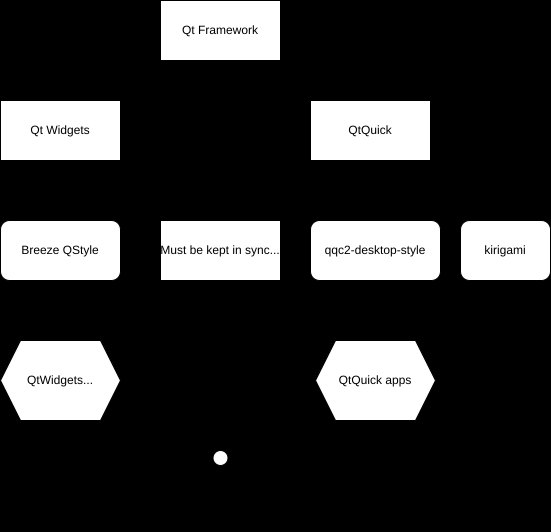
The Problem: Keeping Styles in Sync
As you can see from the diagram, the current situation requires manual synchronization of styles across different frameworks. Every change must be carefully propagated across both systems. An even bigger problem is that QtWidgets and QtQuick can behave very differently, leading to inconsistent visual appearance and user experience across KDE applications.
This synchronization challenge is precisely why Union was created.
Union: A Unified Styling Solution
Union represents KDE's own "style engine" built on top of these existing frameworks. Instead of maintaining two completely different styling stacks, Union accepts a single source of truth in the form of CSS files. It then processes this data to generate appropriate styling for both QtQuick and QtWidgets applications, ensuring they look as similar as possible.
The architecture is flexible enough that creating other outputs is entirely possible—for instance, generating GTK styles. Our ideal goal with Union is to eventually feed style information across different toolkits, though our immediate focus is on perfecting these two primary outputs.
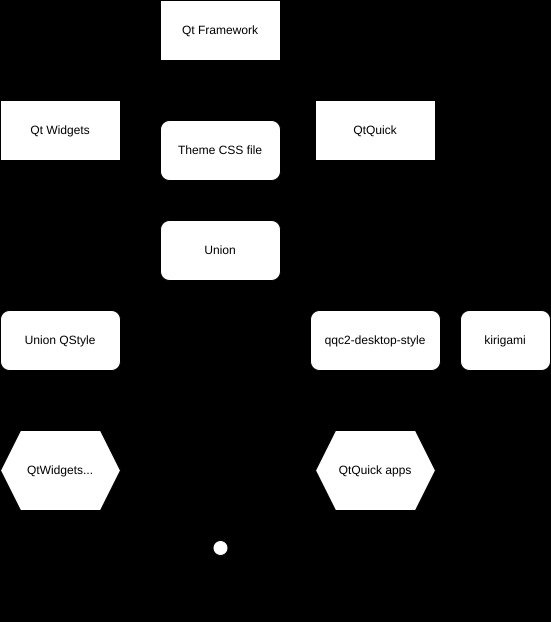
User Customization
Yes, the CSS style files are completely customizable by users! This represents a significant improvement over previous approaches where users would need to edit multiple different styles for various engines, compile them all, and then load them over the defaults. However, it's worth noting that the CSS used by Union isn't a direct 1-to-1 mapping of web platform CSS—it's tailored specifically for KDE's needs.
Plasma Styles: A Special Case
Plasma styles operate somewhat independently, being created entirely from SVG files. It's unclear whether Union will provide an output for Plasma styles or if we'll simply use qqc2-desktop-style directly in our Plasma stack (including panels and widgets), potentially allowing us to deprecate the SVG-based system. No decisions have been made on this front yet, as far as I'm aware.
The Evolution of KDE's UI Stack
Over more than 20 years of KDE development, we've accumulated many different ways of accomplishing similar tasks. This natural evolution has led to the current situation where things can easily get out of sync. Union represents a significant step toward resolving these inconsistencies while enabling users to customize their desktop experience through CSS files, eliminating the need to edit multiple different styles for various engines.
I hope this explanation helps clarify the relationships between these various components. For those interested in the ongoing work, please see my previous post about Breeze and Union preparation: https://akselmo.dev/posts/breeze-and-union-preparing/
Tags: kde, union, themes, qt
Webmentions Have you written a response to this post? Send me the URL! Send Webmention! Replies 💬 lemmy.bestiver.se (mention)
Comments
Please log in or register to join the discussion