As Microsoft floods its ecosystem with diverse AI agents, organizations must understand the distinct capabilities, limitations, and appropriate use cases for each type to avoid security risks, unexpected costs, and implementation failures.
Microsoft's rapid expansion of AI agents across its 365 ecosystem represents both an opportunity and a challenge for organizations. These agents appear in Teams sidebars, SharePoint document libraries, and standard Office applications, promising to revolutionize how we interact with data and automate tasks. However, the ease of creating these agents—allowing virtually anyone in an organization to build one with just a few mouse clicks—creates significant complexity when multiple agents are deployed.
Each AI agent handles security, logic, and permissions differently. Misconfigurations can lead to more than just functionality issues—they might trigger unexpected licensing fees or, more critically, create serious data security vulnerabilities. Understanding these differences isn't just technical; it's a business imperative that requires thoughtful implementation strategies.
SharePoint Agents: The Focused Document Assistants
SharePoint agents represent the most accessible entry point into Microsoft's AI ecosystem. These single-purpose, no-code assistants operate within specific SharePoint document libraries, functioning like intelligent search bars tailored to particular file folders.
The implementation process is straightforward: users select a button in a SharePoint library, choose specific files or folders as the source, and the bot is ready to operate. It leverages the Microsoft Graph Search API to reference those designated files when users ask questions, while respecting standard SharePoint permissions—users can't access files through the bot that they couldn't access directly.
However, real-world implementation reveals significant limitations. Indexing latency creates frustrating user experiences, where updated documents aren't immediately reflected in the agent's responses. The backend crawler can take hours to re-index new data, with no option for manual refresh. Additionally, complex Excel sheets with multiple tabs lose their row-and-column structure during processing, as the agent extracts text without preserving its original context.
SharePoint agents excel in specific scenarios: large collections of PDFs, policies, or standard operating procedures where users need quick access to information without navigating complex folder structures. They're particularly valuable for HR onboarding sites or compliance archives where document retrieval speed matters more than complex document processing.
First-Party App Agents: The Out-of-the-Box Experience
First-party app agents represent Microsoft's pre-built, ready-to-use helpers integrated directly into core products. These include the Microsoft 365 Copilot chat feature in Teams and specialized side panels within Dynamics 365 and Power Apps.
These agents function as "sealed boxes"—Microsoft controls the system messages, manages context, and handles security keys. They connect directly to the host application's database and structure, enabling seamless integration with existing workflows.
The primary limitation lies in the lack of architectural control. If a Dynamics 365 Sales agent summarizes account history while ignoring custom fields or tables that took weeks to develop, there's no way to modify the agent's behavior. Organizations become entirely dependent on Microsoft's product development roadmap, with no ability to customize or extend functionality beyond what Microsoft provides.
Despite these limitations, first-party agents serve a valuable purpose for standard office productivity tasks. They're ideal for summarizing lengthy Teams meeting transcripts, drafting routine emails in Outlook, or extracting generic metrics from CRM systems right out of the box.
Copilot Studio Agents: The Custom Enterprise Solution
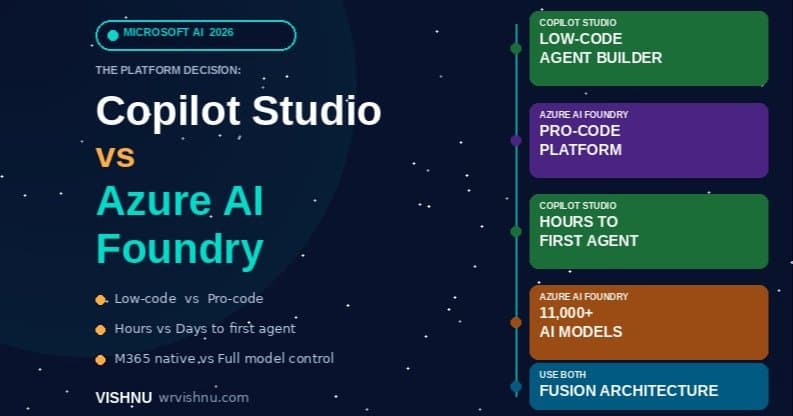
Copilot Studio stands as Microsoft's flagship platform for building custom enterprise bots, bridging the gap between low-code configuration and pro-developer capabilities. This platform is designed for scenarios where bots need to perform actions, such as communicating with third-party APIs or executing business processes.
The system relies on a "dynamic chaining" orchestrator that enables flexible processing of user requests. It supports two approaches: creating strict, step-by-step conditional paths (Topics) for precise sequences like IT password resets, and connecting to external connectors that allow Large Language Models to make real-time decisions.
However, real-world implementation reveals challenges like "intent collision," where specific, secure topics clash with generic company resources. For example, a custom expense claim topic might be ignored in favor of providing an outdated PDF from the intranet when a user asks about submitting receipts. Additionally, the system's reliance on Power Automate for backend logic creates timeout issues—cloud flows taking more than 15 seconds to fetch data cause the Copilot interface to drop the user's chat state entirely.
Copilot Studio excels in enterprise environments requiring custom workflows within Microsoft Teams or company portals. It's particularly valuable for scenarios involving authentication (similar to single sign-on) and multi-step processes like checking inventory levels, updating database records, or obtaining approvals.
Azure AI Foundry Agents: The Developer's Playground
Azure AI Foundry represents the most technical approach to AI agent development, designed for experienced developers, engineers, and data scientists who prefer working directly with code rather than visual interfaces. It supports multiple programming languages including Python, C#, Semantic Kernel, and LangChain.
With Azure AI Foundry, developers deploy raw LLMs into their own Azure subscriptions, writing orchestration code from scratch, managing system prompts, controlling LLM temperature, and building custom data-chunking and vector-search pipelines using Azure AI Search.
This approach comes with significant complexity. Unlike Copilot Studio, Azure AI Foundry agents have no native awareness of Microsoft 365 tenants. Creating a bot that reads SharePoint documents requires building a complete bridge: setting up Azure App Registrations, handling OAuth 2.0 token exchanges, developing custom data pipelines, and manually enforcing user-level data security. When user permissions change in SharePoint, the Azure database remains unaware until the custom sync code runs again.
Azure AI Foundry is appropriate for organizations building completely custom software applications from scratch, requiring granular control over token budgeting, custom embeddings, fine-tuned models, and testing pipelines for large language models.
Strategic Implementation: Choosing the Right Agent
Organizations should consider these scenarios when selecting appropriate AI agent types:
- SharePoint Agents: When you need simple answers about files in specific folders, particularly with large document libraries like HR policies or compliance archives.
- First-Party Agents: For general assistance with writing emails, summarizing meetings, or checking basic calendar functions.
- Copilot Studio: When you require a secure, custom bot within Teams that can interact with custom APIs, run approval flows, and answer company-specific questions.
- Azure AI Foundry: For building completely custom web applications from scratch requiring total control over raw code and model settings.
Most successful implementations combine multiple approaches. Organizations often use Copilot Studio as the primary entry point within Microsoft 365, handling user authentication and basic routing, while directing complex queries requiring advanced data science or custom search to Azure AI Foundry microservices operating in the background.
This hybrid approach leverages the ease of use of Copilot Studio with the powerful capabilities of Azure AI Foundry, creating a robust system that meets unique organizational needs while maintaining appropriate security and performance standards.
Implementation Considerations
As organizations adopt these AI agents, several critical considerations emerge:
Security Architecture: Each agent type handles security differently, requiring tailored approaches to permission management and data access controls.
Cost Management: The ease of creating agents can lead to unexpected licensing costs. Organizations should establish governance frameworks to monitor agent usage and associated expenses.
User Experience: Inconsistent behaviors across different agent types can confuse users. Standardizing interaction patterns where possible improves adoption.
Change Management: As Microsoft updates these platforms, organizations must stay informed about changes that might affect their implementations.
Integration Complexity: Connecting multiple agent types requires careful planning to ensure seamless handoffs and consistent data access.
The Microsoft 365 AI agent ecosystem continues to evolve rapidly. Organizations that take the time to understand these differences and implement thoughtful strategies will be better positioned to leverage these tools effectively, avoiding common pitfalls while maximizing the benefits of AI-powered automation and assistance.
Comments
Please log in or register to join the discussion