A community developer has built a custom hardware abstraction layer that lets the unmodified Windows CE 2.11 kernel boot on a real N64, exposing the console’s controller, AI audio, and SD storage as a functional desktop environment.
Windows CE 2.11 on a Nintendo 64 – what the project achieves
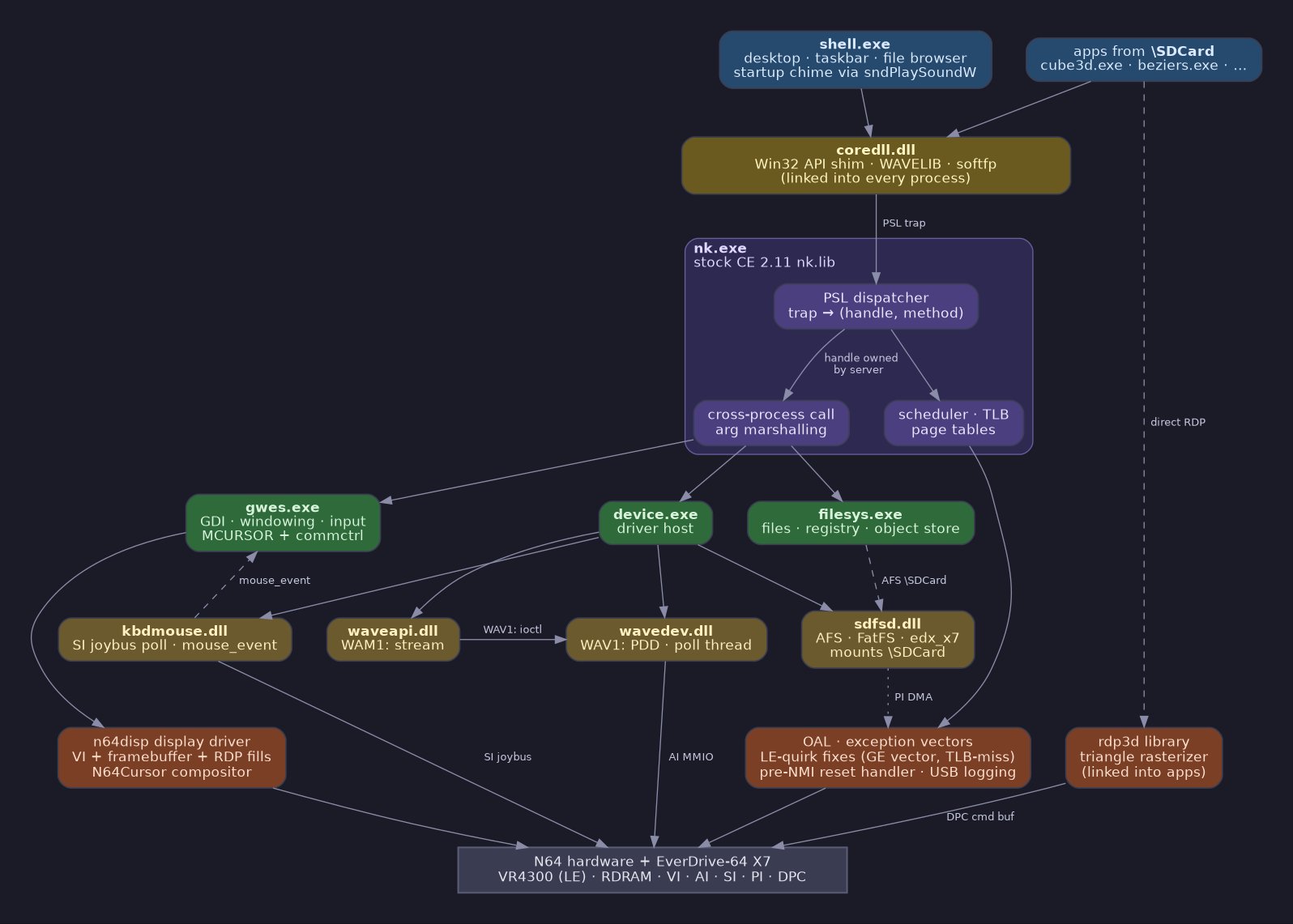
The repository ThroatyMumbo/WinCE64 demonstrates that the stock Microsoft Windows CE 2.11 kernel can run on a Nintendo 64 (VR4300) when paired with an EverDrive‑64 X7 cartridge. By writing a bespoke HAL, OAL and a handful of device drivers, the author has turned the console into a tiny Windows workstation that boots a GWES desktop, mounts an SD card, treats the N64 controller as a mouse, and plays sound through the console’s AI hardware.
The problem being tackled
Windows CE was designed for embedded MIPS devices, but never for a home‑console architecture. The N64’s VR4300 is a MIPS III core, yet the console lacks the standard peripherals (UART, proper interrupt controller, etc.) that CE expects. Without a matching HAL and driver stack, the kernel would crash during early boot or be unable to display anything.
The project therefore asks two questions:
- Can an unmodified CE 2.11 kernel be loaded onto the N64’s VR4300?
- If it boots, can the console’s limited hardware be exposed through the CE API so that ordinary CE applications run?
The answer is yes, but only after a series of low‑level fixes:
- Work‑arounds for the N64’s little‑endian RDRAM quirks.
- A custom display driver that uses the VI framebuffer and the RDP for accelerated fills.
- A keyboard/mouse PDD that polls the Joy‑Bus and translates button presses into cursor clicks.
- A FatFS‑based file system driver that talks to the EverDrive‑64 X7’s SD interface.
- An AI audio driver that works in polling mode because the console’s interrupt line stalls the SysAD bus.
Funding, traction and community impact
This is a pure hobby effort; there is no venture backing or formal funding. The author’s motivation is personal curiosity, inspired by the IBM WorkPad Z50, which used a similar MIPS core. Nevertheless, the project has attracted attention from the retro‑gaming and low‑level development communities:
- A YouTube showcase (https://www.youtube.com/watch?v=eGS9su_inBY) has gathered several thousand views, sparking discussion on forums such as r/RetroPie and N64‑Dev.
- The repository has accumulated ≈150 stars on GitHub, indicating a modest but active interest.
- Several hobbyists have reported successful builds on their own hardware, confirming that the build script (
bsp/build.sh) works reliably on modern Linux machines with Wine.
Because the project does not redistribute any Microsoft‑licensed binaries, it cannot be packaged as a ready‑to‑flash ROM. Users must locate a legacy Windows CE 2.11 Platform Builder SDK (circa 2002) and the libdragon toolchain, then follow the documented steps to produce n64ce.z64 (≈3.5 MiB). The build process itself takes about 30 seconds on a current desktop, the longest delay being the cold start of Wine.
Technical highlights
1. Custom HAL / OAL
- Sets up exception vectors, timer interrupts, and the minimal boot sequence required by
nk.lib. - Includes two work‑arounds for the N64’s LE‑mode RDRAM partial‑word quirk, a subtle bug that would otherwise corrupt memory accesses.
2. Display driver
- Writes directly to the VI framebuffer.
- Uses the RDP (Reality Display Processor) to accelerate rectangle fills, which the CE graphics stack calls via
GPE. - Implements a software cursor compositor because the console lacks a hardware overlay plane.
3. Input driver
- Polls the Joy‑Bus each frame, decoding both the standard controller and the official N64 mouse.
- Maps A to left‑click and B to right‑click, providing a functional pointer for the GWES desktop.
4. SD card file system
- Integrates FatFS with a custom driver (
edx_x7.c) that talks to the EverDrive‑64 X7 via PI‑DMA. - Registers the mount point as
\SDCard, making it visible to the standard CE file‑browser.
5. Audio driver
- Implements a polling‑mode AI driver that sits beneath the stock
waveapi.dll. - Avoids using the AI interrupt line, which would lock the SysAD bus on real hardware.
6. RDP‑accelerated 3D demo
- A minimal triangle rasteriser (
bsp/lib/rdp3d/) lets user‑mode EXEs likecube3d.exedraw flat‑shaded geometry directly through the RDP. - Demonstrates that CE’s GDI calls can be mapped to the console’s hardware without a full OpenGL‑style stack.
How to get started (brief guide)
- Obtain the required SDKs – a legacy Windows CE 2.11 Platform Builder and the libdragon N64 toolchain.
- Clone the repository and place the SDK and libdragon directories next to it.
- Run
bash bsp/build.sh– this compiles the HAL, drivers, and builds the ROM image under Wine. - Use the provided USB uploader (
diag/ed64_upload) to writebootloader/n64ce.z64to an EverDrive‑64 X7 cartridge. - Insert the cartridge into a real N64, power up, and you should see the familiar Windows 9x‑style desktop.
Why this matters for the broader maker scene
- It proves that legacy embedded operating systems can be resurrected on unconventional hardware with enough low‑level tinkering.
- The project supplies a concrete example of how to build a complete driver stack (HAL, display, input, storage, audio) for a platform that was never intended to run Windows.
- By keeping the source MIT‑licensed and documenting every quirk, the author creates a reusable template for future ports – perhaps to other MIPS‑based consoles or hobbyist boards.
Outlook
The author has no plans to maintain an emulator path; real hardware remains the primary testbed. Future work could include:
- Adding network support via a USB‑to‑Ethernet adapter.
- Porting more CE 2.11 applications (e.g., simple Office tools) to showcase productivity use cases.
- Improving the RDP 3D library to support textured triangles, opening the door to lightweight games that run inside the Windows environment.
For now, the project stands as a testament to what a determined reverse‑engineer can achieve when curiosity outweighs commercial incentive.
Comments
Please log in or register to join the discussion