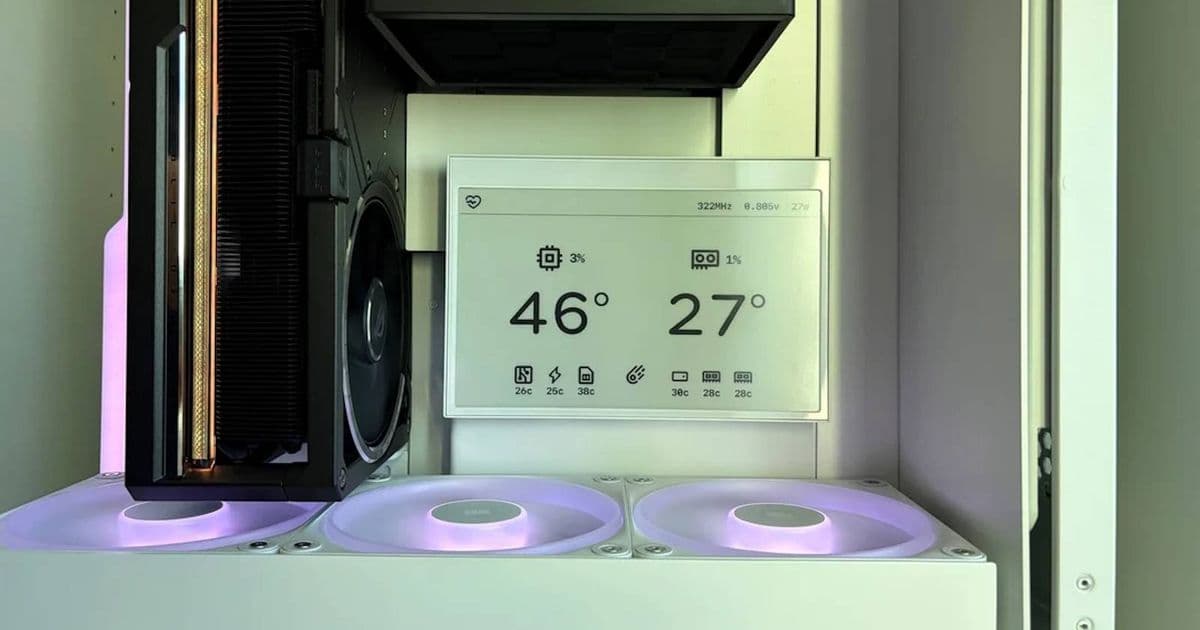
A PC enthusiast integrated a ReTerminal e-ink display into their build to create a power-efficient system monitor that updates every 5 seconds, providing real-time stats while maintaining aesthetic appeal when the PC is off.
The world of PC building continues to evolve with innovative components and creative integration methods. Recently, a Reddit user showcased a particularly impressive build featuring an e-ink display as a system monitor, combining functionality with aesthetic appeal in a way I haven't seen before.
The Build: Engine Block with ReTerminal Integration
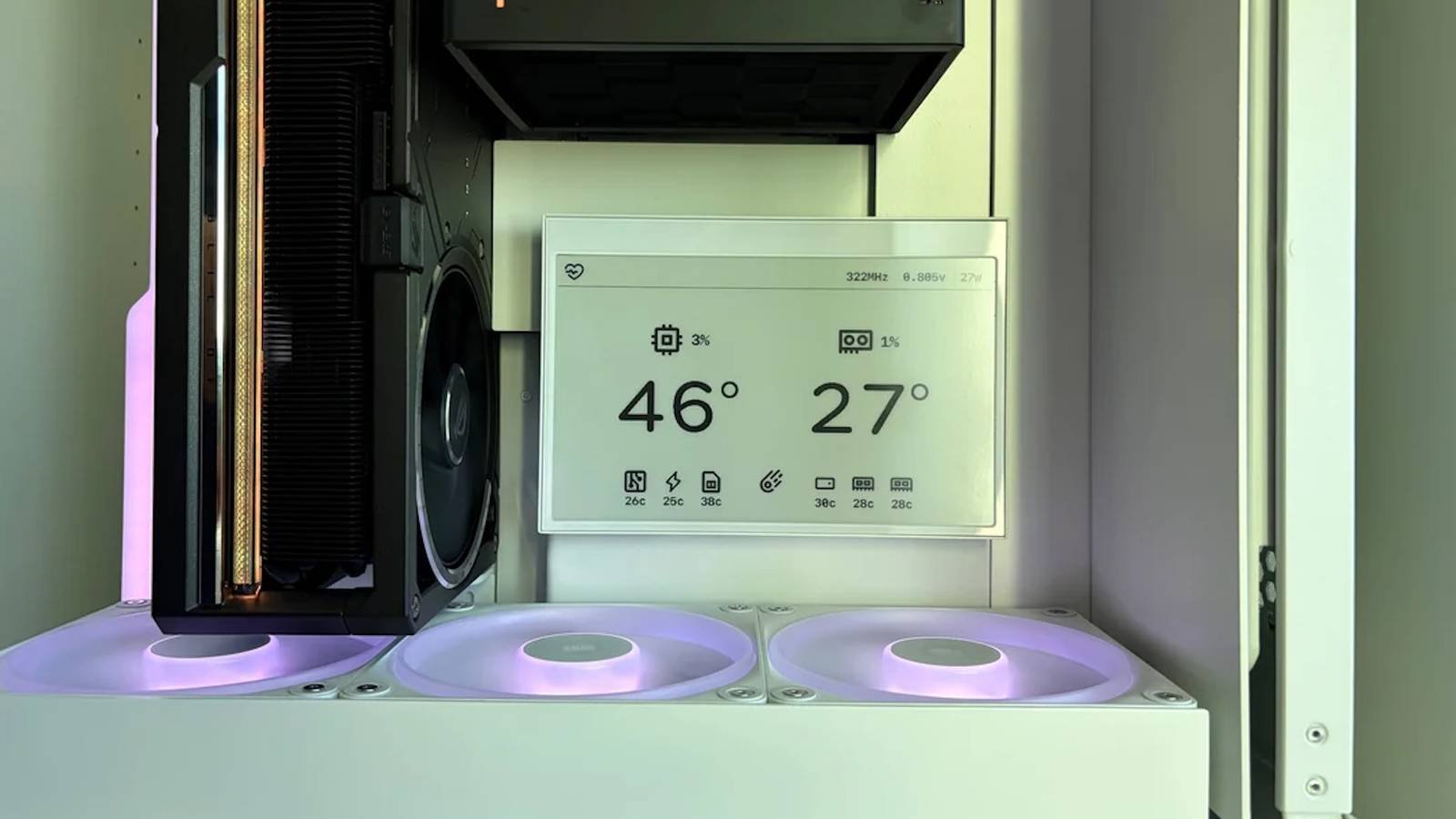
Over on the PC Master Race subreddit, user InvaderJ presented their latest project, a PC build featuring an Xhuttle case and a 5090 GPU with a vertical orientation. The design philosophy centered on creating a living-room PC that remains visually appealing even when powered off. The standout feature, however, is the ReTerminal e-ink display integrated into the system.
"I wanted a dynamic system monitor but refused to use an LCD because when it's off, it's black, and I already had two large black elements. A third would have thrown off the balance!" InvaderJ explained. "So I grabbed a ReTerminal e-ink display and built a custom stats system that uses partial screen refresh to update temps, usage, and clocks every 5 seconds."
Technical Implementation
The ReTerminal e-ink display, manufactured by Seeed Studio, serves as more than just a decorative element. It actively monitors system statistics and updates every 5 seconds using partial screen refresh technology. This approach significantly reduces power consumption compared to traditional LCD displays while maintaining readability.
For developers interested in similar projects, the ReTerminal runs on a Raspberry Pi-compatible platform with various I/O options. The display uses a 7.5-inch e-ink panel with 800×480 resolution, partial refresh capability, and a matte white finish that blends seamlessly with the PC case when inactive.
The implementation likely involves:
- Custom software to read system metrics
- Scripts to format and display the information
- Partial refresh commands to minimize flicker and power usage
- Integration with the PC's monitoring APIs
Benefits of E-Ink for System Monitoring
The choice of e-ink technology offers several advantages over traditional LCD or OLED displays:
Power Efficiency: E-ink displays only consume power when changing the display content, making them ideal for always-on status monitors.
Zero Glare: The matte finish provides excellent readability in various lighting conditions without reflections.
Aesthetic Consistency: When inactive, the display appears as a simple white panel, maintaining the case's design integrity.
Eye Comfort: Unlike backlit displays, e-ink doesn't emit blue light, reducing eye strain during extended viewing.
Cross-Platform Development Considerations
For developers looking to implement similar solutions, cross-platform compatibility becomes essential. The ReTerminal supports multiple operating systems, including:
- Linux: Native support with various libraries available for e-ink control
- Windows: Requires drivers and potentially custom implementations
- Android: Possible integration via USB or serial connection
The official Seeed Studio documentation provides detailed setup instructions and code examples for different platforms. For those interested in the software side, GitHub repositories like eink-weather-display offer inspiration for custom implementations.
Developer Impact
This project demonstrates how e-ink technology can be repurposed beyond e-readers and digital signage. For mobile developers familiar with cross-platform frameworks like React Native or Flutter, creating custom monitoring applications becomes feasible.
The partial refresh capability is particularly noteworthy. Unlike full e-ink refreshes which cause noticeable flicker, partial updates allow for smooth data updates while maintaining the power efficiency benefits. This technology could inspire similar implementations in:
- Home server monitoring
- Network status displays
- Development environment dashboards
- IoT device status panels
Implementation Challenges
While the concept is appealing, several technical challenges must be addressed:
Refresh Rate Limitations: E-ink displays cannot update as quickly as LCD screens, making them unsuitable for applications requiring real-time feedback.
Development Complexity: Creating custom monitoring software requires knowledge of system APIs and display control protocols.
Physical Integration: Ensuring the display fits aesthetically within the case requires careful planning and potentially custom mounting solutions.
Cost Considerations: ReTerminal displays cost significantly more than basic LCD modules, affecting the overall budget of the project.
Alternative Implementations
For those inspired by this project but with different requirements, several alternatives exist:
Smaller E-Ink Panels: Smaller displays like the Waveshare 2.13-inch e-ink HAT can be used for simpler status indicators.
Custom PCB Solutions: Advanced users might design custom PCBs with integrated e-ink controllers.
Mobile Apps with Companion Displays: Using a smartphone app connected to a small e-ink display via Bluetooth or Wi-Fi.
The Future of E-Ink in PC Building
This project represents an interesting intersection of traditional PC building and emerging display technologies. As e-ink technology continues to evolve, we can expect:
- Higher refresh rates with partial update capabilities
- Better color e-ink options for more informative displays
- Lower manufacturing costs increasing accessibility
- More standardized interfaces for easier integration
For mobile developers familiar with cross-platform frameworks, creating custom monitoring applications for e-ink displays presents an interesting opportunity to apply their skills in a novel domain. The principles of efficient data presentation and power optimization translate well from mobile development to this new application.
Getting Started with Your Own E-Ink Display Project
For developers interested in creating similar projects, here are some starting points:
Hardware Selection: Choose an e-ink display with appropriate size and connectivity options for your use case.
Software Setup: Install necessary drivers and libraries for your chosen platform.
Data Collection: Implement scripts to gather the system metrics you want to display.
Display Control: Learn the commands for partial and full refreshes to optimize performance.
UI Design: Create a simple, readable interface that presents information clearly.
The Seeed Studio Wiki provides comprehensive documentation for their e-ink displays, while GitHub offers numerous open-source projects that can serve as inspiration or starting points for custom implementations.
As PC building continues to evolve, we'll likely see more creative applications of display technology that balance functionality with aesthetic appeal. The e-ink system monitor represents an excellent example of how thoughtful component selection can enhance both the form and function of a custom PC build.
Comments
Please log in or register to join the discussion