Microsoft's latest SQL Server Management Studio release pushes GitHub Copilot from a question-answering assistant into an agent that acts on your databases, and it pairs that shift with a permission model built specifically to keep AI-issued queries inside boundaries you define. For teams running SQL Server across on-premises, Azure SQL, and Managed Instance, the governance story here matters as much as the features.
Microsoft shipped SQL Server Management Studio (SSMS) 22.7.0 on June 9, 2026, and it is a denser release than the usual point update. The visible additions are a new in-product What's New page, T-SQL formatting in preview, graphical schema compare in preview, and GitHub Copilot Agent mode in preview. The quieter addition, a configurable execution context for Copilot, is the one that will shape how regulated teams actually adopt AI tooling against production data.
What changed
The center of gravity in this release is GitHub Copilot. Until now, Copilot inside SSMS operated in Ask mode: you asked a question, it returned an answer or a suggested query, and you decided what to do with it. Agent mode changes the contract. It takes a multi-step task, plans the steps, and executes them with your approval at each tool call. Microsoft frames the distinction plainly. Ask mode helps with quick answers, Agent mode helps you solve problems. The practical difference is that Agent mode can run diagnostic queries, read results, and decide what to look at next, rather than handing you a single statement and stopping.
You find it in the mode picker at the bottom left of the chat window. Tools and skills sit at the bottom right, and the plus icon lets you attach a specific skill, surfaced under MCP resources, as context for the conversation. One operational detail worth internalizing early: Agent mode does not inherit connection context from Object Explorer or the active editor. You name the database and server in the prompt, for example asking why the WideWorldImporters database on the SQL 2025 instance is running slow. That decoupling is deliberate, and it has consequences for how you script and standardize prompts across a team.
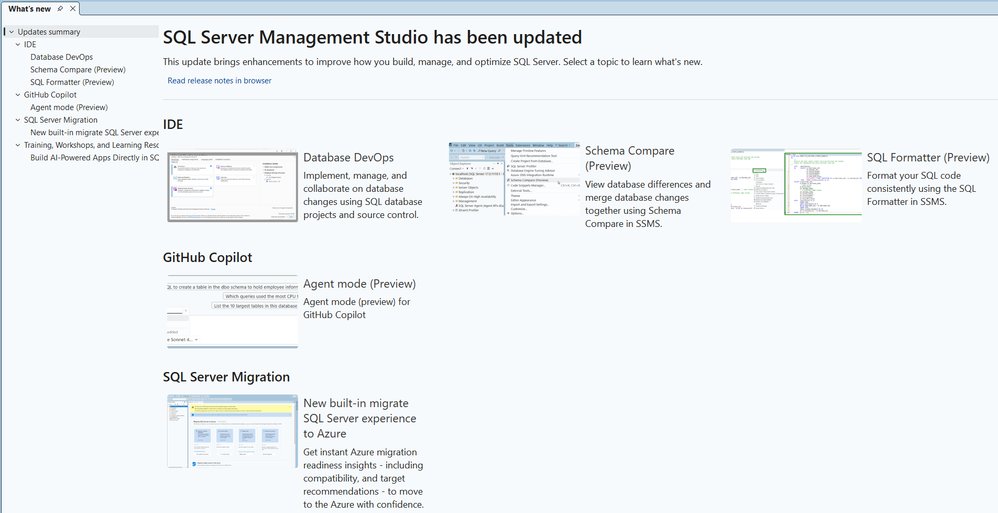
Two safeguards ship with Agent mode by default. Every query it wants to run passes through a tool approval step, so nothing executes against your database without an explicit review and accept. And the agent operates as READ_ONLY out of the box, which keeps the early experimentation phase to investigation, analysis, and assessment rather than mutation. Microsoft is steering people toward using it for diagnostics first and expanding from there through custom skills. The documentation and a companion YouTube playlist cover concrete scenarios.
The execution context is the real governance lever
The feature that deserves the most attention from anyone responsible for data access policy is the new Copilot execution context. Microsoft itself says this has been requested in nearly every feedback session, and it is the answer to the obvious question that Agent mode raises: when an AI agent runs a query, whose permissions does it run under?
The configuration is per database. You define it through a CONSTITUTION.md file stored as an extended property on the database. In the frontmatter of that Markdown file, the metadata block at the top, you specify a database user or SQL login as the agentExecuteAsUser. When Copilot connects, it reads the CONSTITUTION.md, sees the specified principal, and executes all queries under that identity. The setting applies to both Ask and Agent mode.
This is a meaningful design choice. Instead of Copilot inheriting the broad permissions of the connected DBA, you can pin its activity to a constrained, purpose-built principal with exactly the surface area you are willing to expose to automated querying. For organizations operating under SOC 2, HIPAA, or internal least-privilege mandates, this turns Copilot from a policy headache into something you can actually reason about in an audit. Microsoft has signaled a dedicated follow-up blog post with deeper detail, but the architecture is already clear enough to plan around.
Provider comparison: where SSMS sits in the tooling field
It is worth situating these changes against the broader database tooling options, because SSMS is no longer the only credible way to manage SQL Server, and the AI features sharpen the comparison.
Azure Data Studio, Microsoft's cross-platform alternative, has been the modern, VS Code-derived client that runs on macOS and Linux. SSMS remains Windows-only and remains the deeper, more administrative tool, and with Agent mode plus the execution context, SSMS now carries Copilot capabilities that go beyond what the lighter client offers for hands-on database operations. Teams that standardized on Azure Data Studio for portability will want to weigh whether the agentic diagnostics in SSMS justify keeping a Windows management surface in the mix.
On the formatting side, the new T-SQL formatter is built directly into the core SSMS experience with no extra workload to install. It is built on ScriptDOM, the open-source .NET library Microsoft maintains for T-SQL parsing. That matters competitively. Third-party add-ins like Redgate SQL Prompt and ApexSQL Refactor have owned SQL formatting and refactoring inside SSMS for years, often as paid products. A native formatter built on the same parser Microsoft uses internally narrows the gap for teams whose needs are formatting rather than the full refactoring suite. You reach it by right-clicking any query editor window and choosing Format SQL.

The formatter exposes a real set of controls rather than a single opinionated style. You configure keyword casing as uppercase, lowercase, or PascalCase, set indentation size, decide on trailing semicolons, and control how FROM, WHERE, and JOIN clauses break across lines. Alignment options line up clause bodies, column definitions, and SET clause items. Multi-line list options decide whether SELECT columns, WHERE predicates, and INSERT values each take their own line. Because it sits on ScriptDOM, the GitHub issues and pull requests are open channels for shaping where it goes, and Microsoft is explicitly soliciting feedback on formatting behaviors people want added.
Database DevOps keeps maturing
Earlier in the cycle Microsoft brought SQL projects into SSMS through the Database DevOps workload. This release extends that with graphical schema compare in preview and SQLCMD variable support in the publish dialog. Schema compare is a long-standing expectation for anyone doing state-based database deployment, and having a graphical version inside SSMS rather than only in Visual Studio or SQL Server Data Tools reduces the tool-switching tax for DBAs who live in SSMS. SQLCMD variables in the publish dialog address the practical reality of parameterizing deployments across environments, where connection strings and environment-specific values cannot be hardcoded into the project.
This is the part of SSMS that quietly competes with the migration-and-deployment workflows teams otherwise assemble from Flyway, Liquibase, or Redgate's deployment tooling. Microsoft is not trying to replace those CI/CD pipelines wholesale, but bringing project-based schema management and comparison into the daily client lowers the barrier for teams that have not yet formalized database change control.
Smaller fixes that remove real friction
The release notes carry the full list, but a few fixes target workflows that have annoyed people for a while. Azure SQL Managed Instance now supports creating a new login from a Windows domain account directly in SSMS, removing a step that previously meant dropping into scripts. The command-line handling was corrected so that passing both -S and -d alongside a filename no longer pops the Connect to Server dialog anyway. Activity Monitor invoked with Ctrl+Alt+A no longer opens the legacy connection dialog when no Object Explorer connection is active. Object Explorer stopped warning about unsaved name changes when you press F2 on a schema-qualified object and click away without actually renaming it. And the Save Results As dialog no longer misfiles the All files filter as *.txt.
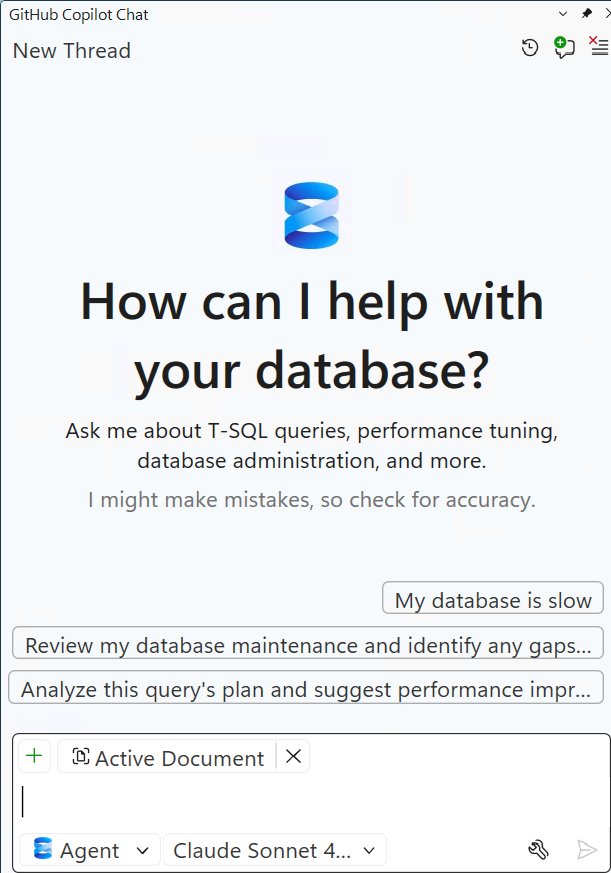
The new What's New page rounds out the visible changes. It appears the first time you open SSMS after updating, summarizes the top features and fixes, and then stays out of the way until the next update. You can always bring it back through Help > What's New.
Business impact
For decision-makers, the strategic read is straightforward. The AI features are genuinely useful, but the adoption question for any team handling sensitive data was never whether Copilot could write a good query. It was whether you could bound what an AI agent is allowed to touch. The CONSTITUTION.md execution context is the answer that makes a controlled rollout defensible: stand up a constrained principal, pin Copilot to it, keep Agent mode in its default READ_ONLY posture, and let your DBAs evaluate the agentic diagnostics against non-production environments before widening scope.
The formatting and schema compare additions reduce dependence on third-party add-ins for teams whose requirements they cover, which is a budget conversation worth having at renewal time even if the native tools do not yet match every feature of the paid alternatives. None of this forces a migration off your existing tooling, and all of these features ship as preview, so the right posture is evaluation rather than wholesale adoption. Pull 22.7.0 into a test environment, validate the Copilot execution context against your access policies, and decide from there. The release notes and the SQL Server blog carry the details Microsoft promised to expand on in follow-up posts.
Comments
Please log in or register to join the discussion