
WhatsApp’s upcoming contacts hub lets iPhone users see who’s online and who was recently active from a single screen, respecting existing privacy rules. The feature is hidden in Settings for now and may influence how cross‑platform chat apps handle presence information.
WhatsApp Tests Centralized Online‑Status Hub in iOS Beta
The latest iOS beta of WhatsApp includes a hidden Contacts hub that aggregates online‑status information. Instead of opening each chat to check whether a contact is online, users will soon be able to view a list that groups favorite contacts, currently online users, and recently active friends.
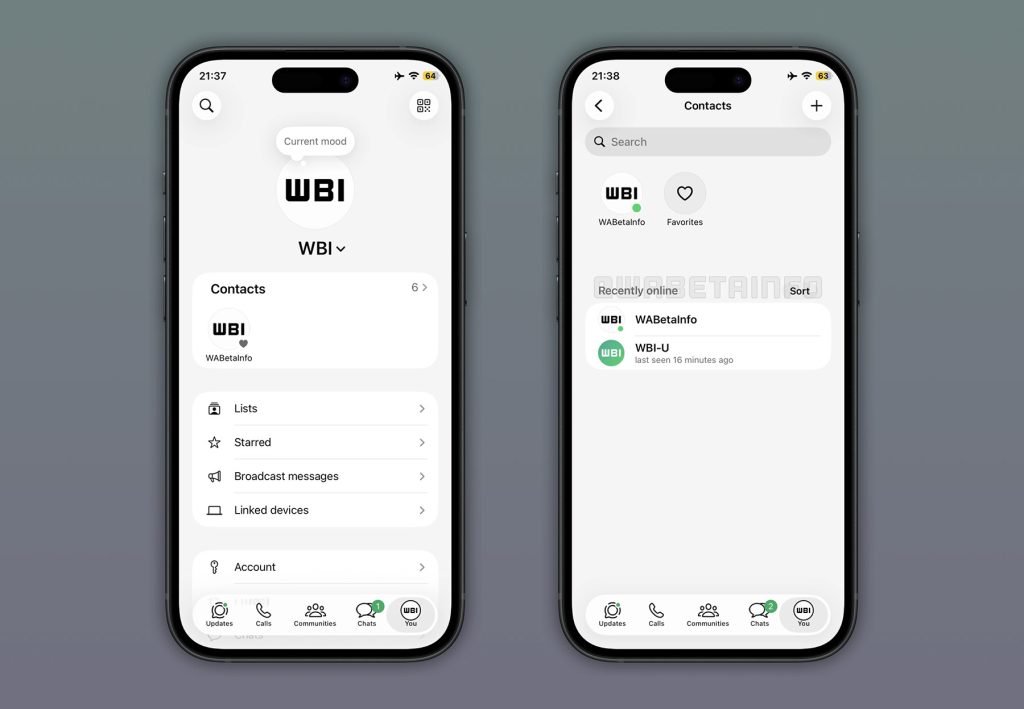
What the new hub does
- Favorites first – contacts you pin to the top of your list appear above everything else.
- Live online section – any contact whose status is set to visible and who is currently using WhatsApp shows up here.
- Recent activity – contacts who were online within the last few minutes appear below the live section, giving a quick sense of who might be reachable.
The hub lives under Settings → Contacts and follows the same privacy model that WhatsApp already uses: you only see a contact’s online presence if you have made your own status visible. This mirrors the existing last seen rule and prevents accidental leakage of presence data.
Why it matters for developers
iOS SDK considerations
The feature is built with the iOS 17 SDK, leveraging the new SwiftUI List component for dynamic sections. Because the hub pulls real‑time presence data, it uses Combine to subscribe to the PresenceService publisher, which pushes updates as they arrive from the server. Developers who maintain chat‑related extensions should note the following:
- Background fetch – the hub requires periodic background network calls. Make sure your app’s
BGTaskSchedulerregistration includes acom.whatsapp.presenceRefreshidentifier, otherwise iOS may throttle updates. - Privacy keys – the new UI respects the
NSLocationWhenInUseUsageDescription‑style keyNSOnlineStatusUsageDescription. Add this to yourInfo.plistif you expose a similar presence view in your own app. - Widget support – Apple’s iOS 17 widgets can now read the same presence feed. If you build a companion widget, use the
WidgetKittimeline provider to fetch thePresenceSnapshotobject.
Cross‑platform implications
WhatsApp’s move hints at a broader trend: real‑time presence is becoming a first‑class UI element rather than an after‑thought. For Flutter, React Native, or Kotlin Multiplatform projects, consider the following:
- Unified API layer – expose a single
PresenceServicethat abstracts platform‑specific push mechanisms (APNs on iOS, FCM on Android). - State management – tools like Riverpod, Redux Toolkit, or SwiftUI’s
@StateObjectcan keep the UI in sync without manual polling. - Privacy parity – Android already mirrors iOS’s rule that you can only see a contact’s status if you share yours. Ensure your cross‑platform code checks the
visibilityflag before displaying any presence data.
Migration path for existing WhatsApp users
- Enable online status – open Settings → Account → Privacy → Show Online Status and toggle it on. Without this, the hub will show no data.
- Add favorites – long‑press a chat, select Add to Favorites, and the contact will appear at the top of the hub.
- Refresh – pull down on the hub screen to force a sync. The UI will display a spinner while the server returns the latest presence payload.
- Opt‑out – if you prefer the classic per‑chat check, you can hide the hub by toggling Show Contacts Hub off in the same Settings page.
Looking ahead
WhatsApp has not announced a public rollout date, and the feature is still hidden behind a feature flag. Historically, the company rolls out UI changes over several months, first to a small group of beta testers, then to the broader user base. Developers building third‑party messaging extensions should keep an eye on the WhatsApp Business API changelog for any new webhook events related to presence.
For a deep dive into the beta findings, see the full report on WABetaInfo.
If you maintain a cross‑platform chat app, now is a good time to prototype a similar hub. The UI patterns are straightforward, and the underlying presence model aligns with the privacy expectations users have come to expect from WhatsApp.
Comments
Please log in or register to join the discussion