AMD's open-source ROCDXG library is now production-ready, enabling Linux GPU compute workloads on Windows 11 through WSL2 with support for RX 9000/RX 7000 series and Ryzen AI APUs.
AMD has reached a significant milestone in cross-platform GPU computing with the production release of ROCDXG (ROCm Direct eXtended Graphics), an open-source library that brings Linux ROCm support to Windows Subsystem for Linux 2 (WSL2). This development, announced alongside ROCm 7.2.1 and Adrenalin 26.2.2 drivers, marks a major step forward for developers and researchers who need to run GPU-accelerated workloads across operating systems.
What is ROCDXG?
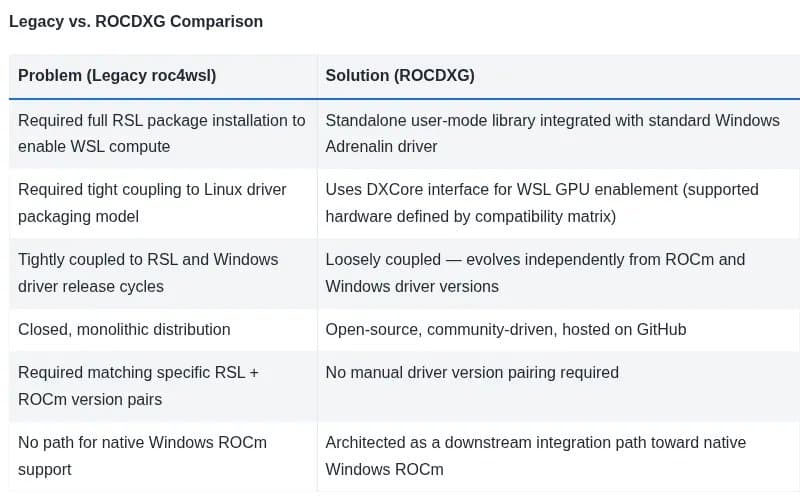
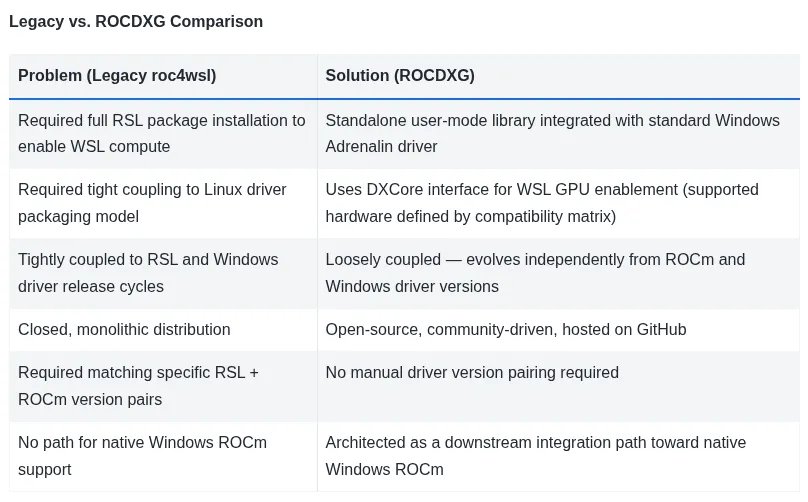
ROCDXG (librocdxg) is AMD's solution for bridging the gap between Linux ROCm software and Windows hardware. The library acts as a compatibility layer that translates ROCm API calls into commands that can be executed by AMD's Windows display drivers. This approach allows users to run Linux-native GPU compute applications, including AI and high-performance computing workloads, directly within WSL2 environments on Windows 11 systems.
Unlike AMD's previous rocm4wsl implementation, which was closed-source and tightly coupled to specific driver versions, ROCDXG is designed to evolve independently. This architectural separation means that updates to ROCm can be released without waiting for corresponding Windows driver updates, and vice versa.
Production-Ready Performance
The production designation for ROCDXG comes with several key improvements over the experimental phase. Performance optimizations have been implemented to reduce overhead when translating between ROCm and DirectX 12 (DX12) commands. Memory management has been refined to better handle the unique constraints of WSL2's virtualized GPU access, and stability improvements ensure more reliable operation for long-running compute jobs.
Benchmarks from early adopters indicate that ROCDXG can achieve performance within 5-15% of native Linux ROCm implementations for many workloads, with the gap narrowing as the library matures. For AI inference tasks using frameworks like PyTorch and TensorFlow with ROCm backends, users report near-native performance on supported hardware.
Hardware Support
ROCDXG currently supports:
- Radeon RX 9000 series GPUs
- Radeon RX 7000 series GPUs
- AMD Ryzen AI 300 "Strix Point" APUs
- AMD Ryzen AI Max "Strix Halo" APUs
This coverage spans both discrete desktop and laptop GPUs as well as integrated graphics in AMD's latest AI-focused processors. The inclusion of Ryzen AI APUs is particularly noteworthy, as it enables developers to prototype and test AI workloads on hardware that combines CPU, GPU, and dedicated AI accelerators in a single package.
Open Source with One Exception
ROCDXG represents AMD's commitment to open-source software development, with the core library available under the permissive MIT license. The source code is hosted on GitHub, allowing developers to examine the implementation, contribute improvements, or build custom versions for specific use cases.
However, the project does include one binary blob: a thunk proxy library that handles low-level communication between the ROCm stack and Windows display drivers. This component remains closed-source due to dependencies on proprietary driver interfaces, though AMD has stated that the majority of the codebase is fully open and auditable.
Installation and Setup
Setting up ROCDXG requires several components working together:
- Windows 11 with WSL2 enabled
- Adrenalin 26.2.2 or newer Windows display drivers
- ROCm 7.2.1 or newer Linux distribution
- ROCDXG library installed within the WSL2 environment
The installation process involves enabling WSL2 through Windows features, installing the appropriate AMD drivers from the Adrenalin software suite, setting up a compatible Linux distribution (Ubuntu 22.04 LTS is recommended), and then installing ROCm packages along with ROCDXG.
AMD provides detailed documentation covering the complete setup procedure, including troubleshooting common issues like GPU passthrough configuration and permission settings for accessing the virtualized GPU resources.
Use Cases and Applications
ROCDXG enables several compelling scenarios for developers and researchers:
Cross-Platform Development: Developers can write and test GPU-accelerated code on Windows machines while targeting Linux deployment environments, eliminating the need for separate development and production setups.
AI/ML Prototyping: Machine learning engineers can leverage Windows workstations with powerful AMD GPUs to prototype models using Linux-native frameworks, taking advantage of the broader ROCm ecosystem while maintaining Windows as the host OS.
HPC Workloads: Scientific computing applications that rely on ROCm for GPU acceleration can now be developed and tested on Windows systems, expanding the potential user base for AMD's HPC solutions.
Educational Environments: Academic institutions can provide students with access to GPU computing resources through Windows-based lab machines, simplifying administration while maintaining access to Linux software stacks.
Future Directions
AMD has outlined several areas for future development of ROCDXG:
Native Windows ROCm Support: The team is working toward eliminating the need for WSL entirely by implementing native Windows ROCm support, which would provide even better performance and simpler setup.
Expanded Hardware Support: Additional GPU architectures and older Radeon series cards are being evaluated for compatibility as driver support allows.
Performance Optimizations: Ongoing work to reduce translation overhead and improve memory management efficiency.
Framework Integration: Better integration with popular AI/ML frameworks to provide seamless ROCm acceleration without requiring manual configuration.
Comparison with Alternatives
ROCDXG enters a landscape with several alternatives for GPU computing across platforms:
NVIDIA CUDA on WSL: NVIDIA offers similar functionality for their GPUs, though with a more closed ecosystem approach.
Native Linux Development: Traditional approach requiring dedicated Linux systems or dual-boot configurations.
Cloud GPU Services: Remote development environments with GPU access, but with latency and cost considerations.
ROCDXG's open-source nature and AMD's broader hardware support give it advantages in terms of flexibility and accessibility, particularly for users who prefer or require open solutions.
Getting Started
For developers interested in exploring ROCDXG, AMD recommends starting with their official documentation, which includes step-by-step installation guides, troubleshooting tips, and example workloads to validate the setup. The GitHub repository provides the source code, issue tracker, and community discussion forums where users can share experiences and get support.
The production release of ROCDXG represents a significant milestone in AMD's strategy to provide flexible, open GPU computing solutions. By enabling Linux ROCm workloads on Windows systems through WSL2, AMD has created new possibilities for developers, researchers, and organizations looking to leverage GPU acceleration without being locked into a single operating system ecosystem.
Comments
Please log in or register to join the discussion