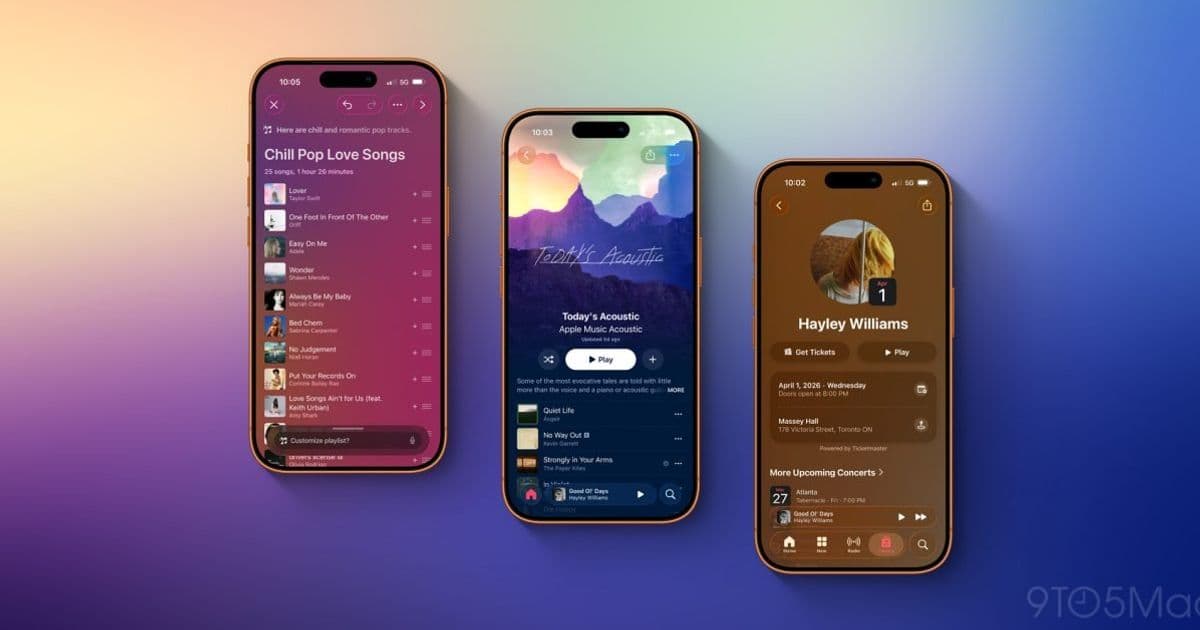
iOS 26.4 brings five significant updates to Apple Music, including AI-powered playlist creation, redesigned album art, new widgets, multi-playlist additions, and concert information integration.
iOS 26.4 is rolling out with a host of new features across the iPhone ecosystem, and Apple Music users have plenty to be excited about. The latest update brings five significant enhancements to the Music app, ranging from AI-powered playlist creation to redesigned album artwork and new concert information integration.
AI-Powered Playlist Creation with Playlist Playground
One of the most notable additions in iOS 26.4 is the Playlist Playground feature, which leverages Apple Intelligence to help users create custom playlists with minimal effort. When creating a new playlist in the Music app, users will now see an option to enter a prompt that Apple's AI can use to automatically generate a playlist.
[IMAGE:3]
The feature works by allowing users to type in descriptive prompts like "upbeat workout songs" or "relaxing evening jazz," and the AI will curate a selection of tracks that match the description. To help users get started, the Music app provides suggested prompts that demonstrate the feature's capabilities.
What makes Playlist Playground particularly useful is its flexibility. Users can always manually add or remove songs after the AI generates the initial selection, and they can make follow-up requests to refine the playlist further. This creates a collaborative experience between the user and the AI, where the technology provides a starting point that can be customized to individual tastes.
Redesigned Album and Playlist Artwork
Apple has completely reimagined how albums and playlists are displayed in iOS 26.4. The new design takes a fullscreen approach where the artwork for an album or playlist now styles the entire background of the track list and other UI elements.
[IMAGE:4]
This means that if an album has a prominent blue color in its artwork, a similar shade of blue will likely fill the whole screen. The design goes beyond simple color matching - Apple's implementation sometimes uses complementary colors to create visual interest. For instance, when album artwork features shades of white and gray, the background might shift to a black color scheme for contrast.
The result is a more immersive and visually cohesive experience when browsing through your music library. The artwork becomes more than just a small image - it transforms into a design element that influences the entire interface, creating a more engaging way to interact with your music collection.
Ambient Music Widget for Home Screen
Last year, Apple introduced Ambient Music as a feature within Control Center, allowing users to quickly start playing music for specific moods like Chill, Productivity, Sleep, and Wellbeing. In iOS 26.4, this feature gets expanded with a dedicated Home Screen widget.
[IMAGE:5]
The Ambient Music widget comes in both Small and Medium sizes, giving users flexibility in how they want to display it on their Home Screen. This addition makes it even more convenient to access mood-based music without diving into the full Music app.
The widget maintains the same four mood categories as the Control Center version, providing quick access to curated playlists designed for specific activities or emotional states. Whether you need to focus on work, relax before bed, or create a productive atmosphere, the Ambient Music widget puts these options just a tap away.
Multi-Playlist Song Addition
iOS 26.4 introduces a small but significant improvement to playlist management: the ability to add songs to multiple playlists simultaneously. When adding a song to a playlist, users will now see a new selection button in the bottom-right corner.
[IMAGE:2]
Tapping this button allows users to select multiple playlists at once, making it much easier to organize music across different collections. This feature addresses a common pain point for music enthusiasts who maintain multiple playlists with overlapping content.
For example, if you discover a new song that fits both your "Road Trip" and "Summer Vibes" playlists, you can now add it to both with a single action instead of going through the add-to-playlist process twice. It's a time-saving enhancement that streamlines playlist management and makes organizing your music library more efficient.
Concert Information Integration
Perhaps the most exciting addition for live music fans is the integration of concert information directly into the Music app. Artist profiles in iOS 26.4 will now highlight "Upcoming Concerts" when there's concert information available.
Users can scroll through the concert listings to see all upcoming shows for their favorite artists. Tapping on a specific concert provides a link to purchase tickets, along with essential details like venue information and start times.
This feature transforms the Music app from just a streaming platform into a comprehensive music discovery and event planning tool. It's particularly useful for discovering when artists you already listen to are performing in your area, potentially introducing you to live music experiences you might have otherwise missed.
Availability and Pricing
Apple Music continues to be available for $10.99 per month as a standalone service, or it can be bundled as part of the Apple One subscription package. The iOS 26.4 update, including all these Apple Music enhancements, is rolling out to compatible iPhone devices now.
These five new features demonstrate Apple's ongoing commitment to improving the Music app experience. From AI-powered playlist creation to concert discovery and visual design enhancements, iOS 26.4 makes Apple Music more powerful, personalized, and integrated into the broader music ecosystem than ever before.
Comments
Please log in or register to join the discussion