
Threat actors are exploiting Apple's own account security alerts to deliver phishing lures, bypassing traditional email filters by using legitimate Apple infrastructure.

Security researchers have identified a sophisticated callback phishing campaign that turns Apple's own security infrastructure against its users. Instead of spoofing an email address or using a look-alike domain, attackers are triggering legitimate account change notifications from Apple's servers to deliver fraudulent messages. This method ensures the emails pass SPF, DKIM, and DMARC authentication, making them nearly invisible to standard spam filters.
The Mechanics of the Attack
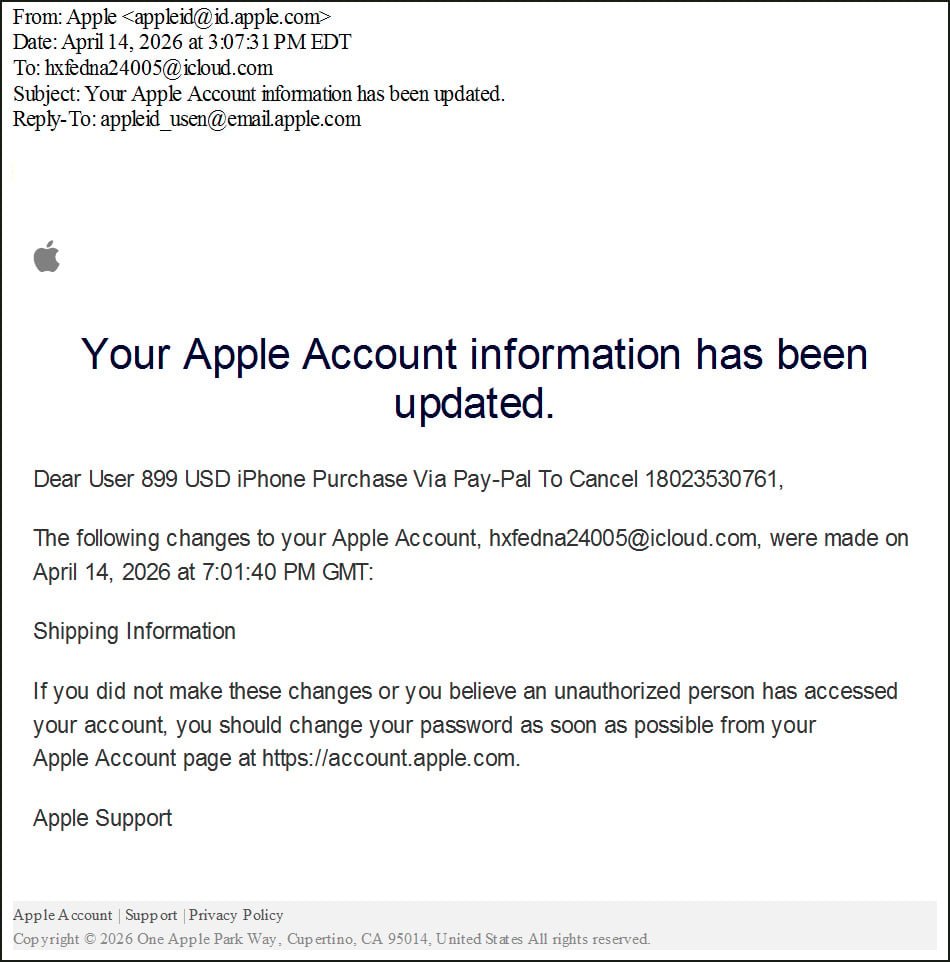
This technique relies on the way Apple handles user profile data and security alerts. The attacker does not hack into a user's account. Instead, they create a new Apple ID and populate the first and last name fields with a phishing lure. Because these fields have character limits, the attackers split their message across both fields to create a cohesive scam.
For example, an attacker might set the first name to "Dear User 899 USD iPhone Purchase" and the last name to "Via Pay-Pal To Cancel 18023530761."
Once the profile is set, the attacker modifies the shipping information on the account. This action triggers an automated security alert from Apple, which is sent to the associated email address. Because Apple's notification system includes the account holder's name in the body of the email, the phishing lure is embedded directly into a legitimate message sent from [email protected].
Why This Bypasses Security
Most email security gateways rely on authentication checks to determine if an email is legitimate. In this case, the email is not a forgery. It originates from Apple's own outbound relays, such as outbound.mr.icloud.com.
When a security tool checks the headers, it sees:
- SPF (Sender Policy Framework): Pass
- DKIM (DomainKeys Identified Mail): Pass
- DMARC (Domain-based Message Authentication, Reporting, and Conformance): Pass
Because the email is technically authentic, it reaches the inbox with a high trust score. The attackers then use mailing lists to route these legitimate notifications to targets who have no connection to the account, creating the illusion that the target's own account has been compromised.
The Callback Phishing Goal
Unlike traditional phishing that directs users to a fake login page to steal credentials, this is a callback scam. The goal is to induce panic. The lure claims a high-value purchase, such as an $899 iPhone, has been made. The victim is urged to call a provided phone number to cancel the transaction.
Once the victim calls, the scammers employ social engineering tactics. They often claim the user's device is infected or their identity has been stolen. This leads to two primary outcomes:
- Remote Access: Victims are told to install software like AnyDesk or TeamViewer, giving the attacker full control over the machine to steal banking credentials or deploy malware.
- Financial Fraud: Victims are convinced to transfer funds to a "safe account" or provide credit card details to "verify" their identity.
Expert Perspective and Practical Advice
This campaign mirrors previous abuses of the iCloud Calendar system, where attackers sent spam invites to users' calendars. It highlights a broader trend where threat actors exploit the "trusted path" of a service provider to deliver malicious content.
To protect yourself and your organization, follow these practical steps:
- Ignore Phone Numbers in Alerts: Legitimate security alerts from Apple, Google, or Microsoft will almost never ask you to call a random phone number to cancel a transaction. Always use official support channels found on the company's verified website.
- Verify via Official Apps: If you receive an alert about a purchase, do not click links or call numbers in the email. Open the App Store or your banking app directly to check for unauthorized transactions.
- Audit Account Recovery: Ensure your Apple ID is protected with two-factor authentication (2FA) and that your recovery information is up to date.
- Train Employees on Callback Scams: Security awareness training should evolve beyond "don't click the link." Users must understand that a "verified" sender does not always mean the content of the message is safe.
By manipulating the data fields that a system treats as "trusted," attackers can turn a security feature into a delivery mechanism for fraud. Vigilance regarding the action requested in an email is now more important than trusting the sender of the email.
Comments
Please log in or register to join the discussion