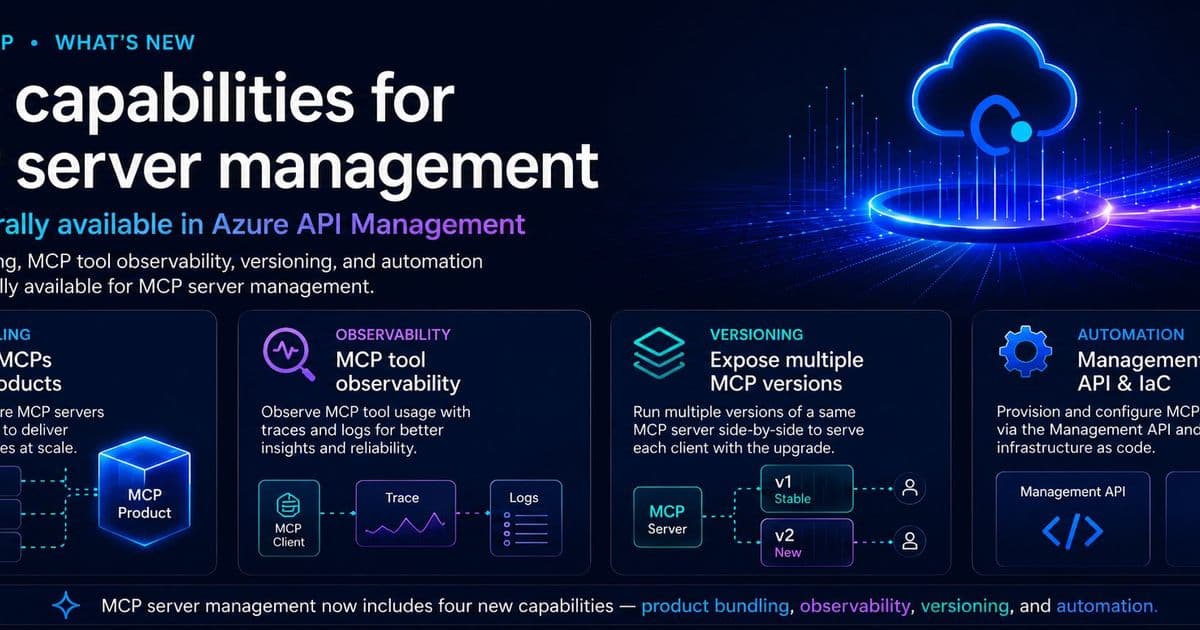
Microsoft has made four MCP server management capabilities generally available in Azure API Management, bringing products, observability, versioning, and Infrastructure as Code to the integration layer that agents use to reach enterprise tools. For organizations standardizing on the Model Context Protocol, this moves MCP from experimental endpoints to managed assets that look and behave like the rest of the API estate.
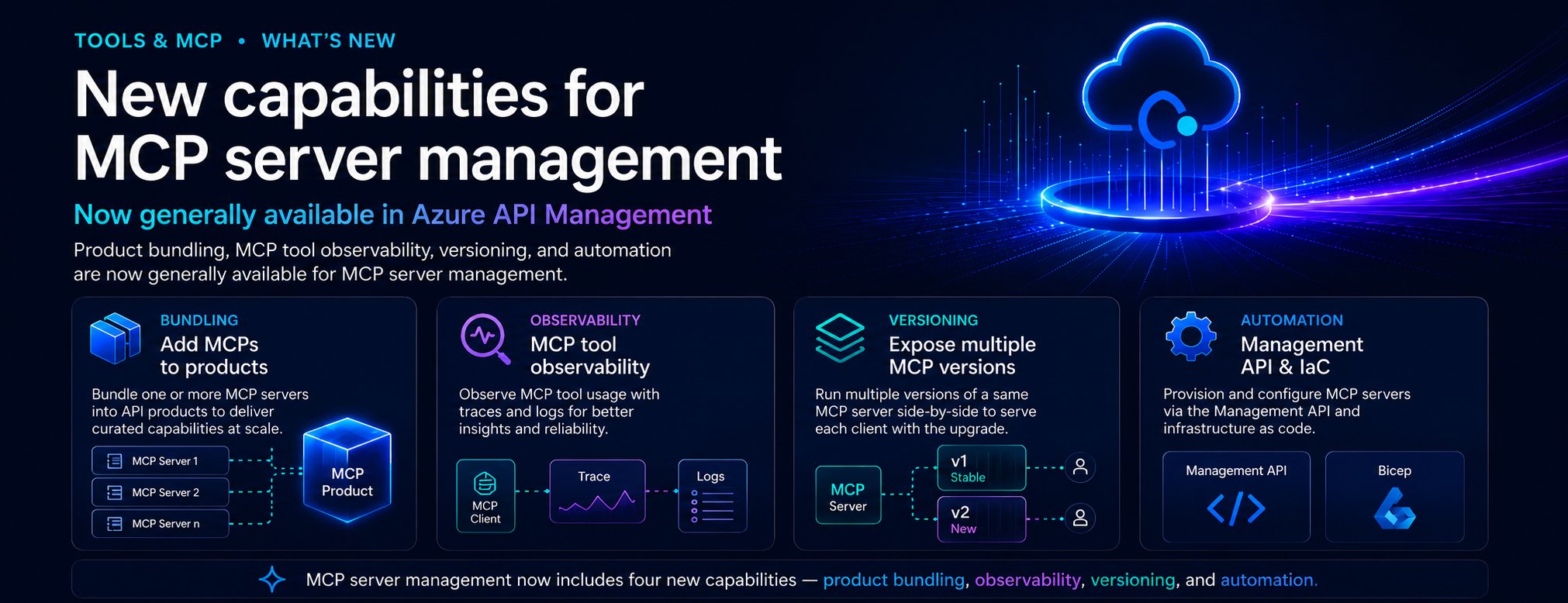
Microsoft has shipped a set of generally available capabilities in Azure API Management that treat Model Context Protocol (MCP) servers the way mature platforms already treat APIs. The release adds four things: the ability to bundle MCP servers into APIM products, tool-level observability, side-by-side versioning, and Management API plus Bicep support for automation. Taken together, they answer a question that has been quietly nagging at platform teams piloting agentic workflows: once you have a dozen MCP servers exposing tools to internal copilots, how do you actually run them?
What changed
MCP is becoming the connective tissue between AI agents and the tools, APIs, data sources, and internal systems they act on. The protocol standardizes how an agent discovers a tool and invokes it, which is genuinely useful, but standardization at the protocol layer does not give you governance at the operational layer. Before this update, Azure API Management could bring MCP servers under enterprise control in a basic sense. The new capabilities push that further.
Four concrete additions are now GA:
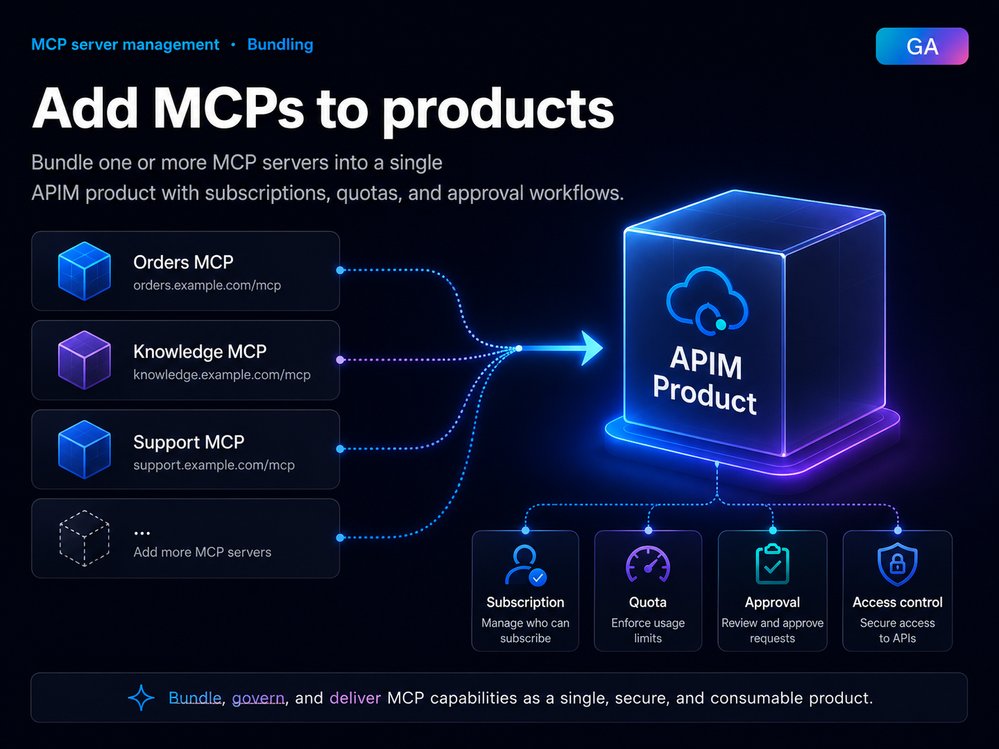
- MCP servers in products. You can add one or more MCP servers to an APIM product, the same packaging unit teams already use to expose APIs to specific audiences. A product for internal agents might bundle a customer profile lookup, order status retrieval, knowledge base search, ticket creation, and a set of workflow automation tools. Subscriptions, quotas, approval workflows, and access management then apply to MCP capabilities exactly as they do to APIs.
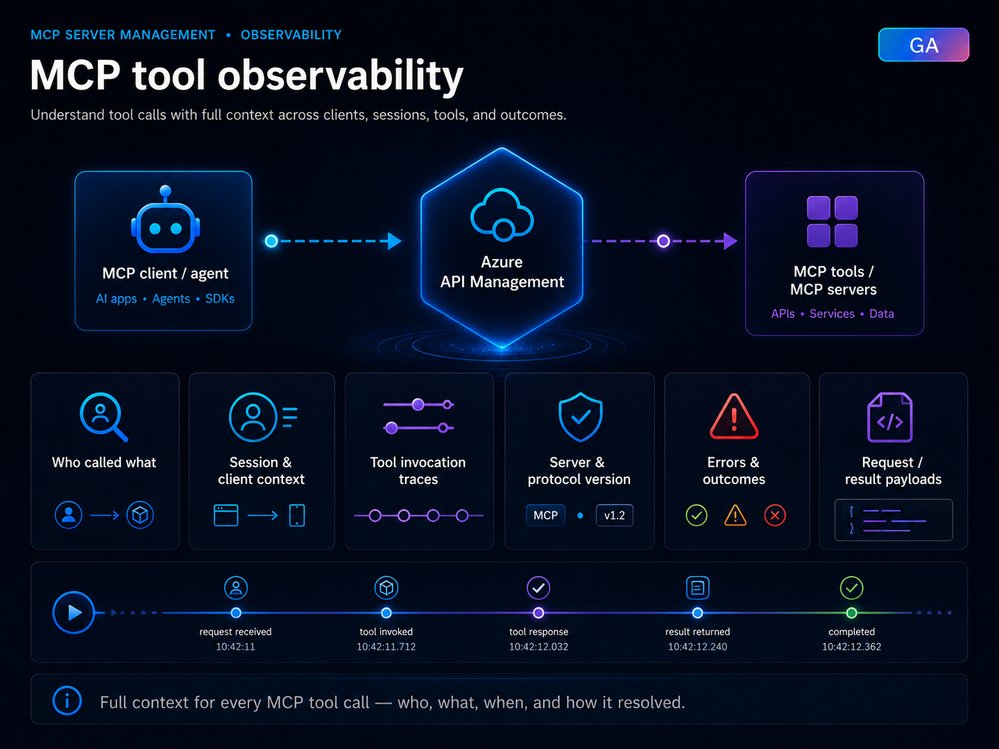
- Tool observability. APIM can now capture MCP-specific trace context for each agent-to-tool interaction. That includes whether a request was a
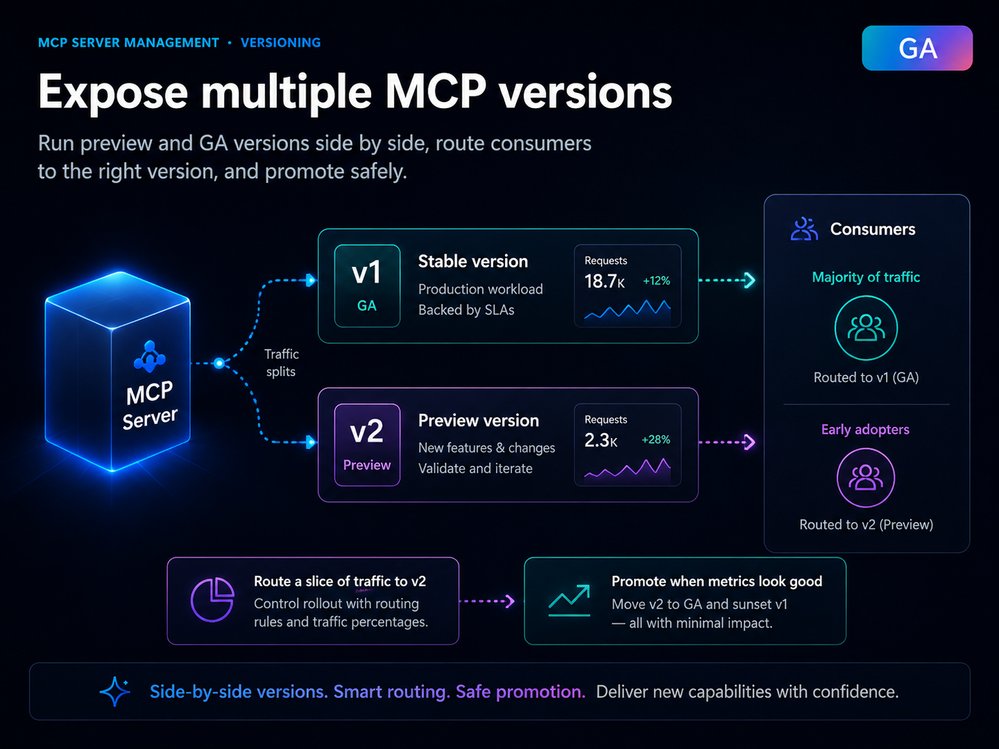
tools/listortools/calloperation, the MCP session ID surfaced throughgen_ai.conversation.id, client name and version, protocol version, server version, authentication and API type, the tool name and type on invocation traces, error type and message on failures, and, when payload logging is enabled, the actual tool arguments and results. - Versioning. You can expose multiple versions of the same MCP server in parallel, running a stable GA version for most production traffic while routing a subset of consumers to a preview build. This matters because MCP tool schemas and capabilities evolve, and agent behavior against a changed schema is hard to predict without a controlled rollout.
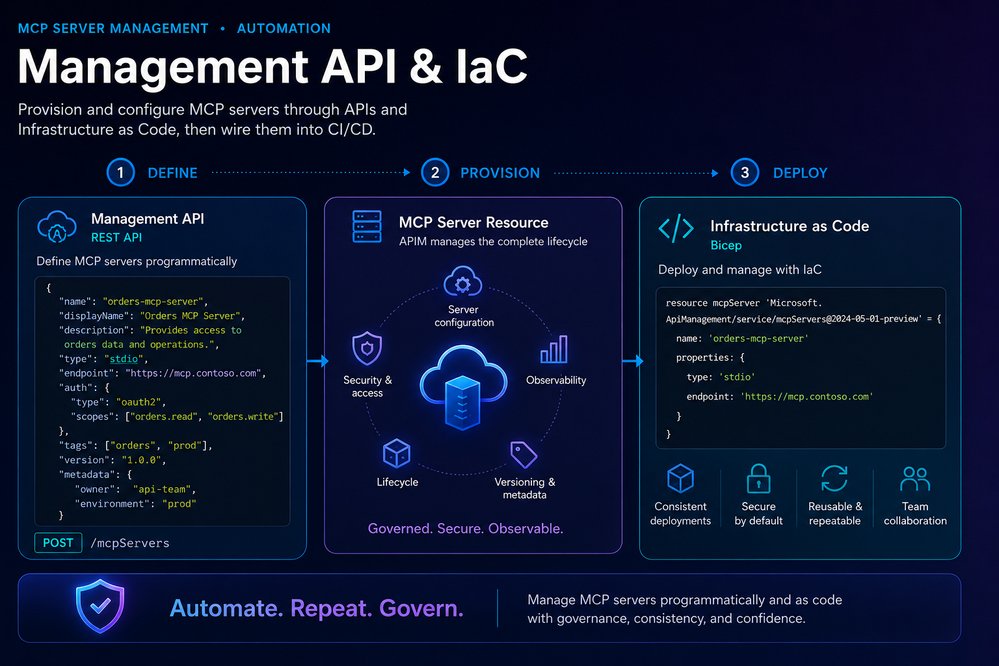
- Management API and Infrastructure as Code. MCP server endpoints, transport settings, authentication, metadata, versioning, product association, and policies can all be provisioned programmatically through Bicep, Terraform, ARM, REST, and CI/CD pipelines.
Why observability is the underrated piece
The headline feature most teams will reach for is products, but observability is the one that changes day-to-day operations. In an agentic workflow, a single user request can fan out into multiple tool calls across different systems. When something goes wrong, the failure could be in any of them, and without trace context you are debugging a black box.
The trace fields APIM exposes map cleanly onto the questions an on-call engineer actually asks. Operation context tells you whether the agent was browsing available tools or executing one. Session context lets you stitch a conversation back together across calls. Tool and error context tell you which specific tool failed and why. Payload context, when you choose to enable it, shows the arguments the agent passed and what came back. That last one is a deliberate trade-off: payload logging gives you the deepest diagnostic signal but also captures potentially sensitive data, so it is opt-in rather than default.
For teams already running APIM, the win is that none of this requires a separate tooling stack. MCP traffic flows through the same diagnostic and monitoring pipelines as the rest of the API estate, which means existing dashboards, alerting, and retention policies carry over.
How this compares to the alternatives
The strategic question for most organizations is not whether to manage MCP servers, but where. There are three broad approaches emerging.
The first is to let each agent framework manage its own tool connections directly. This is fast to start and fine for a single team prototyping, but it produces no central inventory, no shared access control, and no consistent observability. Every team reinvents governance, and security has no single place to ask which servers are approved.
The second is to build a bespoke MCP gateway, often a thin proxy in front of your servers. This gives you control but makes you responsible for the undifferentiated heavy lifting: authentication, rate limiting, versioning logic, and logging. You are rebuilding an API gateway with fewer features.
The third, which this release targets, is to put MCP servers behind a platform you already run. If your organization is on Azure and already uses API Management for APIs, the marginal cost of bringing MCP under the same roof is low. You inherit products, subscriptions, policies, and monitoring rather than rebuilding them. The trade-off is gravity toward the Azure ecosystem. Teams running a deliberately multi-cloud control plane, or standardizing on a vendor-neutral gateway like Kong or an open MCP registry, will weigh that lock-in against the convenience. The Model Context Protocol specification itself is open, so the servers remain portable even when the management layer is not.
Business impact
For platform and integration teams, the practical effect is that MCP servers stop being shadow infrastructure. The capabilities collapse into a familiar lifecycle: register or expose a server through APIM, package it into a product for a specific consumer, apply access controls and quotas, observe tool-level usage and errors, run versions side by side, promote changes once validated, and automate the whole thing through Infrastructure as Code.
Consider a company building internal copilots for support, sales, and operations. Each copilot needs a different slice of tools: customer lookup, order history, case management, knowledge search, refund and escalation workflows. With products, the support copilot subscribes to a support product and the sales copilot to a sales product, each scoped to only the tools it should touch. Early adopters get routed to a preview version of a tool while everyone else stays on GA. Operations watches usage, latency, errors, and traces across all of it. And the entire setup is defined in Bicep or Terraform, so staging and production stay in sync.
The cost dimension is worth thinking through. APIM pricing applies to MCP traffic the same way it applies to API traffic, so high-volume agentic workflows that fan out into many tool calls will register on your APIM consumption. That is a feature as much as a cost: per-tool observability means you can finally attribute spend and latency to specific tools and specific consumers, which is the prerequisite for any sensible chargeback or capacity planning. Teams should model expected tool-call volume per agent before assuming the bill mirrors their existing API traffic, because agent workflows tend to be chattier than human-driven API consumption.
What to do next
If you are already running Azure API Management, the adoption path is incremental rather than a migration. Identify an MCP server you want to govern, add it as a managed resource in APIM, attach it to a product, and configure subscriptions and quotas. Turn on observability before you scale usage, not after, so your first production incident has trace data behind it. Use versioning the moment you anticipate a schema change, and move server definitions into Infrastructure as Code early so environment drift never becomes a problem you have to untangle later.
The broader pattern here is one cloud platforms keep repeating: a new workload type appears, teams adopt it informally, and eventually the platform absorbs it into existing governance primitives. APIs went through this, then serverless, and now agent tooling. Microsoft's bet is that MCP servers are durable enough to deserve the same treatment as first-class managed resources. For organizations whose agentic ambitions are outgrowing their pilots, that is a reasonable bet to take. The full details and getting-started guidance are available on the Azure Integration Services blog and in the API Management documentation.
Comments
Please log in or register to join the discussion