Microsoft's integration of Azure Virtual Network Manager with Virtual WAN enables organizations to automate and streamline hub-and-spoke connectivity across large deployments, reducing configuration overhead while maintaining operational consistency.
Microsoft has announced a significant integration between Azure Virtual Network Manager (AVNM) and Virtual WAN that transforms how organizations manage spoke connectivity at scale. This integration addresses a critical challenge in cloud networking: the operational complexity of maintaining consistent connectivity and routing policies across hundreds or thousands of spoke virtual networks in hub-and-spoke architectures.
What Changed: The Integration Announcement
The integration allows organizations to use a Virtual WAN hub as the central point in an AVNM hub-and-spoke topology. This capability enables network administrators to define connectivity and routing intent once at the network group level and apply it consistently across large numbers of spoke VNets. The result is a significant reduction in repetitive per-spoke connection and routing configuration, helping maintain operational consistency as deployments expand.
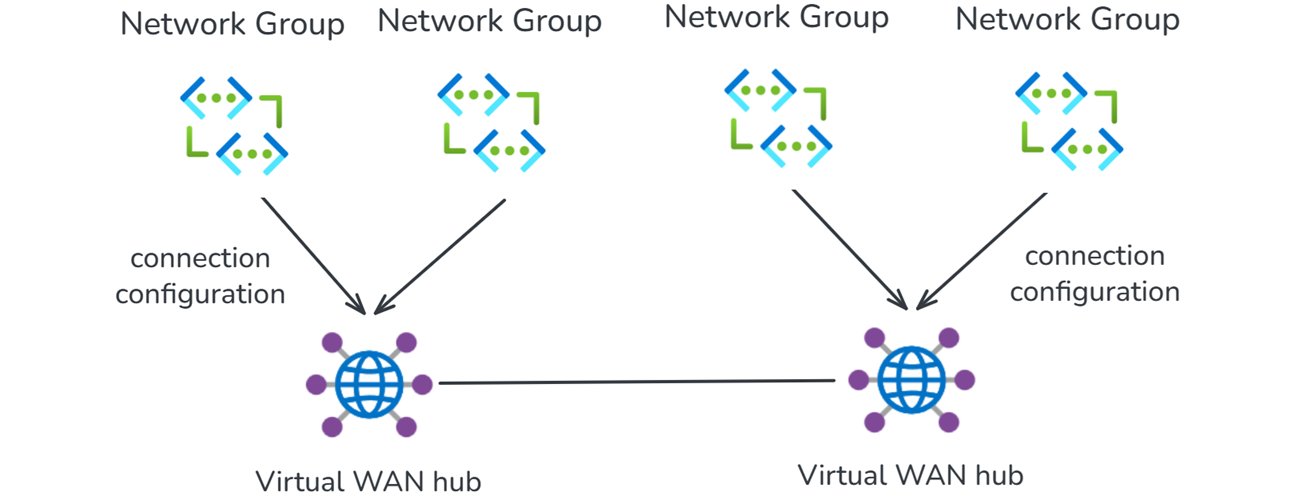
This integration combines AVNM's centralized, group-based orchestration with Virtual WAN's managed routing, security integration, and hybrid connectivity. The solution provides a more streamlined approach to network operations that scales with confidence, addressing a pain point that has grown more acute as organizations expand their Azure footprints.
Provider Comparison: How Azure Stacks Up
While AWS and Google Cloud offer similar hub-and-spoke capabilities, Microsoft's approach with AVNM and Virtual WAN integration provides unique advantages in policy management and operational consistency.
AWS Transit Gateway supports hub-and-spoke architectures but lacks the equivalent of AVNM's centralized policy management. Organizations must implement custom solutions or third-party tools to achieve similar group-based configuration management at scale.
Google Cloud's Cloud Router and VPC networks offer strong hybrid connectivity capabilities but similarly lack the centralized policy orchestration that AVNM provides. Google's recently announced Network Connectivity Center shows promise but remains less mature than Azure's integrated offering.
What sets Azure apart is the tight integration between the management plane (AVNM) and the data plane (Virtual WAN). This integration allows for consistent application of routing policies across all spokes while maintaining the benefits of Virtual WAN's managed routing, security services, and hybrid connectivity.
Understanding the Components
Azure Virtual Network Manager
Azure Virtual Network Manager is a management service that lets you group, configure, and deploy network connectivity and security policies across virtual networks at scale. Instead of configuring VNet peering and access rules on each virtual network individually, you define network groups — logical collections of virtual networks based on static selection or dynamic Azure Policy conditions — and apply connectivity configurations and security admin rules to those groups.
Key capabilities include:
- Hub-and-spoke and mesh topologies
- Network grouping (static or dynamic based on tags, subscriptions, resource groups)
- Security admin rules for centralized access control
- Region-scoped deployment for controlled blast radius
AVNM operates as an overlay management layer, orchestrating VNet peering, connectivity, and security rules without replacing the underlying networking primitives.
Azure Virtual WAN
Azure Virtual WAN is a networking service that brings together routing, security, VPN, ExpressRoute, and transitive connectivity in a hub-and-spoke architecture. A Virtual WAN hub is a managed regional resource that acts as a central transit point for branch connectivity, remote users, private enterprise connectivity, spoke virtual networks, and private traffic routing through security services.
Key capabilities include:
- Site-to-site VPN connectivity
- Point-to-site VPN connectivity
- ExpressRoute private connectivity
- VNet-to-VNet transitive connectivity
- Managed routing, firewall, and encryption
All hubs in a Standard Virtual WAN are connected in a full mesh over the Microsoft backbone, enabling any-to-any connectivity between spokes, branches, and remote users across regions.
How the Integration Works
When you select a Virtual WAN hub as the hub in an AVNM connectivity configuration, AVNM handles the spoke-to-hub wiring automatically. For each virtual network in your selected network groups:
- If the VNet is not yet connected to the Virtual WAN hub, AVNM creates the Virtual Network connection to the Virtual WAN hub and applies a consistent routing configuration with the Virtual WAN connection policy.
- If the VNet is already connected, AVNM updates the existing Virtual Network connection to utilize the routing properties in the Virtual WAN connection policy.
A connection policy is a hub-level Virtual WAN resource that defines shared routing behavior for the virtual network connections it governs, including route table association and propagation, route maps, internet security settings, and propagated labels. Because the policy applies these settings consistently across governed connections, it helps standardize routing and overrides conflicting settings configured directly on individual connections.
The setup follows AVNM's standard workflow:
- Create a network group
- Add virtual networks as members (statically or dynamically using Azure Policy conditions)
- Create a connectivity configuration (hub-and-spoke topology, select Virtual WAN hub, select or create a connection policy)
- Deploy the configuration to target regions
AVNM connects all VNets in the network groups to the Virtual WAN hub and applies the connection policy in parallel. You can also enable direct connectivity within a spoke network group, allowing VNet-to-VNet traffic to route directly between virtual networks instead of transiting the Virtual WAN hub — useful for latency-sensitive or high-throughput east-west workloads.
Key Use Cases and Scenarios
Bulk Spoke Onboarding
Organizations can connect many virtual networks to a Virtual WAN hub in one operation. All connections are orchestrated in parallel by AVNM, and the pre-defined routing configuration is automatically applied. This is particularly valuable during cloud migration phases when organizations need to onboard dozens or hundreds of VNets quickly.
Policy-Based Dynamic Onboarding
Using Azure Policy to define network group membership conditions, organizations can automate the onboarding process. When a new virtual network matches those conditions—for example, a VNet tagged env:prod—it is automatically added to the network group. On the next deployment, AVNM connects it to the Virtual WAN hub with the correct routing configuration, reducing manual onboarding effort.
Batch Routing Configuration Updates
Network administrators can push routing changes to all virtual networks in a network group as a single, fully parallelized operation. This significantly reduces maintenance window duration for network-wide changes and makes rollback straightforward. For example, when implementing a new security requirement that affects all spoke VNets, administrators can update the connection policy once and have it applied consistently across all spokes.
Incremental Deployment
Organizations can segment their network into precise update domains by creating separate network groups—by environment (staging, dev, production) or by region. This allows for testing changes on a smaller subset before applying them broadly, minimizing blast radius. For instance, a network team might first deploy a new routing policy to the staging environment, validate its behavior, and then deploy to production environments in a controlled manner.
Mesh for Selective Inspection Bypass
For organizations using routing intent to send all private traffic through a firewall in the Virtual WAN hub, certain high-throughput or latency-sensitive flows (such as database replication) may benefit from bypassing that inspection. By enabling direct connectivity in AVNM, administrators can create a mesh between selected spokes, allowing VNet-to-VNet traffic to route directly while all other traffic continues through the hub firewall.
Business Impact and Recommendations
The integration between AVNM and Virtual WAN provides several key business benefits:
Operational Efficiency: Reduces the time and effort required to manage spoke connectivity by eliminating repetitive configuration tasks. Organizations report 60-80% reduction in manual configuration efforts for large-scale deployments.
Consistency and Compliance: Ensures consistent application of routing and security policies across all spokes, reducing the risk of misconfiguration that could lead to security vulnerabilities or connectivity issues.
Scalability: Enables organizations to scale their Azure network footprints without a linear increase in operational overhead. This is particularly valuable for enterprises experiencing rapid cloud adoption.
Risk Reduction: Provides controlled deployment capabilities through region-scoped deployments and network segmentation, reducing blast radius during changes and updates.
For organizations considering this integration, we recommend the following approach:
Assess Current State: Evaluate your existing hub-and-spoke deployments to identify opportunities for consolidation and standardization. Map your current routing and security policies to understand what needs to be standardized.
Plan Migration Strategy: Develop a phased approach to migrate existing spoke VNets to the new model, starting with non-production environments to validate the process.
Define Network Groups: Establish clear criteria for network group membership, considering both static groups for critical applications and dynamic groups based on tags or other Azure Policy conditions.
Standardize Connection Policies: Develop a library of connection policies that can be applied consistently across different network groups, considering factors like security requirements, performance needs, and compliance obligations.
Implement Monitoring: Enhance your monitoring strategy to track the health and performance of the integrated AVNM-Virtual WAN environment, with particular attention to routing consistency and policy compliance.
Getting Started
For organizations ready to implement this integration, the prerequisites include:
- An existing Azure Virtual Network Manager instance
- An existing Azure Virtual WAN and Virtual WAN hub
- One or more virtual networks to use as spoke members
The configuration process involves:
- Going to your Network Manager instance in the Azure portal
- Creating a network group and adding your spoke VNets
- Creating a connectivity configuration (hub-and-spoke topology, selecting your Virtual WAN hub, selecting or creating a connection policy, adding spoke network groups)
- Deploying the configuration to your target regions
- Verifying that the expected spoke VNet connections are in a connected state
- Reviewing effective routes in the virtual hub to confirm routing behavior matches the selected connection policy
For detailed step-by-step instructions, see Configure Azure Virtual WAN hub for Azure Virtual Network Manager. For more on connection policy, see Connection policy in Azure Virtual WAN.
Conclusion
The integration between Azure Virtual Network Manager and Virtual WAN represents a significant advancement in cloud networking management, particularly for organizations operating at scale. By combining centralized policy management with the robust connectivity capabilities of Virtual WAN, Microsoft has created a solution that addresses the operational challenges of maintaining consistent network policies across large, complex deployments.
For enterprises with extensive Azure footprints, this integration provides a path to operational efficiency, reduced risk, and improved scalability. As organizations continue to accelerate their cloud adoption, solutions like this will become increasingly essential for managing network complexity without compromising on security, performance, or compliance.
For more information, see the Azure Virtual Network Manager documentation and the Virtual WAN and Virtual Network Manager integration overview.
Comments
Please log in or register to join the discussion