Microsoft's latest Excel update introduces enhanced Copilot functionality with improved entry points, a new Show Changes feature for AI transparency, and an upgraded =COPILOT function with web search capabilities, fundamentally changing how users interact with AI assistance in spreadsheets.
Excel's May 2026 Update: AI Transparency Meets Productivity Enhancements
Microsoft has released its May 2026 update for Excel, marking a significant evolution in how artificial intelligence integrates with spreadsheet functionality. This update introduces three major enhancements: streamlined Copilot entry points with a keyboard-first approach, a new Show Changes feature that brings transparency to AI-assisted edits, and an expanded =COPILOT function capable of web search and live data integration. These changes represent Microsoft's continued commitment to making AI assistance more accessible, transparent, and powerful within its productivity suite.
Streamlined Copilot Experience
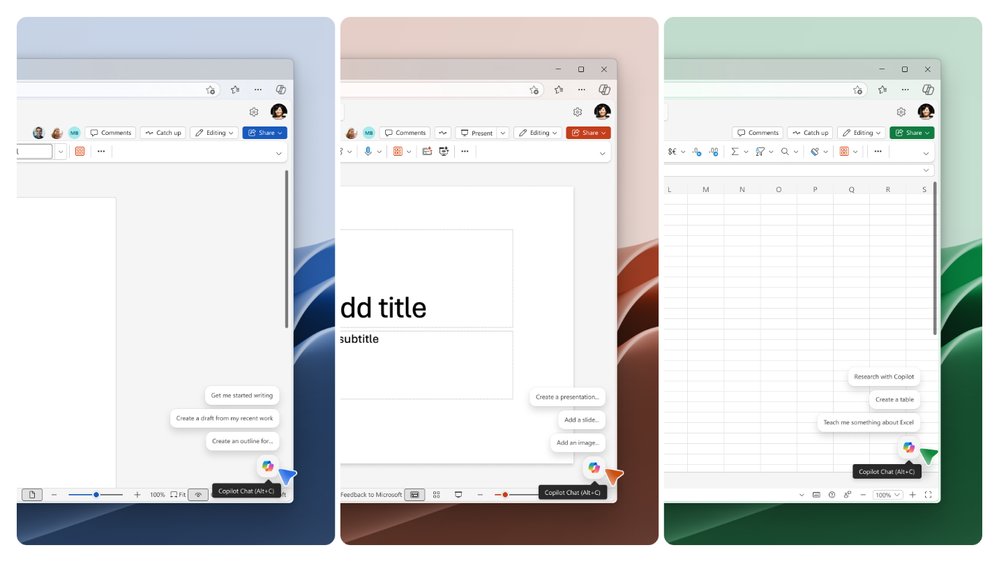
The most noticeable change in this update is the restructuring of Copilot entry points within Excel. Microsoft has consolidated the previous multiple access points into just two strategic locations, simplifying the user experience while maintaining functionality. This reduction in entry points aligns with broader UX principles of cognitive load reduction, allowing users to focus more on their content rather than navigating complex interfaces.
A key enhancement is the introduction of a "Dock" feature that enables users to position the Copilot entry point according to their workflow needs. By right-clicking the Copilot button and selecting Dock, users can customize the interface to suit their working style—a thoughtful addition that acknowledges diverse user preferences and working environments.
Alongside these interface changes, Microsoft has implemented curated suggestions that anticipate user needs based on context and usage patterns. These intelligent recommendations appear alongside the new canvas entry point, reducing the need for manual command input and accelerating common tasks. The update also includes updated keyboard shortcuts, reinforcing Excel's commitment to keyboard-first design principles that power users appreciate.
The =COPILOT function receives significant improvements in this update, particularly for Insiders users. The function now incorporates web search capabilities, allowing it to ground responses in live, current data rather than relying solely on static information. This enhancement transforms the =COPILOT function from a static helper into a dynamic information retrieval tool.
Practical applications of this expanded functionality include:
- Enriching tables with current market data
- Looking up real-time company details and financial metrics
- Pulling in industry benchmarks and comparative data
- Updating information across spreadsheets with a single formula
These capabilities are currently available to Insiders and Frontier users on Windows, Insiders users for Mac, and Frontier users for Web. This staged rollout suggests Microsoft is carefully monitoring performance and user feedback before broader deployment.
Show Changes: Bringing Transparency to AI Edits
Perhaps the most significant addition from a collaboration and governance perspective is the Show Changes feature. This new functionality addresses a critical challenge in AI-assisted work: transparency. When collaborators make changes using Copilot, Excel now displays a Show Changes card that includes a Copilot attribution indicator—a small visual flag with the Copilot icon that clearly identifies AI-generated modifications.
This seemingly simple addition has profound implications for workplace collaboration and accountability. In professional environments where understanding the origin of changes is crucial for compliance, auditing, or simply workflow comprehension, the Show Changes feature provides clear visibility into which modifications were made by human users versus AI assistance. The feature supports more transparent, informed collaboration by giving team members clearer insight into how workbook edits have been created and refined.
The Show Changes feature is currently available for Excel on the web, with desktop versions likely to follow in subsequent updates. This web-first rollout may reflect Microsoft's strategy to enhance collaboration features that are particularly valuable in cloud-based, multi-user environments.
Excel in the Competitive Landscape
Microsoft's enhancements to Excel's AI capabilities place it in an interesting position relative to other spreadsheet solutions. While Google Sheets has long offered collaborative features and AI-powered suggestions, Excel's integration of Copilot represents a more sophisticated approach to AI assistance. The combination of transparent AI attribution, dynamic web search capabilities, and keyboard-first design creates a compelling value proposition for enterprise users.
Compared to open-source alternatives like LibreOffice Calc, Excel's AI features demonstrate Microsoft's substantial investment in differentiating its productivity suite through intelligent automation. The =COPILOT function's ability to incorporate live data from the web particularly positions Excel as a more dynamic tool for real-time analysis and decision-making.
However, this AI-enhanced approach also raises questions about data privacy and security, especially when the =COPILOT function searches the web and incorporates potentially sensitive information into spreadsheets. Organizations adopting these features will need to establish clear governance policies regarding data handling and AI usage.
Business Impact and Productivity Implications
The May 2026 update to Excel carries several business implications that extend beyond simple feature additions:
Accelerated Decision-Making: The ability to incorporate live data through the =COPILOT function enables more timely and informed decision-making. Business users can now pull in current market conditions, competitor data, or industry benchmarks directly into their analysis without leaving Excel.
Enhanced Collaboration Transparency: The Show Changes feature addresses a critical need in team environments where understanding the origin of modifications is essential for accountability and workflow management. This transparency is particularly valuable in regulated industries with strict compliance requirements.
Improved User Experience for Power Users: The keyboard-first design and streamlined entry points cater to experienced Excel users who value efficiency and customization. These enhancements acknowledge that AI assistance should augment, not replace, expert user capabilities.
Reduced Learning Curve: By consolidating Copilot entry points and providing curated suggestions, Microsoft has made AI assistance more accessible to users who might otherwise be intimidated by complex interfaces or uncertain about how to leverage AI effectively.
Competitive Differentiation: As AI becomes a standard feature across productivity software, Excel's sophisticated implementation—particularly the transparency features—sets it apart from competitors and reinforces Microsoft's position as a leader in intelligent productivity tools.
Adoption Considerations
Organizations planning to adopt these new Excel features should consider several factors:
User Training: The expanded AI capabilities may require training to ensure users understand both the potential and limitations of AI assistance. The keyboard-first design suggests Microsoft is targeting experienced users who may already have established workflows.
Data Governance: The web search capabilities of the =COPILOT function necessitate clear policies about data sources, accuracy, and security. Organizations should establish guidelines about which types of queries are appropriate and how resulting data should be verified.
Change Management: The Show Changes feature represents a significant shift in how collaborative work is attributed and understood. Teams may need to adjust their workflows and communication protocols to accommodate this new transparency.
Version Management: With features being rolled out to different user groups (Insiders, Frontier, general release) at different times, organizations should plan for potential version disparities and ensure compatibility across their user base.
Future Outlook
Microsoft's direction with Excel suggests a continued emphasis on AI integration that enhances rather than replaces human expertise. The focus on transparency (Show Changes) and customization (Dock feature) indicates an understanding that AI assistance must be adaptable to individual user needs while maintaining visibility into automated processes.
The staged rollout of the =COPILOT function's web search capabilities hints at potential future expansions, possibly including integration with more specialized data sources, advanced analytics capabilities, or deeper connections to Microsoft's broader AI ecosystem.
As organizations increasingly adopt AI tools across their software stack, Excel's evolution reflects a broader trend toward intelligent productivity applications that understand context, anticipate needs, and provide transparent assistance. The May 2026 update positions Excel not just as a calculation tool, but as an intelligent workspace that bridges the gap between human expertise and AI capabilities.
Conclusion
Microsoft's May 2026 update to Excel represents a thoughtful evolution of the spreadsheet software's AI capabilities. By focusing on streamlined interfaces, transparent attribution of AI changes, and dynamic data integration, the update addresses both user experience and collaboration needs in professional environments. These enhancements position Excel as a more intelligent, transparent, and adaptable tool for business users, while also acknowledging the importance of maintaining human control and understanding in AI-assisted workflows.
As organizations continue to navigate the integration of AI into their productivity tools, Excel's approach—balancing power with transparency—may serve as a model for how AI can enhance human capabilities rather than replace them. The combination of technical sophistication and user-centric design suggests that Microsoft is not just adding AI features to Excel, but reimagining how spreadsheets can function in an AI-enhanced workplace.
This update is particularly significant as it demonstrates Microsoft's responsiveness to user feedback, with the company explicitly acknowledging that "many of these features are the result of your feedback." This user-informed approach to development bodes well for future iterations of Excel and suggests that Microsoft will continue to refine its AI integration based on real-world usage patterns and needs.
For business users and organizations, the May 2026 update offers both immediate productivity benefits and a glimpse into the future of spreadsheet software—one where AI assistance is seamlessly integrated, transparently attributed, and intelligently contextualized to enhance human decision-making rather than replace it.
Comments
Please log in or register to join the discussion