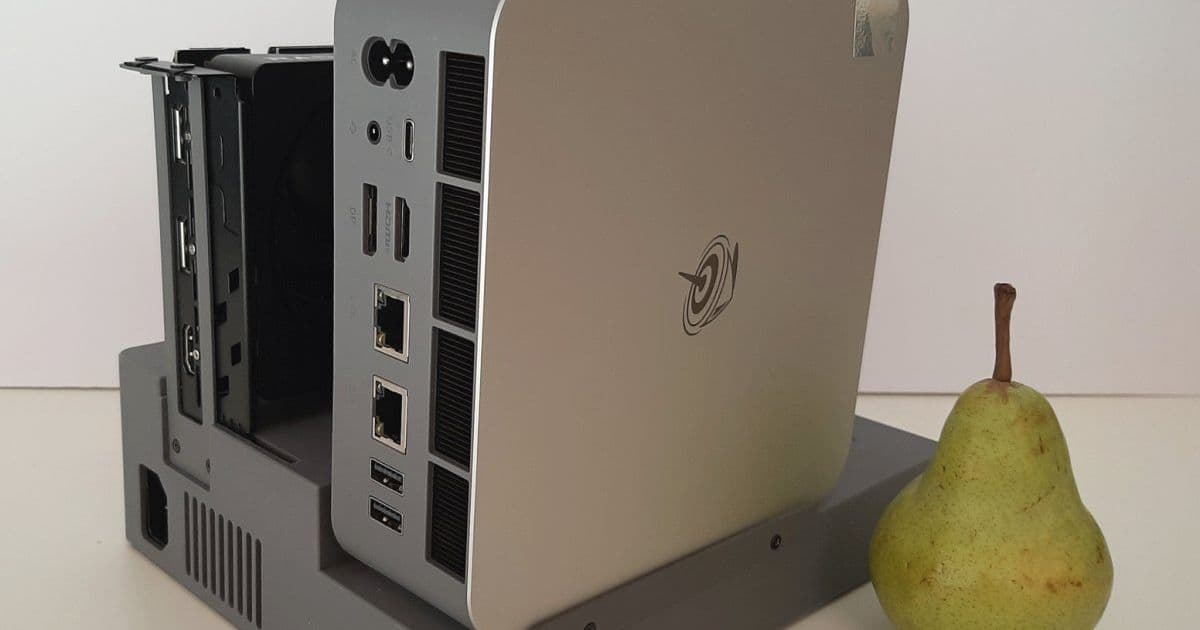
The Beelink GTi15 Ultra is a powerful mini PC with an Intel Core Ultra 9 285H processor, support for up to 96GB DDR5 RAM, and optional discrete graphics via the EX Pro docking station. However, its high idle power consumption raises concerns about its practicality.
The Beelink GTi15 Ultra is a mini PC that stands out in the crowded market of compact computers. At first glance, it appears to be a well-equipped system with an Intel Core Ultra 9 285H Arrow Lake processor, support for up to 96GB of DDR5 RAM, two M.2 2280 slots for storage, an integrated power supply, support for up to three displays, and dual 10 Gbps Ethernet ports. But what truly sets this mini PC apart is its ability to connect to a desktop graphics card through the optional Beelink EX Pro docking station, offering a PCIe 5.0 x8 connection that promises near full-speed graphics performance.
Design and Features
The GTi15 Ultra is built around Intel's powerful Core Ultra 9 285H processor, which features 16 cores (without hyperthreading) consisting of 6 Performance-cores, 8 Efficient-cores, and 2 Low Power Efficient-cores. The processor includes Intel's Arc 140T integrated GPU with 8 Xe-cores capable of up to 77 TOPS AI performance, plus a dedicated NPU (Intel AI Boost) capable of up to 13 TOPS, bringing the total AI performance to 99 TOPS.
The mini PC comes with either 64GB or 96GB of DDR5 RAM running at 5600 MT/s, two M.2 2280 PCIe 4.0 x4 storage slots, and a full-sized SD 4.0 card reader. For networking, it features dual 10 Gb Ethernet ports, WiFi 7, and Bluetooth 5.4. The integrated 145-watt power supply eliminates the need for an external power brick, and the system includes built-in Digital Signal Processing (DSP) enhanced dual speakers, a built-in microphone array with voice recognition up to 5 meters, and a power button with integrated fingerprint sensor.
Despite all these features, the GTi15 Ultra maintains a compact form factor measuring 158 x 158 x 55.8 mm (6.2 x 6.2 x 2.2 inches), excluding its rubber feet. The front panel includes a USB Type-A 3.2 Gen 2 port, SD card reader, USB Type-C 3.2 Gen 2 port, 3.5mm audio jack, power indicator light, and power button with fingerprint sensor. The rear panel offers HDMI 2.1, DisplayPort 1.4a, two 10 Gb Ethernet ports, two USB Type-A 3.2 Gen 2 ports, and a C7 power jack.
The EX Pro Docking Station
The Beelink EX Pro Docking Station is an upgraded version of the original EX model, featuring a built-in 600-watt power supply and support for either an M.2 2280 NVMe drive or an M.2 2230 WiFi card with external antennas. The most significant upgrade is the PCIe 5.0 x8 slot (electrically wired as x16), which provides much faster data transfer speeds compared to the PCIe 4.0 x8 slot in the original EX model. The docking station also includes a 4-pin header for an external fan and a USB 2.0 Type-A port.
Performance Testing
Windows Performance
The GTi15 Ultra comes pre-installed with Windows 11 Pro, though it includes some Chinese software that many users might prefer to remove. After a clean Windows installation and driver updates, the system showed impressive performance in various benchmarks.
In CrystalDiskMark testing, the included Crucial P3 Plus NVMe drive delivered sequential read speeds of nearly 5200 MB/s and sequential write speeds of just over 4700 MB/s, exceeding Crucial's specifications. SD card performance was also solid, with sequential read speeds around 270 MB/s and write speeds around 240 MB/s.
When compared to similar mini PCs in benchmark tests, the GTi15 Ultra showed competitive performance. Against the GEEKOM IT15 (which uses the same Intel Core Ultra 9 285H processor), the GTi15 Ultra performed slightly better in most tests. However, when compared to AMD Ryzen AI 9 HX 370 systems like the GEEKOM A9 Max and GMKtek EVO-X1, the Intel system showed mixed results. The AMD systems generally outperformed the Intel system in graphics benchmarks and gaming tests, particularly at 1080p resolution.
Linux Performance
Testing with Debian 13 and Ubuntu 25.10 showed good hardware support overall, though the SD card performance issue persisted in Linux as well. Geekbench scores were slightly lower than in Windows, but PassMark scores were marginally better. The integrated GPU only supports OpenGL rendering in Linux, resulting in lower Heaven benchmark scores compared to Windows.
Networking Performance
Networking performance was excellent across all tests. The dual 10 Gb Ethernet ports delivered speeds of 9.91 Gbps for upload and 9.88 Gbps for download. WiFi 7 performance on the 6 GHz band was particularly impressive, reaching 3.11 Gbps for upload and 3.25 Gbps for download - faster than a 2.5 Gb Ethernet connection.
Thermal and Acoustic Performance
Thermal testing showed that the GTi15 Ultra's cooling system is adequate for the configured power limits. During a 20-minute stress test on all 16 cores, the CPU temperature stabilized around 75°C, with the frequency remaining constant at around 4200 MHz. The system is impressively quiet, measuring only 37.0 dBA under load and being inaudible when idle.
The Power Consumption Problem
Here's where the review takes a significant turn. Despite the GTi15 Ultra's impressive performance and features, its power consumption is unacceptably high. When powered off (shutdown), the system still consumes 4.8 watts. At idle, it consumes 24.2 watts in Windows and a staggering 41.8 watts in Debian. Under CPU stress testing, power consumption reaches 78.2 watts in Windows and 77.0 watts in Debian.
For context, the GEEKOM IT15 with the same processor consumes only 4.5 watts at idle. Similarly powered AMD mini PCs like the GEEKOM A9 Max (2.9 watts) and GMKtek EVO-X1 (5.6 watts) show much better power efficiency. This level of power consumption, especially when idle, is likely non-compliant with energy regulations in many countries and represents a significant operational cost for users.
External GPU Performance with EX Pro
The EX Pro Docking Station significantly improves external storage performance compared to the original EX model. Using the same Samsung 980 PRO NVMe drive, sequential read speeds increased from just under 900 MB/s to nearly 1780 MB/s, and write speeds improved from around 900 MB/s to 1700 MB/s.
For graphics performance testing, a PowerColor Reaper Radeon RX 9060 XT GPU was used. The PCIe 5.0 x8 connection provided by the EX Pro should theoretically offer near full-speed graphics performance. In Heaven benchmark testing, the system achieved 336.8 FPS, and in Shadow of the Tomb Raider, it reached an average of 166 FPS at 1080p with high settings.
Comparison with Alternative eGPU Solutions
To provide context for the EX Pro's performance, comparisons were made with alternative eGPU solutions:
GTBOX G-DOCK via USB4: Using the same GPU but connected via USB4 instead of the EX Pro resulted in reduced performance. Heaven benchmark dropped to 306.3 FPS (10% decrease), while Shadow of the Tomb Raider only dropped to 158 FPS (5% decrease).
DIY eGPU via NVMe slot: A makeshift solution using an NVMe to PCIe adapter and OCuLink connection surprisingly outperformed the EX Pro in gaming tests. Shadow of the Tomb Raider achieved 182 FPS (10% increase over EX Pro), though Heaven benchmark was nearly identical at 337.6 FPS.
Verdict
The Beelink GTi15 Ultra presents a difficult recommendation. On one hand, it's a powerful, well-designed mini PC with excellent performance, good thermal management, and the unique ability to connect to desktop graphics cards through the EX Pro docking station. The EX Pro itself is a significant upgrade over the original model, offering faster storage speeds and better graphics performance.
However, the power consumption issue is a deal-breaker for many potential users. Consuming over 40 watts when idle on Linux and 24 watts in Windows is simply unacceptable for a modern computer, especially one marketed as an energy-efficient mini PC. This level of power consumption not only increases electricity bills but also raises environmental concerns and may violate energy regulations in some regions.
Unless Beelink addresses this power consumption issue through a BIOS update or other means, the GTi15 Ultra cannot be recommended despite its other strengths. The EX Pro Docking Station, however, remains a good investment for anyone who already owns a compatible GTi Ultra mini PC and wants to add discrete graphics capabilities.
The Beelink GTi15 Ultra is available for $1249 from Amazon or the Beelink website, and the EX Pro Docking Station is available for $179. While the hardware and performance are impressive, the power consumption issue significantly undermines the system's value proposition.
Comments
Please log in or register to join the discussion