Microsoft’s new PostgreSQL Hub consolidates samples, guided learning paths, and a GitHub‑powered forum into a single portal for Azure Database for PostgreSQL users. The article compares Azure’s managed Postgres offering with AWS RDS for PostgreSQL and Google Cloud SQL, examines pricing and migration considerations, and explains how the hub can accelerate AI‑enabled workloads for enterprises.
Introducing PostgreSQL Hub for Azure Developers
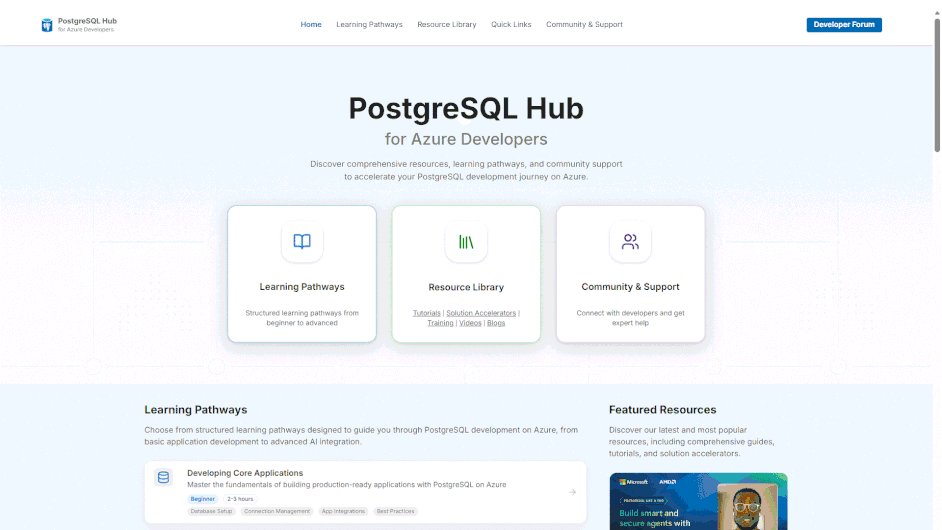
When you build an application on PostgreSQL, the effort spent hunting down documentation, sample code, and community advice often eclipses the time spent writing business logic. Microsoft’s PostgreSQL Hub (aka.ms/postgres-hub) is designed to eliminate that friction. It aggregates curated resources, structured learning pathways, and a developer forum into a single, Azure‑centric experience.
What changed?
- One‑stop portal – All official docs, sample apps, solution accelerators, videos, and workshops are now reachable from a single URL.
- Guided learning – Pathways walk developers from fundamentals to advanced AI scenarios such as vector search, AI functions, and multi‑agent architectures.
- Community integration – A GitHub Discussions‑backed forum lets you post questions, share feedback, and collaborate directly with Microsoft engineers. Real‑time chat and webinars are slated for a near‑term release.
- Continuous updates – Resources are refreshed whenever Azure Database for PostgreSQL releases a new feature (e.g., native vector extensions, built‑in AI functions).
The hub is more than a content aggregator; it is a strategic layer that reduces time‑to‑value for any PostgreSQL workload on Azure, especially those that incorporate AI.
Provider comparison – Azure vs. AWS vs. GCP
| Aspect | Azure Database for PostgreSQL | Amazon RDS for PostgreSQL | Google Cloud SQL for PostgreSQL |
|---|---|---|---|
| Pricing model | Pay‑as‑you‑go vCore or Serverless tier; compute billed per second, storage per GB‑month, backup up to 7 days included. Serverless adds per‑request scaling and automatic pause. | On‑Demand instances billed per hour; provisioned IOPS and storage separate. Reserved instances give up to 55 % discount for 1‑ or 3‑year terms. | Tiered machine types (custom or predefined); storage billed per GB‑month, backup 7 days included. Sustained‑use discounts apply automatically. |
| AI‑ready extensions | Built‑in pg_vector, Azure OpenAI integration, AI functions (serverless JavaScript/Python) available as managed extensions. | Supports pg_vector via custom parameter groups; no native Azure OpenAI link. | Offers pgvector via Cloud Marketplace; AI functions require Cloud Functions or Cloud Run orchestration. |
| High‑availability | Zone‑redundant HA with automatic failover (99.99 % SLA). | Multi‑AZ deployment with automatic failover (99.95 % SLA). | Regional HA with read replicas; automatic failover via Cloud SQL HA (99.95 % SLA). |
| Migration tooling | Azure Database Migration Service (online & offline), Data Sync, and now direct import from the PostgreSQL Hub sample apps. | AWS Database Migration Service (CDC), Schema Conversion Tool. | Database Migration Service (Google Cloud) with minimal‑downtime option. |
| Pricing example (single‑zone, 2 vCore, 100 GB) | ~US$0.12/vCore‑hour + $0.10/GB‑month → ≈ $86/month. | ~US$0.13/vCPU‑hour + $0.12/GB‑month → ≈ $95/month. | ~US$0.11/vCPU‑hour + $0.09/GB‑month → ≈ $84/month. |
| Ecosystem integration | Tight coupling with Azure AI services (Azure OpenAI, Cognitive Search), Azure Kubernetes Service, and Power Platform. | Deep integration with AWS Lambda, SageMaker, and QuickSight. | Native with Vertex AI, BigQuery federation, and Anthos. |
Key takeaways
- Azure’s pricing is competitive, especially when you leverage the Serverless tier for bursty workloads.
- The biggest differentiator for Azure is the managed AI extensions that the hub highlights – developers can enable vector search or AI functions with a single portal click, without provisioning separate services.
- Migration from on‑prem or other clouds is straightforward with Azure Database Migration Service, and the hub’s sample apps include ready‑made migration scripts.
Business impact – why the hub matters for enterprises
- Accelerated onboarding – New teams can follow a curated pathway from “Create a PostgreSQL instance” to “Deploy an AI‑powered recommendation engine” in under a day. The reduction in learning curve translates to lower labor costs and faster proof‑of‑concept cycles.
- Consistent architecture – Sample apps are built on Microsoft‑approved best practices (e.g., use of managed identities, Azure Private Link, and built‑in monitoring via Azure Monitor). Enterprises can adopt these patterns to enforce security and compliance without reinventing the wheel.
- Cost predictability – The hub surfaces cost‑impact calculators for each learning path. For example, the “Vector Search with pg_vector” pathway shows expected storage growth and query latency, allowing finance teams to model monthly spend before provisioning.
- Reduced vendor lock‑in risk – By exposing migration scripts and cross‑cloud comparison tables, the hub helps organizations keep options open. If a future strategy requires moving to AWS or GCP, the documented steps are already in place.
- Community‑driven innovation – The GitHub Discussions forum encourages developers to contribute back sample code or performance benchmarks. Microsoft engineers routinely surface these contributions in product updates, ensuring that the platform evolves in line with real‑world usage.
How to get started
- Visit the portal at aka.ms/postgres-hub.
- Choose a learning pathway that matches your skill level – Fundamentals, Intermediate Patterns, or Advanced AI.
- Deploy the accompanying sample app with a single‑click Azure Resource Manager (ARM) template. The template automatically provisions Azure Database for PostgreSQL, a VNet, and any required AI extensions.
- Join the Developer Forum (GitHub Discussions) to ask questions, suggest enhancements, or share your own sample projects.
- Keep an eye on the upcoming real‑time chat and monthly webinars for live troubleshooting and deep‑dive sessions.
Migration checklist for existing PostgreSQL workloads
| Step | Action | Azure tool |
|---|---|---|
| 1 | Inventory databases, versions, extensions | Azure Migrate assessment |
| 2 | Choose migration mode (online CDC vs. offline dump) | Azure Database Migration Service (DMS) |
| 3 | Map storage and compute sizing using hub’s cost calculator | Azure Pricing Calculator + hub estimator |
| 4 | Run a test migration with a copy of the data | DMS “Create migration project” wizard |
| 5 | Validate application connectivity (private endpoint, managed identity) | Azure Private Link & Azure AD integration |
| 6 | Cut over during low‑traffic window, enable read replica for rollback | Azure HA failover groups |
| 7 | Decommission legacy servers and update CI/CD pipelines | Azure DevOps or GitHub Actions |
Bottom line
The PostgreSQL Hub gives Azure developers a consolidated, continuously refreshed knowledge base that bridges the gap between documentation and production‑ready code. By comparing Azure Database for PostgreSQL with AWS RDS and Google Cloud SQL, you can see that Azure’s managed AI extensions and integrated learning paths provide a tangible advantage for teams building intelligent applications. Enterprises that adopt the hub can expect faster delivery, clearer cost forecasting, and a smoother migration experience – all while staying connected to a vibrant developer community.
Comments
Please log in or register to join the discussion