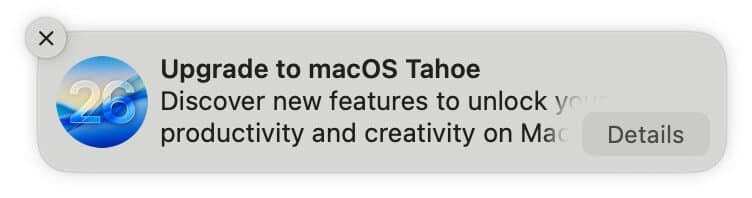
A detailed exploration of using device management profiles to suppress macOS Tahoe upgrade notifications, including step-by-step implementation and potential implications for enterprise environments.
The persistent notifications urging users to upgrade to macOS Tahoe have become a source of frustration for many Mac users who prefer to remain on their current operating system version. These notifications, complete with attention-grabbing red badges on the System Settings icon, can be particularly intrusive for those who have chosen to delay upgrading due to various concerns about the new Liquid Glass interface or functional changes introduced in the latest release.
The Technical Workaround
The solution to this annoyance lies in leveraging device management profiles, a feature typically associated with enterprise environments but equally applicable to individual users managing their own machines. These profiles allow administrators to enforce policies on Macs, including the ability to block activities related to major macOS updates for up to 90 days at a time.
Implementation Process
The implementation process involves several technical steps that require familiarity with Terminal and configuration files:
- Repository Setup: Begin by cloning the Stop Tahoe Update project repository from GitHub and navigating to its directory in Terminal
- Permission Configuration: Set all scripts within the repository to executable status using chmod commands
- UUID Generation: Generate and insert two unique UUIDs into the configuration profile file, replacing placeholder text
- Profile Customization: Modify the configuration file to specify which types of updates should be blocked
- Profile Installation: Execute the installation script and complete the process through System Settings
The configuration profile works by creating a policy that prevents the system from displaying upgrade notifications and indicators for the specified period. This approach effectively creates a temporary barrier against the upgrade prompts without preventing other important security updates from being installed.
Enterprise Implications
From an enterprise management perspective, this technique represents a practical application of existing device management capabilities. Organizations that need to maintain consistency across their Mac fleets can use similar profiles to control upgrade timing and ensure compatibility with critical business applications.
However, the approach raises interesting questions about the balance between user autonomy and organizational control. While enterprise environments typically require such controls for security and compatibility reasons, individual users employing the same techniques may be circumventing Apple's intended upgrade path.
Technical Considerations
Several technical aspects merit consideration when implementing this solution:
Rolling vs. Fixed Deferral Periods: The article notes that the 90-day deferral appears to work due to a bug in macOS 15.7.3, where the period functions as a rolling date rather than being fixed from the release date. This behavior may not be consistent across all macOS versions or could potentially be corrected in future updates.
Profile Persistence: The configuration profile remains active until explicitly removed or until the deferral period expires. Users must be prepared to either reinstall the profile or accept upgrade notifications when the period concludes.
Update Classification: The ability to distinguish between major OS updates and minor security updates provides flexibility in maintaining system security while avoiding unwanted interface changes.
Automation and Maintenance
The author demonstrates an elegant solution for maintaining the profile by creating a shell alias that automates the reinstallation process. This approach reduces the maintenance burden to a simple command execution every 90 days, making the workaround sustainable for long-term use.
The automation script handles both the profile installation and the subsequent approval process within System Settings, streamlining what could otherwise be a cumbersome manual process.
User Experience Impact
Beyond the technical implementation, the psychological impact of eliminating these persistent notifications cannot be understated. The constant visual reminder of an unwanted upgrade, combined with the interruption of workflow through pop-up notifications, creates a significant source of user frustration.
By removing these elements, users can maintain focus on their work without the cognitive load of repeated upgrade prompts. This improvement in user experience highlights how seemingly minor interface elements can have substantial impacts on overall satisfaction with a computing platform.
Potential Risks and Considerations
While the technical solution is effective, users should consider several potential risks:
Security Implications: Delaying major OS updates may mean missing important security improvements or compatibility fixes that could affect system security or functionality.
Support Limitations: Apple's support policies may change regarding older operating system versions, potentially limiting access to technical support or compatibility with newer software releases.
Future Compatibility: As software developers optimize their applications for newer operating systems, users on older versions may experience compatibility issues or reduced functionality.
Conclusion
The ability to block macOS Tahoe upgrade notifications through device management profiles represents a powerful tool for users who wish to maintain control over their upgrade timing. The technical implementation, while requiring some familiarity with Terminal and configuration files, provides a robust solution that can be automated for long-term use.
This approach exemplifies how enterprise-level management features can be repurposed for individual use cases, demonstrating the flexibility of macOS's underlying architecture. As operating systems continue to evolve, such techniques may become increasingly valuable for users who prefer to maintain control over their upgrade timing while avoiding the constant pressure of upgrade notifications.
The solution's effectiveness, combined with its automation potential, makes it a compelling option for users who wish to remain on their current operating system while avoiding the intrusive nature of upgrade prompts. However, users should carefully weigh the benefits against potential security and compatibility considerations when deciding to implement such a workaround.
Comments
Please log in or register to join the discussion