
Understanding Exchange Online mailbox quotas is critical for effective administration. This guide explains primary, archive, and recoverable items quotas, their default values, how to check usage, and solutions for common scenarios.
Mailbox quotas govern storage limits in Exchange Online

Mailbox quotas in Exchange Online enforce storage limits across different mailbox components. Understanding these quotas prevents user disruptions and helps administrators manage resources effectively.
Core Mailbox Quota Types
1. Primary Mailbox Quota (ProhibitSendReceiveQuota)
- Function: Blocks sending/receiving emails when exceeded
- Default: 100GB (varies by license)
- Check:
Get-Mailbox user | FL ProhibitSendReceiveQuota - Usage:
Get-MailboxStatistics user | FL TotalItemSize
2. Archive Mailbox Quota (ArchiveQuota)
- Function: Prevents adding content to specific archive shard
- Default: 100GB (auto-expanding archives use multiple shards)
- Key Insight: Auto-expanding provides 1.5TB total but each shard caps at 100GB
- Check:
Get-Mailbox user | FL ArchiveQuota
3. Recoverable Items Quota (RecoverableItemsQuota)
- Function: Blocks purging items when full
- Default: 30GB (non-hold users) or 100GB (hold users)
- Check:
Get-Mailbox user | FL RecoverableItemsQuota - Usage:
Get-MailboxStatistics user -Archive | FL TotalDeletedItemSize
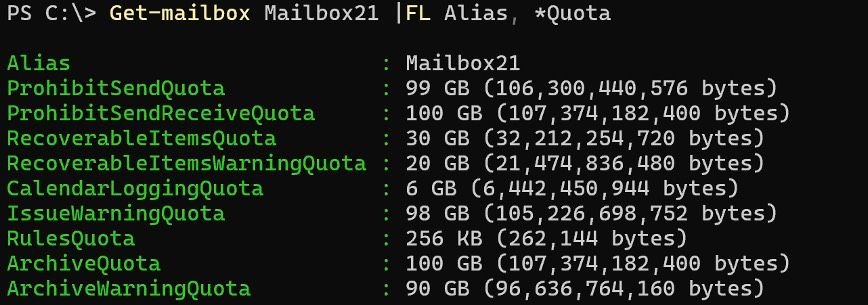
Example quota configuration in PowerShell
Checking Storage Usage
| Component | Command | Key Parameter |
|---|---|---|
| Primary Mailbox | Get-MailboxStatistics user |
TotalItemSize |
| Archive Mailbox | Get-MailboxStatistics user -Archive |
TotalItemSize |
| Recoverable Items | Get-MailboxStatistics user |
TotalDeletedItemSize |
Folder-level analysis:Get-MailboxFolderStatistics user -FolderScope RecoverableItems | FT Name, FolderSize
Critical Scenarios & Solutions
Scenario 1: Migration Failures
- Problem: Cross-tenant migrations failing due to recoverable items limits
- Solution: For Mail Users:
Set-MailUser user -EnableLitigationHoldForMigration
Increases recoverable quota to 100GB
Scenario 2: Full Primary Mailbox
- Solutions:
- User cleanup (delete unnecessary items)
- Enable archive mailbox
- Upgrade to Exchange Online Plan 2 (100GB limit)
Scenario 3: Full Archive Mailbox
- Solution: Enable auto-expanding archive
Set-Mailbox user -AutoExpandingArchiveEnabled $true
Creates auxiliary archives when main archive fills
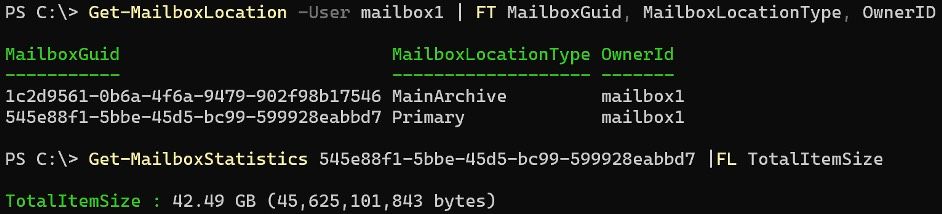
Auto-expanding archive architecture
Pro Tips
- Hold Status Increases Quotas:
Litigation hold boosts recoverable items quota to 100GB - Auto-Expanding Side Effects:
Disables mailbox restoration/offboarding - Monitor: Use M365 mailbox usage reports
Best Practices
- Check quotas quarterly via
Get-Mailbox - Enable auto-expanding archive proactively
- Address warnings at 90% capacity (
IssueWarningQuota)
Additional Resources
Documentation updated: January 2026 | Version 2.0
Comments
Please log in or register to join the discussion