
User Assigned Managed Identity (UAMI) offers operational flexibility in Azure, but enterprise deployments must carefully consider trust boundaries and blast radius when designing identity architectures.
As organizations move toward secretless authentication models in Azure, Managed Identity has become the preferred approach for enabling secure communication between services. User Assigned Managed Identity (UAMI) in particular offers flexibility that allows identity reuse across multiple compute resources such as: Azure App Service Azure Function Apps Virtual Machines Azure Kubernetes Service
While this flexibility is beneficial from an operational perspective, it also introduces architectural considerations that are often overlooked during initial implementation. In enterprise environments where shared infrastructure patterns are common, the way UAMI is designed and assigned can directly influence the effective trust boundary of the deployment.
Understanding Identity Scope in Azure
Unlike System Assigned Managed Identity, a UAMI exists independently of the compute resource lifecycle and can be attached to multiple services across:
- Resource Groups
- Subscriptions
- Environments
This capability allows a single identity to be reused across development, testing, or production services when required. However, identity reuse across multiple logical environments can expand the operational trust boundary of that identity. Any permission granted to the identity is implicitly inherited by all services to which the identity is attached.
From an architectural standpoint, this creates a shared authentication surface across isolated deployment environments.
High-Level Architecture: Shared Identity Pattern
In many enterprise Azure deployments, it is common to observe patterns where:
- A single UAMI is assigned to multiple App Services
- The same identity is reused across automation workloads
- Identities are provisioned centrally and attached dynamically
While this simplifies management and avoids identity sprawl, it may also introduce unintended privilege propagation across services.

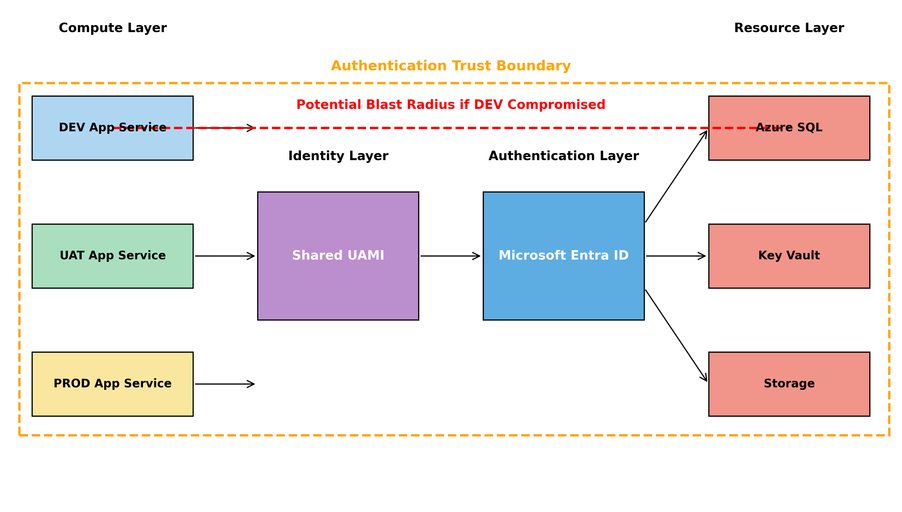
In this architecture:
- Multiple App Services across environments share the same managed identity
- Each compute instance requests an access token from Microsoft Entra ID using Azure Instance Metadata Service (IMDS)
- The issued token is then used to authenticate against downstream platform services such as:
- Azure SQL Database
- Azure Key Vault
- Azure Storage
Because RBAC permissions are assigned to the shared identity rather than the compute instance itself, the effective authentication boundary becomes identity-scoped instead of environment-scoped. As a result, any compromised lower-tier environment such as DEV may obtain an access token capable of accessing production-level resources if those permissions are assigned to the shared identity. This expands the operational trust boundary across environments and increases the potential blast radius in the event of identity misuse.
Blast Radius Considerations
Blast radius refers to the potential impact scope of a security or configuration compromise. When a shared UAMI is used across multiple services, the following conditions may increase the blast radius:
| Design Pattern | Potential Risk |
|---|---|
| Single UAMI across environments | Cross-environment access |
| Subscription-wide RBAC assignment | Broad privilege scope |
| Identity used for automation pipelines | Lateral movement |
| Shared identity across teams | Ownership ambiguity |
Because Managed Identity authentication relies on Azure Instance Metadata Service (IMDS), any compromised compute resource with access to IMDS may request an access token using the attached identity. This token can then be used to authenticate with downstream Azure services for which the identity has RBAC permissions.
Enterprise Design Recommendations: Environment-Isolated Identity Model
To reduce identity blast radius in enterprise deployments, the following architectural principles may be considered:
Environment-Scoped Identity
- Provision separate UAMIs per environment: UAMI-DEV, UAMI-UAT, UAMI-PROD
- Avoid reusing the same identity across isolated lifecycle stages
Resource-Level RBAC Assignment
- Prefer assigning RBAC permissions at:
- Resource
- Resource Group
- Instead of Subscription scope wherever feasible
Identity Ownership Model
- Ensure ownership clarity for identities assigned across shared workloads
- Identity lifecycle should be aligned with:
- Application ownership
- Service ownership
- Deployment boundary
Least Privilege Assignment
- Assign roles such as:
- Key Vault Secrets User
- Storage Blob Data Reader
- Instead of broader roles such as:
- Contributor
- Owner
Recommended High-Level Architecture
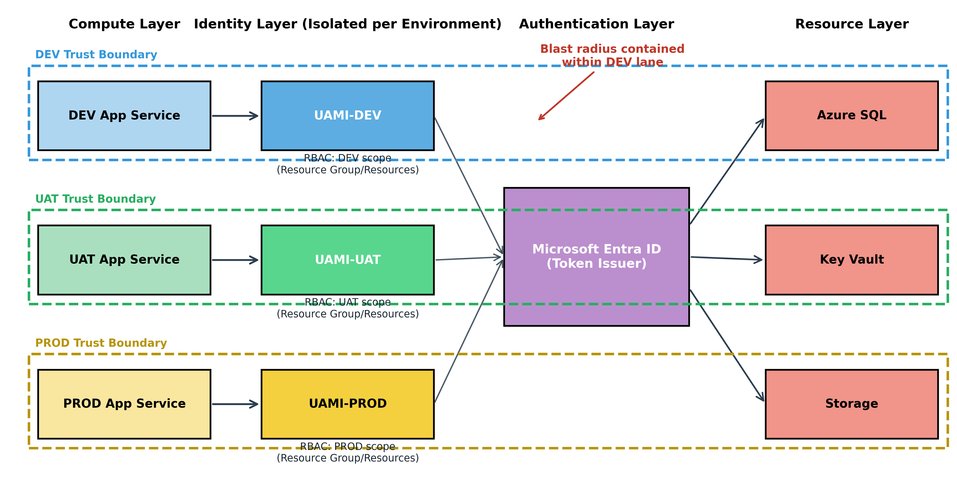
In this architecture:
- Each App Service instance is attached to an environment-specific managed identity
- RBAC assignments are scoped at the resource or resource group level
- Microsoft Entra ID issues tokens independently for each identity
- Trust boundaries remain aligned with deployment environments
A compromised DEV compute instance can only obtain a token associated with UAMI-DEV. Because UAMI-DEV does not have RBAC permissions for production resources, lateral access to PROD dependencies is prevented.
Blast Radius Containment
This design significantly reduces the potential blast radius by ensuring that:
- Identity compromise remains environment-scoped
- Token issuance does not grant unintended cross-environment privileges
- RBAC permissions align with application ownership boundaries
- Authentication trust boundaries match deployment lifecycle boundaries
Conclusion
User Assigned Managed Identity offers significant advantages for secretless authentication in Azure environments. However, architectural considerations related to identity reuse and scope of assignment must be evaluated carefully in enterprise deployments.
By aligning identity design with trust boundaries and minimizing the blast radius through scoped RBAC and environment isolation, organizations can implement Managed Identity in a way that balances operational efficiency with security governance.
Comments
Please log in or register to join the discussion