
The latest Firefox release focuses on GPU performance improvements, security enhancements, and UI refinements, while Thunderbird updates are imminent.
Mozilla has released Firefox 147, bringing significant hardware acceleration improvements for both Apple Silicon and AMD GPU users, alongside a reorganization of tab-related settings and multiple security updates. The release also lays groundwork for Thunderbird 147, which appears ready for launch.
Picture-in-Picture Changes and Tab Management
The most user-visible change in Firefox 147 affects Picture-in-Picture video playback. The feature, which first appeared in Firefox 71 on Windows and Firefox 72 on Linux and macOS, now triggers automatically when a tab moves to the background. While this behavior may appeal to users who multitask heavily, it represents a shift toward persistent video overlays that follow users across their browsing session.
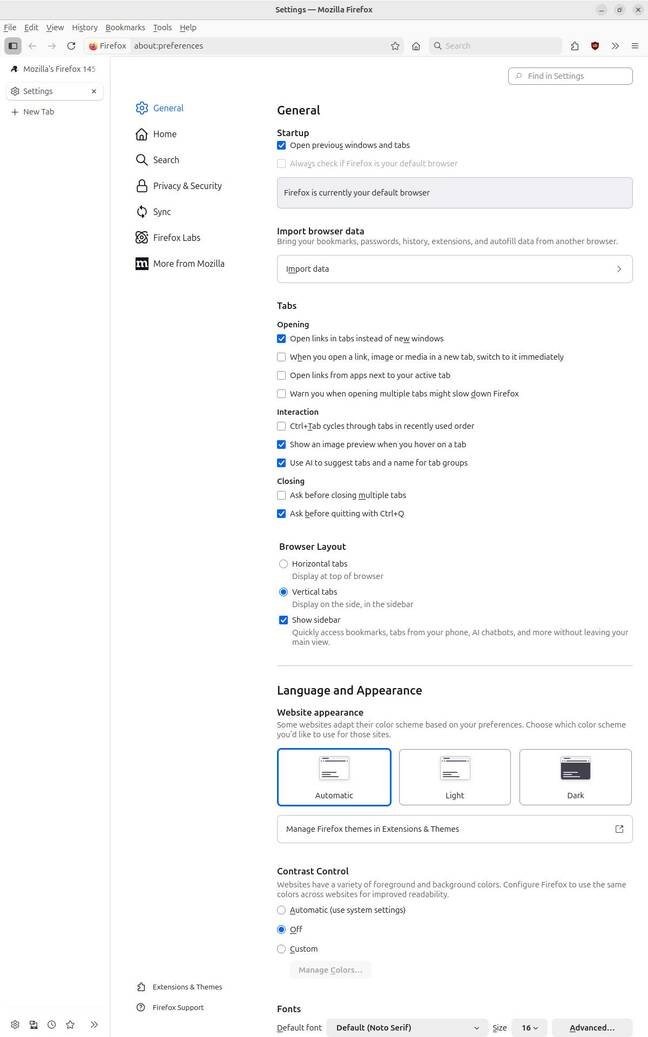
The Tabs page within Settings has been reorganized into three distinct categories: Opening, Interaction, and Closing. This restructuring consolidates preferences that were previously scattered across different sections, making it easier to configure tab behavior comprehensively. Users who frequently adjust how tabs open, behave, and close will find this organizational improvement reduces the time needed to locate specific settings.
Hardware Acceleration Updates
Firefox 147 delivers substantial improvements for specific hardware configurations. For Apple Silicon ARM64 processors, the release enhances support for WebGPU, the cross-platform standard that debuted in Firefox 141 six months ago. WebGPU originated from Apple engineering approximately nine years ago and enables hardware-accelerated 3D graphics within web applications running inside HTML5 <canvas> elements. The technology uses backend APIs including Vulkan, Metal, or Direct3D to replace the aging WebGL standard, offering better performance and more direct hardware access.
On the PC side, users with AMD GPUs receive zero-copy hardware-assisted video playback. This optimization brings Firefox's AMD GPU support to parity with Intel and Nvidia implementations, eliminating unnecessary data copying between memory spaces during video decoding. The result is reduced CPU overhead and smoother video playback, particularly for high-resolution content.
Linux and Security Enhancements
Linux users gain support for the XDG Base Directory Specification, which standardizes how applications store configuration files and user data. This integration improves Firefox's compliance with Linux desktop standards and helps keep user directories more organized.
Security updates include support for Google's Safe Browsing version 5 specification, incorporating the new Local List mode. This enhancement allows Firefox to check potentially dangerous sites against a locally stored list, improving both privacy and response times compared to server-based lookups.
Enhanced Tracking Protection receives additional restrictions when set to Strict mode. This configuration now blocks local device access attempts in addition to public internet tracking, though Mozilla is rolling this change out gradually to avoid disrupting user workflows.
AI Feature Management
The release continues Mozilla's approach to AI integration, though user control remains a point of contention. Following reports from August about excessive CPU usage from AI features, Firefox provides access to machine learning settings through the hidden about:config interface by searching for browser.ml preferences. Users who prefer to disable these features entirely can turn off all available options, though some community reports suggest these settings may re-enable after updates.
Thunderbird Update Imminent
Thunderbird 147 appears ready for release, with notes already published though the update isn't yet being offered to users. The email client's update includes two primary changes: a Show Full Path option for better file location visibility and optional folder-name localization for international users.
System Requirements
Firefox 147 maintains existing system requirements, needing Windows 10 or macOS 10.15 minimum, or recent Linux distributions. No additional hardware requirements have been introduced.
Developer Documentation
Mozilla provides comprehensive release notes for developers detailing API changes, deprecations, and new capabilities. These documents cover WebGPU improvements, security policy updates, and changes to browser APIs that affect extension developers and web application builders.
The release represents Mozilla's continued focus on hardware performance optimization while maintaining user privacy controls and providing gradual feature rollouts for controversial additions like AI integration.
Official Firefox Release Notes WebGPU Specification XDG Base Directory Specification Thunderbird 147 Release Notes
Comments
Please log in or register to join the discussion