
Mozilla's Firefox 149 beta brings a visible split view feature for viewing two web pages side by side, though the functionality has been quietly available in recent versions and requires manual activation.
Mozilla's Firefox 149 beta introduces a highly visible split view feature that allows users to view two web pages side by side within a single browser window, though the functionality has actually been available in recent versions and simply required manual activation.
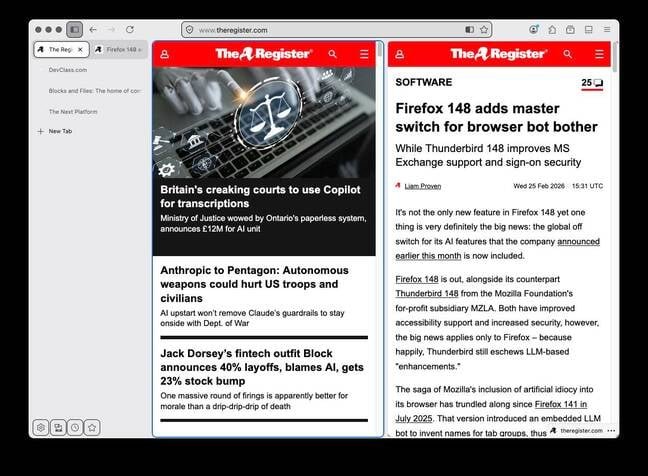
The split view feature, which lets users drag a separator between two tabs to adjust their relative widths, has been in testing for some time but is now enabled by default in the Firefox 149 beta. Users can select two tabs using Ctrl (or Cmd on Mac), right-click, and choose "Open in Split View" to activate the feature.
However, there's a significant caveat for beta testers: running the beta version automatically picks up your current Firefox profile, and by default Firefox won't open a profile that's been modified by a newer version. This creates a potential lock-in problem where users cannot easily revert to their stable Firefox installation without creating a new profile or using command-line switches like --allow-downgrade.
The good news is that users don't actually need to wait for Firefox 149 or risk their current setup to try split view. The feature became available in Firefox 146 in early December 2025 and remains accessible in Firefox 147 and 148. To enable it in these versions, users can navigate to about:config, search for browser.tabs.splitView.enabled, and change the setting from false to true.
Once activated, the split view works quite well. The two panes scroll independently, share a single URL bar that updates based on which pane is active, and allow individual tab management. The tab buttons appear side by side in the tab bar, and users can close tabs individually with two close buttons available per pane.
Firefox 149 also includes other improvements such as hardware-accelerated PDF rendering, expanded address autofill support in more countries, performance tweaks for WebGL on Windows, and easier sharing capabilities. The browser is scheduled for release on March 24, 2026.
This development could pose challenges for specialized browsers like Zen, which we examined in September 2024. Zen is a Firefox fork with built-in tiling that can display up to four panes simultaneously and offers more advanced layout options including 2×2 arrangements. While Firefox's split view currently only supports two side-by-side panes, Mozilla's implementation brings core tiling functionality to the mainstream browser without requiring users to learn new tools or adopt alternative environments.
For power users who already utilize tiling window managers like Rectangle on macOS or the Pop!_OS COSMIC desktop, Firefox's built-in split view may offer limited additional value. However, for the majority of users who spend most of their online time in the browser, this feature provides convenient multitasking capabilities without the learning curve of dedicated tiling environments.
The arrival of split view in Firefox represents a significant step toward bringing desktop productivity features into the browser experience, though there remains room for improvement in areas like drag-and-drop link handling between panes and more flexible layout options.
Comments
Please log in or register to join the discussion