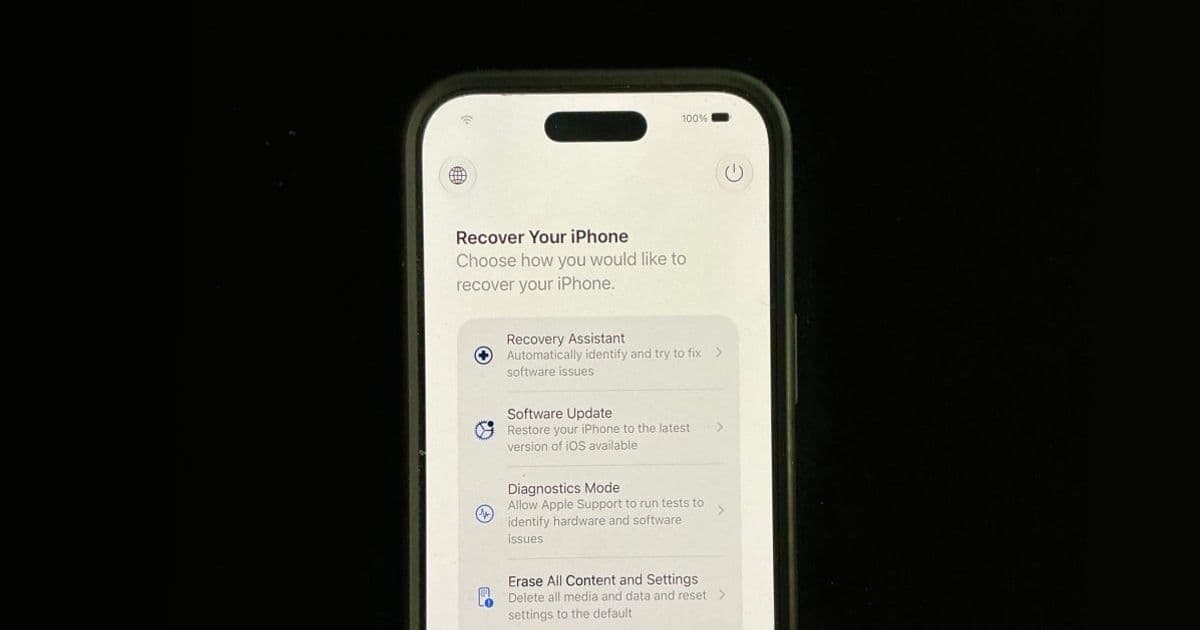
Apple is bringing a Mac-style recovery environment to iPhone and iPad, reducing how often developers, testers, and support teams need a computer to rescue a failed update or beta install.
Platform update
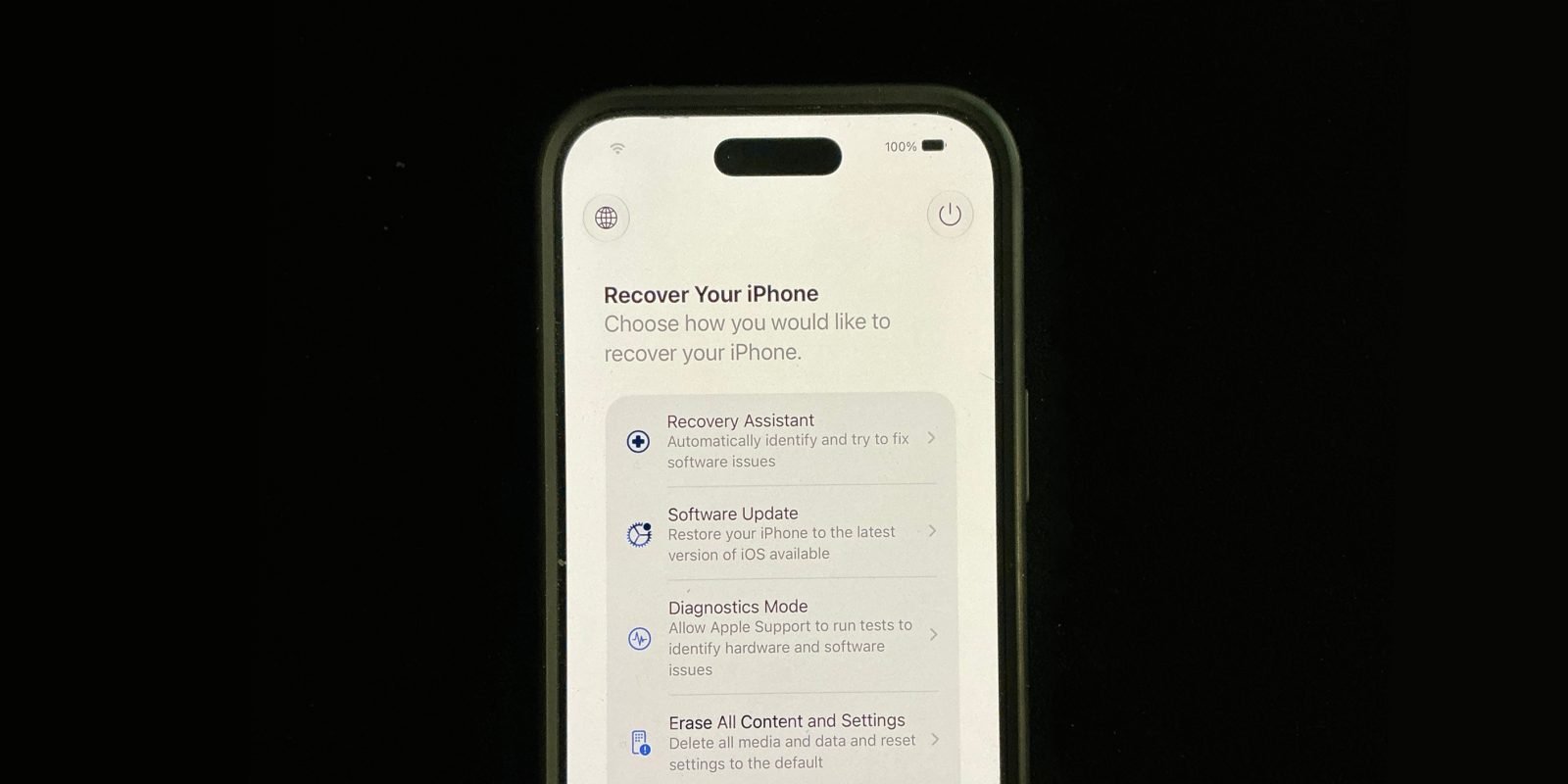
iOS 27 and iPadOS 27 introduce a new on-device recovery mode for iPhone and iPad. Instead of requiring the device to boot the full operating system, the device can start into a smaller recovery interface with repair-focused tools. The flow is closer to Apple Silicon Mac recovery than the older iPhone recovery process that depended heavily on Finder, iTunes, or the Apple Devices app on Windows.
The entry path is intentionally hardware-level. Shut down the iPhone or iPad, hold the side or top button while powering it back on, keep holding through the Apple logo, then wait for a progress bar and the recovery UI. From there, iOS 27 exposes options such as Recovery Assistant, Software Update, Diagnostics Mode, Erase All Content and Settings, and the traditional Recovery Mode path. The screen also shows battery percentage and can automatically join known Wi-Fi networks, which matters because update repair is often network-bound.
This is available as part of the iOS 27 SDK and iPadOS 27 SDK cycle, with day-to-day development still centered on Xcode 27 for Apple-platform builds. The platform requirement is straightforward from an app perspective: the feature exists on iPhones and iPads that can install iOS 27 or iPadOS 27. It is not an app-facing API, and developers should not assume they can invoke it, customize it, or detect every recovery action from application code.
The practical change is where failure recovery happens. Current Apple support flows for restore problems still describe connecting an iPad to a computer, then using Finder on macOS or the Apple Devices app on Windows to update or restore the device. Apple documents that older computer-assisted path in its iPad recovery support article. iOS 27 does not remove those deeper recovery routes, but it creates a first-line repair environment on the device itself.
For developers, that distinction matters. DFU and computer-based restore workflows remain relevant for severe firmware or provisioning failures. The new mode targets the more common ugly middle: a failed software update, a beta install that loops, a device that reaches the Apple logo but cannot finish booting, or a test iPad that needs diagnostics before anyone finds the one Mac in the office with the right cable.
Developer impact
Most app teams will not need code changes just because iOS 27 has a new recovery mode. The impact is operational. If you maintain iOS and Android apps, especially with a shared codebase, this changes how you think about beta testing, device farms, QA runbooks, and support instructions.
The biggest win is for teams running prerelease OS builds. Mobile developers already accept that early iOS and iPadOS betas can break push notification behavior, background execution, WebKit quirks, entitlement checks, database migrations, and simulator parity. The scary failure mode is not a broken API. It is a physical device that can no longer boot after an update. A self-contained Software Update recovery path lowers the cost of using real hardware during the iOS 27 beta window.
That does not make beta testing risk-free. It changes the failure budget. A tester with a known Wi-Fi network, enough battery, and the recovery procedure can attempt an OS reinstall or repair without immediately connecting to macOS Finder or a Windows machine. For distributed teams, that is a real reduction in downtime. For enterprise teams, it means support docs can separate user-recoverable update failures from cases that still need IT, MDM intervention, or Apple service.
Cross-platform teams should treat this as an Apple-side platform capability, not as a shared app feature. Android already has its own recovery, fastboot, sideload, OEM rescue tools, and vendor-specific diagnostic flows. Those flows vary by device maker and carrier image. iOS 27 is moving in the opposite direction: a more uniform recovery surface across supported iPhones and iPads. If your QA plan covers both platforms, do not try to normalize the procedures into one generic “mobile recovery” document. Keep platform-specific steps clear and short.
For React Native, Flutter, Capacitor, Kotlin Multiplatform, Unity, and .NET MAUI teams, the important point is that the shared framework does not own this layer. Your JavaScript bundle, Dart isolate, WebView shell, Kotlin shared module, or C# app code will not run in this recovery environment. Recovery mode sits below the app runtime. That means no custom telemetry event fires from your app when the user repairs iOS through this UI, and no shared abstraction can paper over the restore behavior.
The testing implications are still concrete. If your app uses SQLite, Core Data, Realm, encrypted local storage, keychain items, background uploads, or resumable downloads, you should test interrupted OS update scenarios once iOS 27 betas are part of your matrix. A recovery repair that reinstalls the OS is not the same as deleting and reinstalling your app. App containers, keychain persistence, managed app configuration, and iCloud restoration can each behave differently depending on whether the device updated, restored, erased, or recovered from backup.
This also intersects with MDM and enterprise deployment. A corporate iPad used as a kiosk, point-of-sale terminal, field-service tool, classroom device, or warehouse scanner may be supervised, single-app locked, and remote-managed. If that device enters recovery mode, the support question becomes policy-driven: can the local user run Recovery Assistant, should they erase the device, and how does the device re-enroll after recovery? Teams using Apple Business Manager, Apple School Manager, or an MDM provider should test the iOS 27 path before updating fleets.
There is also a UX support angle. Apps often receive blame when a platform update goes badly. A user installs iOS, sees a boot loop, then later opens a support ticket against the last app they used. Support teams for high-volume consumer apps should update macros to distinguish app crashes from OS recovery events. Ask for the iOS version, whether the device was updated recently, whether the recovery screen appeared, and whether the user chose Software Update, Erase All Content and Settings, or classic Recovery Mode.
From the SDK side, keep your build assumptions conservative. Xcode 27 and the iOS 27 SDK are where you validate compile-time issues, new warnings, simulator behavior, and deployment target interactions. This recovery feature is not a reason to raise your minimum deployment target. If your app still supports iOS 16, iOS 17, iOS 18, iOS 26, or a broad enterprise range, your recovery documentation can mention iOS 27 behavior while your binary continues supporting older systems.
Migration
Start by updating internal runbooks. Add a dedicated iOS 27 and iPadOS 27 recovery section instead of editing old DFU instructions in place. The new path begins from a powered-off device and uses a long hold on the side or top button, while classic recovery and DFU procedures use different button timing and often require a cable. Mixing those steps is how testers lose time.
For development teams, the migration checklist should include Xcode, devices, CI, and support documentation. Install Xcode 27 on a non-primary machine first if your release pipeline is still shipping production builds with the prior stable Xcode. Keep CI pinned until your dependencies support the iOS 27 SDK, then test native modules and build scripts. React Native projects should check native dependency compatibility against their current React Native environment setup. Flutter teams should verify their iOS toolchain against Flutter’s iOS deployment docs. Capacitor teams should review the current iOS guide, especially if plugins touch native entitlements, background modes, or WebKit configuration.
Next, refresh physical-device testing. Simulators are useful for SDK warnings and UI regression checks, but they cannot represent device recovery. Keep at least one non-critical iPhone and one non-critical iPad on iOS 27 or iPadOS 27 during beta evaluation. Confirm that your team can enter recovery mode, exit it without erasing when appropriate, run Software Update recovery, and identify when a computer-based restore is still required.
For apps with local persistence, build a recovery-adjacent test plan. Install a production build, sign in, create offline data, start a large sync, then update the device OS. After recovery or repair, check whether pending uploads resume correctly, whether auth tokens remain valid, whether encrypted stores open, and whether background tasks recover without duplicate work. This is especially relevant for healthcare, finance, field operations, messaging, travel, and productivity apps where local state loss is expensive.
For cross-platform teams, mirror the documentation style across iOS and Android while keeping the commands separate. Android recovery, ADB, OEM bootloader unlocking, and sideload paths are not equivalent to iOS 27 recovery mode. Put iOS 27 instructions under an Apple heading and Android instructions under a device-family heading. Shared mobile teams move faster when nobody has to translate “recovery” across two different platform models during an incident.
For support and IT teams, define escalation boundaries. A reasonable tier-one instruction might be: charge the device, connect to known Wi-Fi, enter iOS 27 recovery mode, run Recovery Assistant or Software Update, then restart normally. A tier-two instruction can cover Diagnostics Mode, supervised-device behavior, MDM re-enrollment, and when to erase. A final tier should still cover Finder, Apple Devices on Windows, classic Recovery Mode, DFU, and Apple service.
The migration is less about adopting a new API and more about retiring bad habits. Do not tell every user with an update failure to find a laptop first. Do not treat Erase All Content and Settings as the first fix. Do not assume a recovered device has the same app state as a clean install. iOS 27 gives Apple devices a more capable self-repair path, and mobile teams should respond by making their testing and support processes more precise.
Comments
Please log in or register to join the discussion