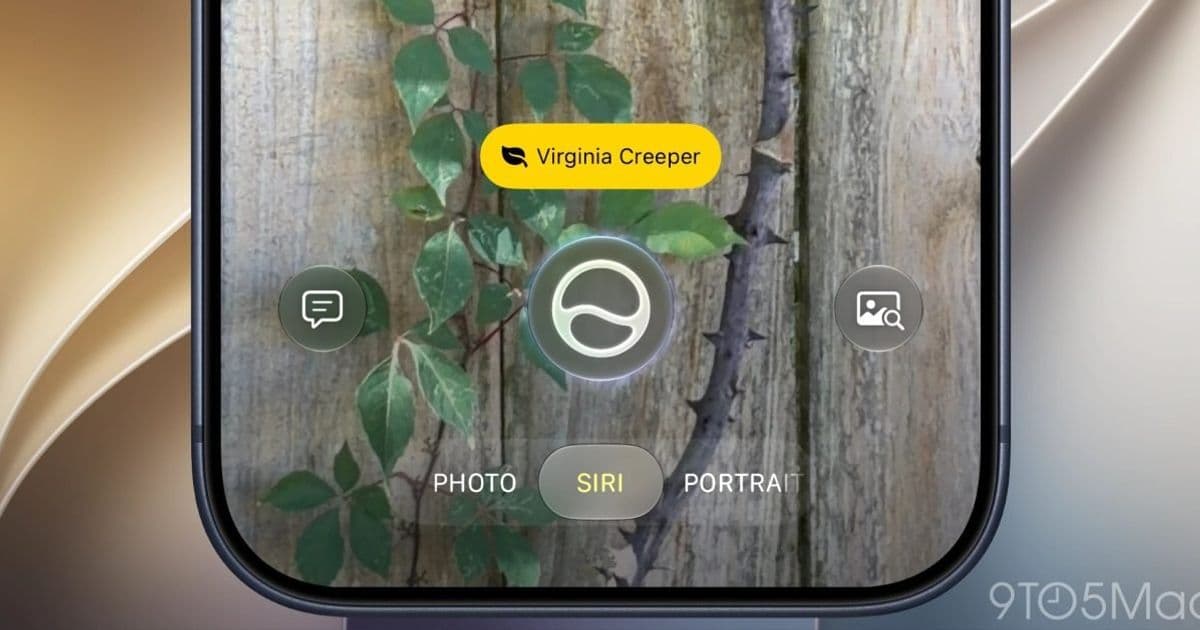
Apple is folding Visual Intelligence into the Camera app as a Siri shooting mode in iOS 27, which means long-pressing Camera Control no longer yanks you out of your camera workflow. The change is small on the surface, but it points to a clearer model for how the iPhone's hardware button behaves and what developers can expect when integrating with it.
Apple is reworking how the Camera Control button behaves in iOS 27, currently in developer beta, and the result cleans up one of the more frustrating interaction quirks introduced over the past two releases. Visual Intelligence, the camera-driven lookup feature that shipped with Apple Intelligence, is no longer a separate system surface invoked by a long-press. Instead it becomes Siri mode, a shooting mode inside the Camera app itself.
If you maintain a camera-adjacent app on iPhone, or you just use the device daily, the practical difference is immediate. The behavior change is worth understanding both as a user and as someone shipping software that touches the camera pipeline.
What actually changed
In iOS 18 and iOS 26, Camera Control had a split personality. A quick click launched the Camera app or whatever photography app you assigned to it. A long-press, by contrast, launched Visual Intelligence, which ran as its own resource-heavy interface layered over the system rather than as a normal app. Those are two genuinely different destinations bound to one piece of hardware, separated only by how long your finger lingered.
The failure mode was predictable. Press a half-second too long when you meant to grab a quick shot, and Visual Intelligence would take over. Getting back to the actual camera meant dismissing a UI that did not feel like an app and did not have an obvious exit. For a button whose entire value proposition is speed, that round trip undercut the point.
iOS 27 collapses the two destinations into one. Long-pressing Camera Control still opens Siri mode, but Siri mode now lives as a mode within the Camera app, sitting alongside Photo, Video, Portrait, and the rest. If you land there by accident, you swipe to Photo mode the same way you switch between any other capture modes. There is no separate surface to dismiss and no scramble to find your way home.
Why the developer impact is bigger than it looks
The surface story is an ergonomics fix. The underlying story is about a more coherent mental model for the camera, and that matters if you build anything that integrates with capture.
Visual Intelligence as a standalone system feature was awkward to reason about. It intercepted a hardware gesture, presented its own UI, and existed outside the normal app lifecycle that developers understand through AVFoundation and the camera APIs. Moving that functionality into the Camera app as a mode brings it back inside familiar territory. The camera is the camera, and AI-driven lookup is one of the things it can do, not a parallel universe that hijacks the button.
For apps that register as the Camera Control launch target, the change reinforces a pattern Apple started in iOS 26: the button is a fast path to a photography app, full stop. The long-press ambiguity that competed with that promise is gone. If your app is the assigned target, users can trust that Camera Control means your app, not a coin flip between your app and a system feature.
This also clarifies how to think about Siri-driven camera features going forward. Rather than treating visual lookup as a bolted-on capability, Apple is positioning it as a capture mode, which is a more natural integration point. It suggests that future camera intelligence features will arrive through the camera surface rather than as separate system intercepts, and that is a more stable foundation to design around.
Cross-platform context
If you ship on both iOS and Android, the comparison is instructive. Android has long treated camera shortcuts as configurable launches, with double-press power button gestures and assignable shortcut keys that open a camera app rather than a distinct AI surface. The Pixel line layers Google Lens and other intelligence features inside the camera experience instead of binding them to a hardware gesture that competes with plain capture.
Apple's iOS 27 approach moves closer to that philosophy. The hardware control launches the camera, and the AI features live inside the camera as modes. For teams maintaining a shared design language across platforms, this convergence reduces the special-casing you need. The iOS-specific behavior of a long-press dumping users into a separate intelligence surface was the kind of platform quirk that forced divergent documentation and support paths. Removing it lets the iOS and Android camera entry points behave more alike.
Platform requirements and what to test
Siri mode in the Camera app is part of Siri AI, which means it depends on Apple Intelligence support and the associated device and regional availability. As with Visual Intelligence before it, expect the feature to be gated to hardware that meets the Apple Intelligence requirements rather than the full installed base of iOS 27 devices. Plan your testing accordingly: the Camera Control long-press behavior will differ between Apple Intelligence-capable hardware and older devices that still run iOS 27 without it.
If your app assigns itself as the Camera Control target, verify the launch behavior against the iOS 27 beta now. The single-destination model means a quick click and a long-press should both resolve cleanly, but confirm that your app handles the launch path the way you expect across the beta cycle. Apple's developer documentation for Camera Control integration is the place to confirm the current entitlements and APIs as the betas progress.
The broader takeaway is that Apple is simplifying rather than expanding what Camera Control does. After iOS 26 pared the button down to a dedicated camera launcher and iOS 27 folds Visual Intelligence into a capture mode, the hardware control has a clearer job than it did at launch. For developers, predictable behavior is worth more than clever behavior, and this is a move toward predictable.
Comments
Please log in or register to join the discussion