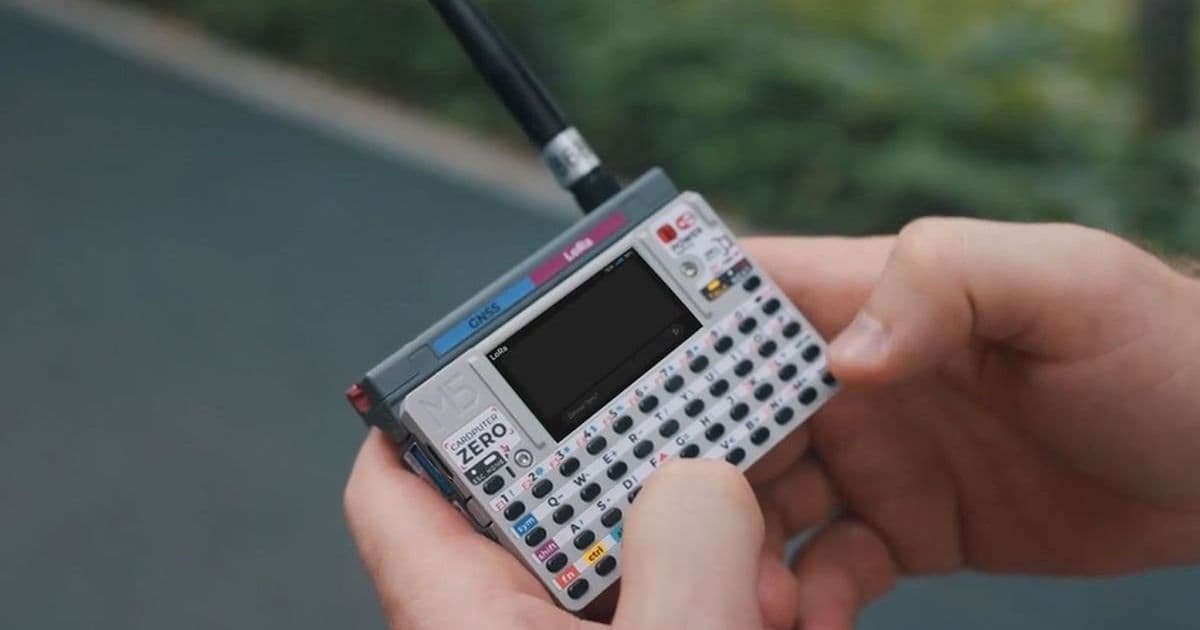
The new CardputerZero packs a Raspberry Pi Compute Module 0, a 1.9‑inch LCD and a 46‑key keyboard into a device the size of a business card, offering a full Linux environment in a truly portable form factor.
 )
)
M5Stack has just announced the CardputerZero, a pocket‑sized computer that finally combines a Raspberry Pi Zero 2W‑class processor with an integrated display, keyboard and battery. The device measures only 85 × 54 × 23 mm (3.35 × 2.13 × 0.91 in) and fits comfortably in a pocket or small bag, yet it runs a full Linux stack.
What’s under the hood?
- Compute Module 0 – Based on the Broadcom BCM2710A1 quad‑core Cortex‑A53, the same chip that powers the Raspberry Pi Zero 2W.
- Memory – 512 MiB LPDDR2, enough for the default Raspberry Pi OS Lite image and most headless applications.
- Connectivity – Wi‑Fi 4 (802.11n) and Bluetooth 4.2 LE built into the module, plus a 10/100 Mbps Ethernet port on the carrier board.
- Storage – A 32 GiB microSD card is included with the standard model; the Lite version ships without storage so you can add your own.
- Display – 1.9‑inch TFT, 320 × 240 px, 262 K colour, driven by the onboard GPU.
- Keyboard – 46‑key matrix layout (compact but functional for quick edits and command‑line work).
- I/O – HDMI 1.4 (1080p @ 30 fps), two USB‑C 2.0 ports, a USB‑A host, 3.5 mm audio jack, IR TX/RX, and breakout pins for I²C, SPI, UART, GPIO and 5 V power. This makes it easy to attach LoRa modules, Grove sensors or any M5Stack accessory.
- Battery – 1500 mAh Li‑ion cell provides several hours of typical use; a 1 W speaker adds basic audio feedback.
Why the shift from ESP32 to Raspberry Pi?
Previous Cardputer models used ESP32 chips, which are excellent for low‑power IoT tasks but lack the RAM and CPU horsepower to run a full Linux distribution. By moving to a Compute Module, M5Stack opens the door to:
- Standard Raspberry Pi OS – developers can flash the same images they use on a Pi Zero, including the Raspberry Pi OS Desktop, Ubuntu Server for ARM, or custom Yocto builds.
- Package ecosystem – apt‑based package managers work out of the box, letting you install
git,python3,node, or any compiled binary available for ARMv8. - Cross‑platform tooling – the same SDKs you use for Raspberry Pi (e.g., the Raspberry Pi Pico SDK for native C/C++ or the
raspberrypi-picoDocker images) can be leveraged for rapid prototyping. - Better performance – the quad‑core Cortex‑A53 offers roughly 3× the compute of the ESP32‑S2 used in the Cardputer Adv, making Python scripts, small web servers, or even lightweight GUI apps feel responsive.
Developer impact
If you already maintain a codebase that targets Raspberry Pi Zero or other ARMv8 SBCs, the CardputerZero can act as a drop‑in hardware platform. The only adjustments you’ll likely need are:
- Screen handling – the 320 × 240 LCD is driven via the DPI interface; most Linux frame‑buffer tools (e.g.,
fbset,fbi) work without modification, but you may want to install thekmscubedemo to verify GPU acceleration. - Keyboard mapping – the matrix keyboard appears as a standard HID device, but keycodes differ from a full‑size keyboard. A quick
xmodmaporsetkeycodestweak resolves any quirks. - Power management – the on‑board PMIC can be accessed through
/sys/class/power_supplyto monitor battery level and trigger graceful shutdowns.
Migration path for existing Cardputer owners
Current Cardputer owners who have built projects around the ESP32 can still reuse many of their peripheral designs. The new carrier board exposes the same 2‑mm pitch GPIO header, so you can plug in existing Grove or M5Stack modules. To move a firmware project:
- Port the code to Linux – replace ESP‑IDF calls with standard POSIX APIs (e.g.,
open(),read(),write()). For sensor drivers, the Linux I²C and SPI subsystems already provide generic interfaces. - Re‑flash the OS – download the latest Raspberry Pi OS Lite image from the official site, write it to the supplied microSD card, and boot.
- Install required packages –
sudo apt update && sudo apt install python3-pip gitetc., then pull your project repository. - Test I/O – verify that the GPIO pins line up with the CardputerZero header using
gpioinfofrom thelibgpiodtools.
Pricing and availability
M5Stack is running a Kickstarter campaign that started at $79 for the Lite variant and $119 for the full‑spec model. The standard version includes the 8 MP camera, gyroscope, accelerometer and a pre‑installed 32 GiB microSD card. The Lite version omits the camera, motion sensors and the SD card, making it a lighter entry point for developers who only need compute and I/O.
What this means for the pocket‑computer market
The CardputerZero shows that a true Linux environment can fit inside a business‑card‑sized chassis without sacrificing connectivity or expandability. For developers who need a portable testbed for Python scripts, MQTT brokers, or tiny web services, the device offers a ready‑made platform that eliminates the need for a separate SBC and external peripherals.
For more details, visit the official M5Stack CardputerZero Kickstarter page and the Raspberry Pi Compute Module documentation.
Comments
Please log in or register to join the discussion