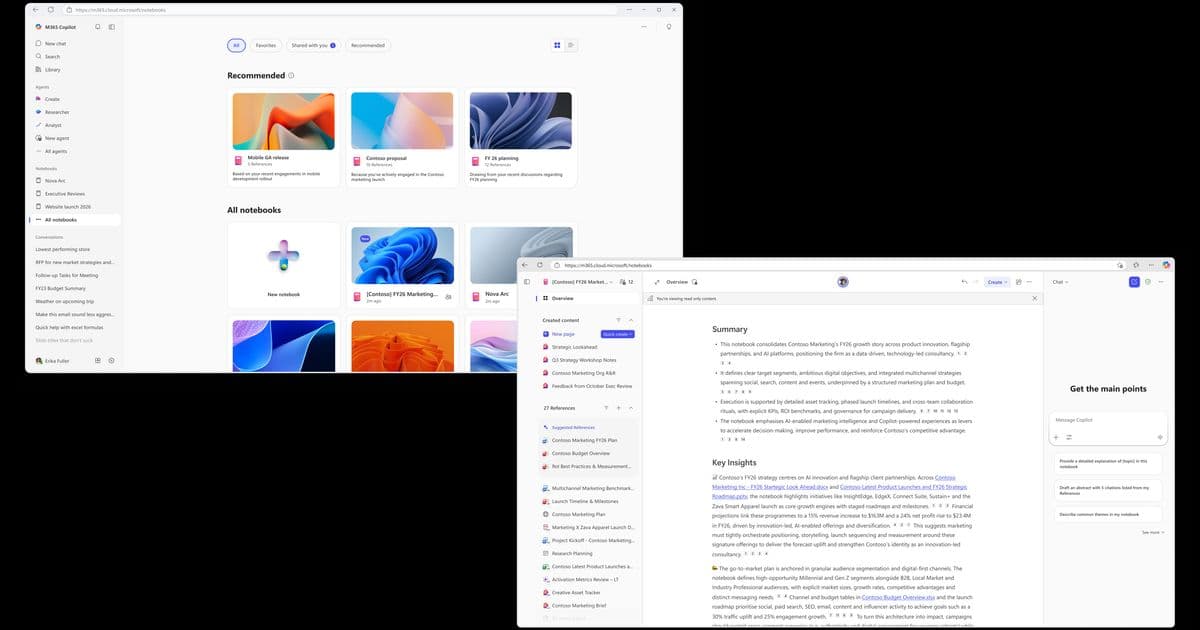
Microsoft has launched a redesigned Copilot Notebooks experience with a three-column layout, expanded reference support, and new AI-powered features like Audio Overview and Study Guide, making it easier for teams to collaborate on projects and research topics.
Microsoft has unveiled a significant update to Copilot Notebooks, transforming them into a more powerful and collaborative workspace for Microsoft 365 users. The refreshed experience, now generally available, introduces a redesigned three-column layout and enhanced AI capabilities that make it easier to gather, analyze, and share information across projects and teams.
What's New in Copilot Notebooks
The updated Copilot Notebooks feature a streamlined three-column design that brings references, Copilot Pages, and chat conversations together in one seamless view. This layout allows users to maintain context while working across different content types without breaking their workflow.
One of the most notable improvements is the expanded support for reference materials. Users can now add Word documents, PowerPoint presentations, Excel spreadsheets, OneNote pages, PDFs, Copilot Pages, and even entire SharePoint sites and folders to their notebooks. The system automatically keeps these references up to date when source files change, eliminating the need to manage separate copies.
A new Overview page provides instant summaries of all references in a notebook, surfacing key insights, topics, and themes. This page evolves with your notebook and can be refreshed with a single click, ensuring your understanding stays current without manual effort.
The "Quick create" feature transforms raw content into structured artifacts like audio overviews, flash cards, quizzes, and drafts in seconds. Additionally, Copilot chat in notebooks now provides access to specialized agents such as Researcher and Designer, enabling users to produce visual designs, infographics, and detailed reports directly within their workspace.
Enhanced Collaboration Features
Microsoft has made Copilot Notebooks shareable with teammates, enabling teams to build common understanding around the same source material. This feature is particularly valuable for maintaining shared knowledge bases, organizing project information, and supporting cross-functional collaboration.
Practical Applications for Teams
The updated notebooks offer several proven workflows for different use cases:
Project Management: Teams can create a central hub for new projects by bringing together relevant files and using the Overview page to quickly understand key points. The Audio Overview feature allows team members to listen to project summaries on the go.
Recurring Reporting: For regular updates like weekly reports or business reviews, notebooks serve as a steady source of truth. Teams can reuse the same notebook structure, add new inputs as they arrive, and rely on Copilot to highlight changes, identify patterns, and produce consistent summaries.
Focused Research: When working on specific tasks like academic papers or case analyses, notebooks provide dedicated spaces to collect materials, ask targeted questions, and keep reasoning tied to a single goal. The curated references help minimize hallucinations and ensure reliable responses.
Skill Development: For learning new topics or technologies, notebooks can serve as personal research hubs, bringing together articles, reports, and meeting notes. The Quick create options help users learn through topic pages, quizzes, and study plans.
Getting Started
To access the updated Copilot Notebooks, users need a Microsoft 365 Copilot license and an active SharePoint or OneDrive license. The experience is available through the Microsoft 365 Copilot app on web, Windows, Mac, and mobile, as well as the OneNote app on Windows.
Users can create their first notebook by clicking "New Notebook," adding references, and engaging with Copilot through questions, summaries, or content generation. The shareable nature of notebooks makes it easy to collaborate with colleagues and build shared understanding.
Availability and Requirements
The updated experience is now generally available to commercial Microsoft 365 users with work or school accounts. However, it remains unavailable to Microsoft 365 Personal, Family, and Premium subscribers, though these users can still access the original notebook experience.
Microsoft encourages users to provide feedback through the Help > Feedback option in OneNote or the feedback menu in the Microsoft 365 Copilot app, helping to shape future improvements to the platform.
This update represents Microsoft's continued investment in making AI-powered collaboration more accessible and effective for enterprise users, addressing the growing need for tools that can handle complex, long-term projects across distributed teams.
Comments
Please log in or register to join the discussion