Microsoft is rolling out Copilot Notebooks to all Microsoft 365 Education A1, A3, and A5 licenses, with the Study Guide feature reaching general availability for both education and enterprise tenants starting June 11. The move extends Copilot's footprint into seats schools already pay for, and it raises familiar questions about provider lock-in, admin controls, and how Microsoft's AI bundling strategy compares to Google's parallel push in classrooms.
Microsoft just closed a gap that education customers had been asking it to close. Copilot Notebooks, the AI-powered workspaces that pull reference materials into a single context for Copilot to reason over, are now extending to Microsoft 365 Education licenses rather than sitting behind separate commercial Copilot SKUs. Alongside that, the Study Guide feature inside Notebooks reached general availability for both education and enterprise tenants on June 11, 2026.
For IT decision-makers, the headline is less about the feature set and more about distribution. Microsoft is putting Copilot capability into A1, A3, and A5 seats that institutions already license. That changes the cost calculus of AI in the classroom, and it shapes how this compares to what Google and others are offering in the same accounts.
What changed
Copilot Notebooks are subject-scoped or project-scoped workspaces. A student or study group drops in source material, a teacher's PDF, last week's slides, a Word document of notes, and Copilot grounds its responses in those references rather than the open internet. The new piece is that this now flows to Microsoft 365 Education A1, A3, and A5 users through the Microsoft 365 Copilot web and desktop apps. Microsoft expects availability in education tenants within roughly two weeks of the announcement, with OneNote support arriving after that. Admins can point users to aka.ms/copilotnotebooks to get started.
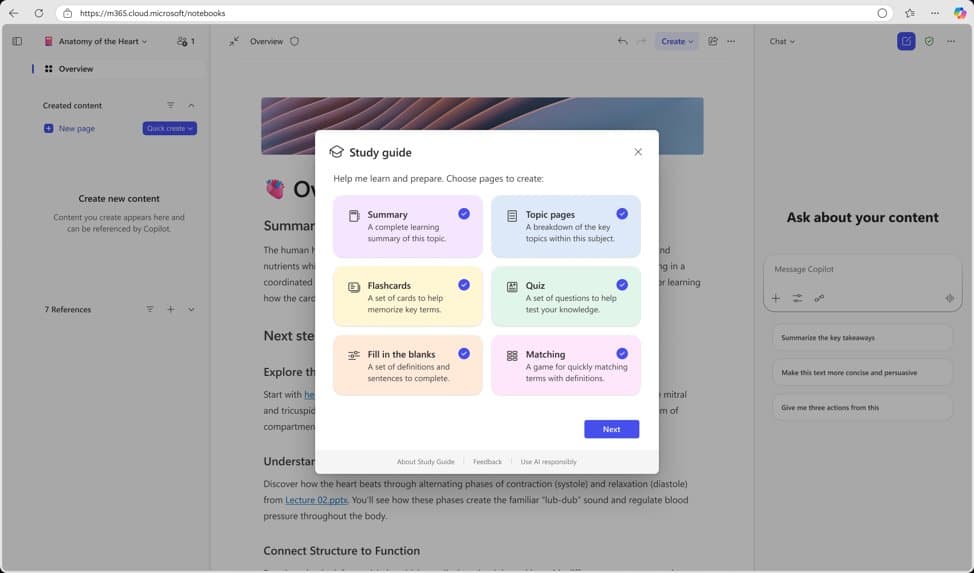
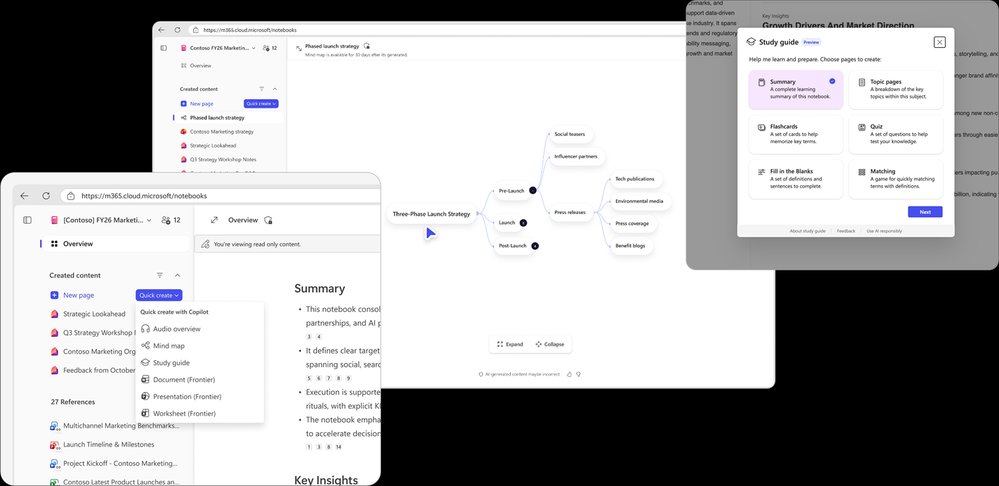
Study Guide is the more substantive functional addition. It reads across the references a learner provides, identifies key ideas, and generates a multi-page interactive study companion inside the notebook. The output spans three learning phases. The understand phase produces a summary page (overview, why the topic matters, key topics, glossary, common misconceptions) and topic pages that act like mini-chapters with worked examples and citations. The practice phase generates flashcards, fill-in-the-blank exercises, and matching activities. The test phase builds a Microsoft Forms-powered quiz with explanations for multiple-choice answers, and results stay private to the learner unless they choose to share.
The design choice that matters most for institutional trust is grounding. Study Guide does not pull random facts from the web. Summary and topic pages cite back to the original source materials, so a student can trace any claim to the document it came from. Microsoft is framing this as an AI literacy mechanism, turning citation-checking into a habit. Study Guide supports 21 languages at launch, including Arabic, both Chinese variants, French, German, Japanese, Korean, Spanish, Ukrainian, and Vietnamese.
What admins actually need to configure
The deployment story is lighter than most Copilot rollouts, but it is not zero. Study Guide requires no separate deployment once Copilot Notebooks are present in the Microsoft 365 Copilot app. The gating happens at the identity layer. Student accounts need the correct Age Group set in Microsoft Entra ID, and K-12 students aged 13 to 17 require Microsoft 365 Copilot Chat to be enabled by an IT admin before they can touch Notebooks or Study Guide. Study Guide is restricted to users aged 13 and up.
This is the kind of detail that determines whether a rollout is smooth or generates a wave of help-desk tickets in week one. Entra ID Age Group attributes are frequently incomplete in education tenants that provisioned accounts through SIS integrations or bulk imports years ago. Institutions planning to enable this should audit their Entra age data before pointing students at the feature, because an unset or incorrect age group will silently block access.
On governance, Microsoft is making the data-handling commitments that education procurement teams now expect. Study Guide pages are private by default, stored in the learner's own Microsoft 365 notebook, and the learner can edit or delete them. Prompts and outputs are not used to train AI models. Quiz results are private unless shared. Microsoft is also explicit that Study Guide quizzes are self-checking tools, not gradebook instruments, which keeps the feature on the practice side of the assessment line.
Provider comparison and the bundling strategy
The strategic context here is the competition for AI mindshare inside accounts that schools already hold. Microsoft and Google have spent two decades fighting over education seats, and AI is the current front.
Microsoft's play is to fold AI into existing A-series licensing rather than charge a per-seat Copilot add-on for these specific Notebooks and Study Guide capabilities. That is a meaningful difference from the enterprise side, where Microsoft 365 Copilot has historically carried a substantial per-user monthly premium. By delivering Notebooks and Study Guide to A1, A3, and A5 holders, Microsoft reduces the procurement friction that usually stalls AI adoption in budget-constrained districts and universities. The marginal cost to the institution is administrative, not financial.
Google has been moving on a similar axis with Gemini features inside Google Workspace for Education and the NotebookLM product, which shares conceptual DNA with Copilot Notebooks: ground an AI assistant in a fixed set of user-supplied sources and generate study artifacts, audio overviews, and summaries. The competitive question for an institution standing up AI tooling is no longer which vendor has the feature, because both now have grounded notebook experiences. It is which vendor the institution is already standardized on for identity, storage, and productivity. Migration cost between these ecosystems is high, and AI features deepen that lock-in by accumulating user-generated study material inside one vendor's storage and identity fabric.
For mixed-environment institutions, and many are mixed, running Microsoft 365 for staff and Google Workspace for students or vice versa, this announcement is a reason to revisit which ecosystem owns the student-facing AI experience. The grounding-and-citation model is now table stakes on both sides, so the decision should turn on identity management overhead, existing content gravity, and the language and accessibility coverage each vendor offers. Microsoft's 21-language launch list is broad, and that breadth matters for institutions serving multilingual student populations.
{{IMAGE:3}}
Business impact
Three practical takeaways for institutional leaders.
First, the cost of saying yes to classroom AI just dropped for Microsoft-standardized schools. When a capability arrives inside seats you already license, the internal conversation shifts from budget approval to enablement policy. That accelerates timelines, and it means governance frameworks need to exist before the feature shows up, not after.
Second, the Entra ID age-group dependency is the real deployment work. Institutions that treat this as a flip-the-switch change will hit access failures. The smart sequence is to validate Entra age data, confirm Copilot Chat enablement for the 13-to-17 cohort, and only then communicate availability to students and faculty.
Third, the lock-in dynamic deserves a clear-eyed read. Grounded notebooks accumulate student work, study sets, and course context inside one provider's storage. That is genuine value for learners, and it is also genuine switching cost for the institution. Leaders should make the ecosystem commitment deliberately rather than letting it accrete feature by feature. If you are already committed to Microsoft 365 for student identity and storage, extending into Copilot Notebooks is a low-friction win. If you are running a split or Google-leaning environment, this is a prompt to decide where the student AI experience should live, because consolidating later is expensive.
The broader pattern is consistent with how both major cloud providers are now distributing AI: bundle it into the licenses customers already hold, ground it in customer data to build trust and stickiness, and compete on identity and content gravity rather than on raw model capability. For education IT, the winning approach is to align AI enablement with the ecosystem you have already committed to, get the identity prerequisites right before launch, and treat citation and source-grounding as a teachable feature rather than a compliance checkbox. Microsoft's documentation and the educator professional development materials are available through the Copilot Notebooks portal and Microsoft Learn.
Comments
Please log in or register to join the discussion