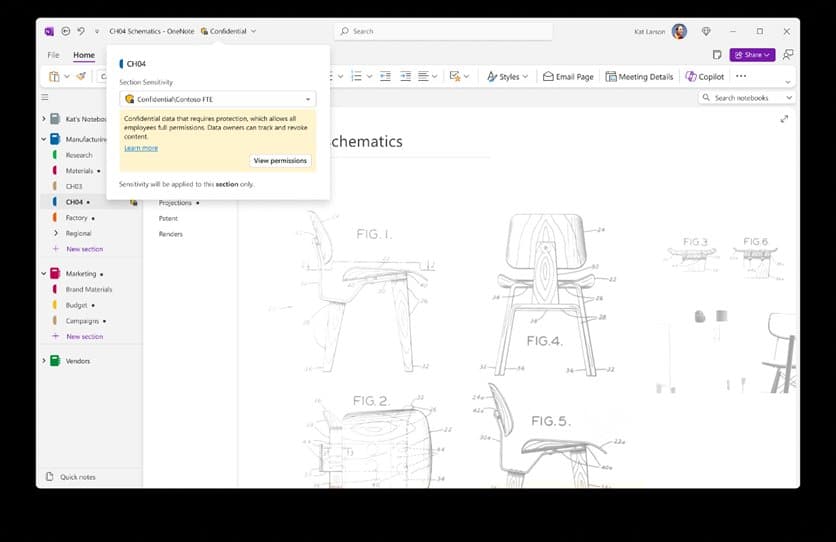
Microsoft has officially launched sensitivity labels for OneNote, enabling enterprise users to apply encryption and access controls to protect sensitive information while maintaining productivity across devices.
Microsoft has reached a significant milestone in enterprise data protection with the General Availability release of sensitivity labels for OneNote. This long-awaited feature allows organizations to apply Microsoft Purview sensitivity labels directly to OneNote sections, bringing enterprise-grade security controls to one of the most widely used note-taking applications in the Microsoft 365 ecosystem.
Enterprise Security Meets Productivity
For years, enterprise customers have requested better ways to safeguard sensitive information within OneNote. The challenge has been balancing robust security controls with the need for seamless collaboration and productivity. With sensitivity labels now generally available, organizations can finally apply encryption at the section level, meet compliance requirements without disrupting workflows, and enable secure collaboration across devices and platforms.
The integration with Microsoft Purview means that when a section is labeled, the controls defined by your organization's policies—such as encryption and access restrictions—are automatically applied. This ensures sensitive content is handled in line with compliance requirements while maintaining the familiar OneNote experience users expect.
Copilot Integration and Security Foundation
From a Copilot perspective, the security foundation is already in place since Copilot only accesses content users are permitted to see. With Sensitivity Labels now available in OneNote, Microsoft adds an additional layer of control by allowing organizations to classify and protect their most sensitive notes. This helps keep AI-powered assistance compliant with your organization's security and privacy standards while enabling teams to work confidently with protected notes.
What's Included in the GA Release
The General Availability release includes several key capabilities:
- Manual Labeling: Apply sensitivity labels at the section level across all OneNote platforms including Windows, Mac, iOS, Android, and Web
- Consistent Experience: The labeling interface is familiar and aligned with other Microsoft 365 applications
- Microsoft Purview Integration: OneNote enforces file-based sensitivity labels defined by your organization and applies corresponding encryption settings
Cross-Platform Support and User Experience
The labeling experience has been carefully designed to work consistently across all OneNote clients. Whether users are working on Windows, Mac, iOS, Android, or the web version, they'll find the same intuitive labeling interface. This consistency is crucial for enterprise environments where users work across multiple devices and platforms throughout their workday.
Implementation Requirements
While OneNote uses the same sensitivity labels configured for files in SharePoint and OneDrive, the labeling capability in OneNote is not enabled by default. IT administrators must manually enable this feature through the Microsoft Purview compliance portal. Organizations need to follow the guidance in "Enable sensitivity labels for files in SharePoint and OneDrive" and review the documentation for "Microsoft Purview sensitivity labels in OneNote" to properly configure this capability.
Visual Experience Across Devices
The labeling experience has been optimized for each platform while maintaining consistency:
- Windows Client: Full-featured labeling interface with context menus and ribbon integration
- Web Client: Streamlined labeling experience accessible through the browser
- Mac: Native macOS integration with sensitivity label options in the file menu
- iOS and Android: Mobile-optimized labeling experience that works seamlessly with touch interfaces
Business Impact and Use Cases
This capability addresses several critical business needs:
Compliance Requirements: Organizations in regulated industries can now ensure that sensitive notes containing financial data, patient information, or intellectual property are properly classified and protected.
Secure Collaboration: Teams can collaborate on sensitive projects without worrying about unauthorized access, as encryption and access controls travel with the content.
Data Governance: IT departments gain better visibility and control over sensitive information stored in OneNote, reducing the risk of data breaches or compliance violations.
User Productivity: The familiar labeling experience means users don't need extensive training to adopt these security features, minimizing disruption to existing workflows.
What's Next for OneNote Security
Microsoft has indicated that this is just the beginning of enhanced security capabilities in OneNote. The company plans to continue evolving the labeling experience to bring even more value to organizations. Future updates may include automated labeling based on content analysis, integration with other Microsoft security services, and expanded policy controls.
Getting Started with Sensitivity Labels in OneNote
Organizations looking to implement this capability should:
- Review existing sensitivity label configurations in Microsoft Purview
- Enable the labeling capability for OneNote through the compliance portal
- Communicate the new features to users and provide training on proper label application
- Monitor usage and compliance through Microsoft 365 reporting tools
- Plan for ongoing refinement of labeling policies based on organizational needs
Strategic Implications for Microsoft 365 Adoption
The addition of sensitivity labels to OneNote represents Microsoft's continued commitment to making security features accessible across its entire productivity suite. This move strengthens the case for organizations to adopt a comprehensive Microsoft 365 strategy, as it ensures consistent security controls across all collaboration tools.
For enterprises evaluating their note-taking and collaboration solutions, this development makes OneNote an even more compelling option, particularly for organizations that prioritize data protection and compliance. The ability to apply enterprise-grade security controls to notes and notebooks brings OneNote on par with other enterprise content management systems while maintaining its ease of use and collaboration features.
The General Availability of sensitivity labels in OneNote marks a significant step forward in Microsoft's vision of secure, compliant collaboration across its productivity ecosystem. As organizations continue to grapple with data protection challenges in an increasingly distributed work environment, features like these become essential tools in the enterprise security toolkit.
Comments
Please log in or register to join the discussion