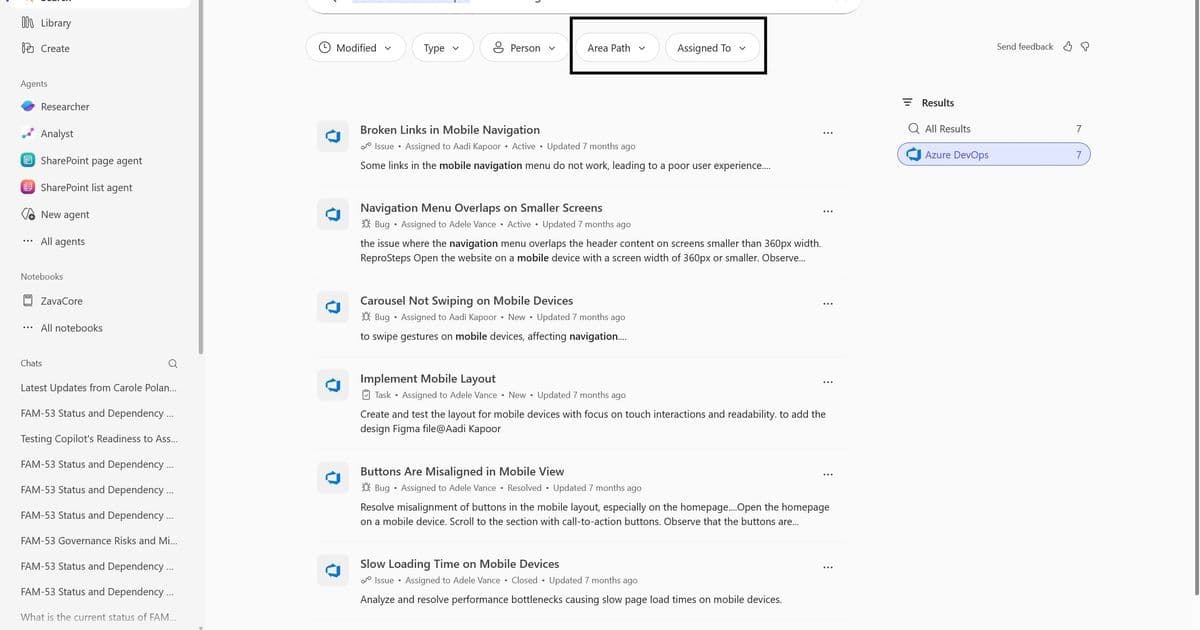
Microsoft has rolled out source-specific filters in Copilot Search worldwide, enabling users to refine results directly within specific data sources without rewriting queries or manual setup.
Microsoft has announced the general availability of source-specific filters in Copilot Search, a feature designed to streamline enterprise search by allowing users to refine results directly within specific data sources without the need to rewrite queries or manually set up filters. This update addresses a longstanding challenge in enterprise search: helping users move seamlessly from broad discovery to precise, actionable results without friction.
Why Source-Specific Filters Matter
Copilot Search works best when users can explore information broadly and then quickly narrow their results. Until now, refining results often required rewriting queries or scrolling through long result lists, particularly when working across third-party systems. The new source-specific filters close this gap by delivering connector-aware, zero-setup filtering directly within Copilot Search.
Filters automatically appear when you drill into results from a specific data source, making it easier to refine results without changing how you search. This is a key step toward a more productivity-first search experience, where your time spent refining queries is reduced and your focus shifts to getting work done.
A More Efficient Way to Refine Results
With source-specific filters, you can move from question to answer in a single interaction. For example, a query like: "Open ADO tickets for mobile navigation" can now be refined using Area Path and Assigned To filters directly in the results view instead of rewriting the query or scanning long lists of results. The experience is faster, more intuitive, and better aligned with how people work across connected systems.
How Source-Specific Filters Work
The new filtering system is designed to be both intelligent and user-friendly:
- Connector aware: Filters adapt to the underlying data source (for example, Area Path and Assigned To for ADO, or Site Name for SharePoint)
- Contextually relevant: Filter values are derived from real result data, ensuring users only see options that are relevant to their query
- Instantly applied: Selecting a filter refines results immediately—no query rewriting required
Where to Find Source-Specific Filters
You can access source filters by navigating to:
- Copilot Search
- Run a query
- Select a data source in the right rail
- Apply filters for that source
Filters appear automatically when a supported connector is selected, with no additional setup required by admins.
What This Means for Enterprise Search
Source-specific filters help Microsoft deliver a more focused and efficient search experience by reducing noise, eliminating unnecessary steps, and making refinement intuitive. As Microsoft continues to invest in both discovery and precision, features like source-specific filters ensure users can quickly find what they need across Microsoft 365 and connected systems with Copilot connectors.
The company has indicated plans to expand coverage and continue improving the end-to-end Copilot Search experience, suggesting this is just one step in a broader strategy to enhance enterprise search capabilities.
This update represents a significant improvement for organizations using Microsoft 365 and Copilot connectors, as it reduces the cognitive load on users who previously had to remember specific query syntax or manually navigate through multiple systems to find the information they need. By bringing intelligent, context-aware filtering directly into the search experience, Microsoft is making it easier for teams to access the information they need to make decisions and get work done efficiently.
Comments
Please log in or register to join the discussion