Microsoft Defender for Endpoint now offers built-in, centrally managed scheduled antivirus scans on Linux in public preview, replacing the cron-and-script approach that Linux administrators have relied on for years. The move closes a long-standing parity gap with Windows and reshapes how multi-platform security teams think about endpoint coverage across mixed cloud estates.
What changed
Microsoft has shipped a public preview of centrally managed scheduled antivirus scans for Linux inside Microsoft Defender for Endpoint. Until now, scheduling scans on Linux endpoints meant writing custom shell scripts wrapped around cron jobs, then maintaining that tooling separately on every host or distribution image. That works at small scale and falls apart quickly once you are running thousands of Linux VMs across multiple regions or cloud providers.
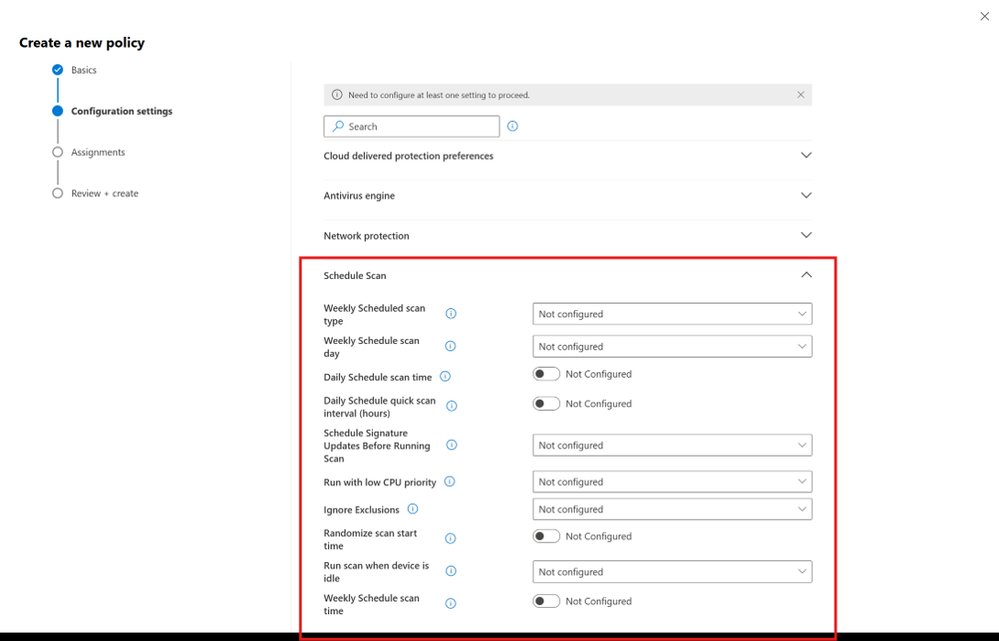
The new capability brings scheduling logic directly into the Defender agent and exposes it through two configuration paths. The first is security settings management policy in the Microsoft Defender portal, which gives you centralized policy enforcement from a single console. The second is a local managed JSON configuration that you push through standard configuration management tooling such as Ansible, Puppet, or Chef. That second option matters because it lets infrastructure teams treat scan policy as code and fold it into the same pipelines they already use for everything else on the host.
The scheduling options cover the patterns most teams actually need: hourly quick scans on an interval, daily quick scans at a defined time, and weekly scans where you choose between a quick or full scan type. On top of that, Defender now exposes a set of execution controls that address the real operational complaints about scanning Linux servers. You can restrict scans to run only when the device is idle, run them at low CPU priority to limit performance impact, check for definition updates before the scan starts, randomize start times so a fleet does not hammer shared storage simultaneously, and optionally ignore exclusions during scheduled scans for deeper coverage.
To use the preview, endpoints need agent version 101.26032.0000 or later on the production ring. Microsoft has published setup guidance for scheduling scans on Linux in its documentation.
Why scheduled scanning still matters
Real-time protection catches threats at the moment of execution or access, but it does not cover everything. Dormant malicious artifacts sitting on disk, payloads staged before detection signatures existed, and files that slipped through during a coverage gap are exactly the kind of thing periodic scanning surfaces. For regulated environments, scheduled scans are also a compliance line item. Auditors frequently want evidence that every endpoint is scanned on a defined cadence, and a pile of bespoke cron jobs is hard to prove consistent across an audit boundary.
The central enforcement angle is the part worth weighing carefully. When scan policy lives in scattered scripts, drift is inevitable. One team disables a scan to chase a performance problem and never re-enables it; another bakes a different schedule into a golden image. Pulling the policy into Defender means the schedule is enforced uniformly and reported back into the same security posture view as the rest of your endpoint telemetry, rather than living as tribal knowledge in a repository somewhere.
How it compares across the cloud estate
For organizations standardizing on Defender, this release closes a parity gap. Windows endpoints have had centrally managed scheduled scans for a long time, and the absence of an equivalent on Linux forced security teams into a split operating model: one workflow for Windows, a hand-rolled one for Linux. Consolidating both under the same policy engine reduces the number of tools an analyst has to reason about and makes cross-platform reporting cleaner.
The comparison that matters for multi-cloud teams is against the native and third-party alternatives. If you run workloads across AWS, Azure, and GCP, your Linux fleet is rarely homogeneous. Some shops lean on the cloud provider's own posture tooling, AWS GuardDuty for runtime threat detection or Google's Security Command Center, but those services focus on behavioral and network signals rather than on-disk file scanning, so they do not replace an antivirus scan schedule. Others run an open-source stack built on ClamAV with custom cron orchestration, which is flexible and free of licensing cost but pushes all the maintenance, tuning, and central reporting burden back onto your team.
Defender's pitch here is operational consolidation rather than raw detection novelty. If you are already paying for Defender for Endpoint and running it on your Linux hosts for real-time protection, the scheduled scan capability is included in that footprint, so the marginal cost is configuration effort rather than new licensing. If you are weighing whether to standardize, the calculation comes down to whether centralized policy and unified reporting across Windows and Linux outweigh the lock-in of routing your Linux security posture through a Microsoft-managed control plane. For a heterogeneous, multi-cloud Linux fleet, that single pane of management is usually the deciding factor, because the cost of maintaining parallel scanning systems tends to dwarf the licensing math.
Business impact
The practical takeaway for security and platform teams is that a category of custom tooling can now be retired. Every line of bespoke cron-and-script scanning logic is something an engineer has to maintain, test against new distributions, and document for the next person. Replacing it with declarative JSON pushed through Ansible or a portal policy lowers that maintenance surface and makes the behavior auditable.
The execution controls also change the migration conversation for performance-sensitive workloads. Teams have historically been reluctant to schedule full scans on busy database or application servers because of the CPU and I/O hit. Idle-only execution, low CPU priority, and randomized start times give operators enough knobs to schedule meaningful scans without provoking a performance incident, which removes one of the standing objections to consistent coverage.
Because this is a public preview, treat it accordingly. Pilot it on a representative slice of your Linux fleet, validate the performance controls against your busiest hosts, and confirm the reporting flows into your existing Defender dashboards before you commit to retiring the scripts you depend on today. The direction is clear, though: Microsoft is steadily erasing the operational differences between managing Windows and Linux endpoints, and for shops already invested in Defender, that convergence is the real value on offer.
Comments
Please log in or register to join the discussion