Apple's Journal app picks up streak controls, visible iCloud sync status, higher attachment limits, entry time stamps, and dynamic writing prompts across iPhone, iPad, and Mac in the OS 27 cycle.
Apple's Journal app started life as an iPhone-only release with iOS 17, then expanded to iPad and Mac in the iPadOS 26 and macOS 26 Tahoe cycle. With iOS 27, iPadOS 27, and macOS 27 (codenamed Golden Gate), the app gets a round of refinements that address some of the rough edges that showed up once it had to behave consistently across three platforms instead of one.
None of these changes rewrite how Journal works. They are the kind of updates you get when an app has matured enough that the gaps are about sync reliability, storage limits, and small UX signals rather than missing core features. For anyone maintaining a journaling habit across an iPhone, an iPad, and a Mac, that is the more useful kind of release.
Streaks you can actually configure
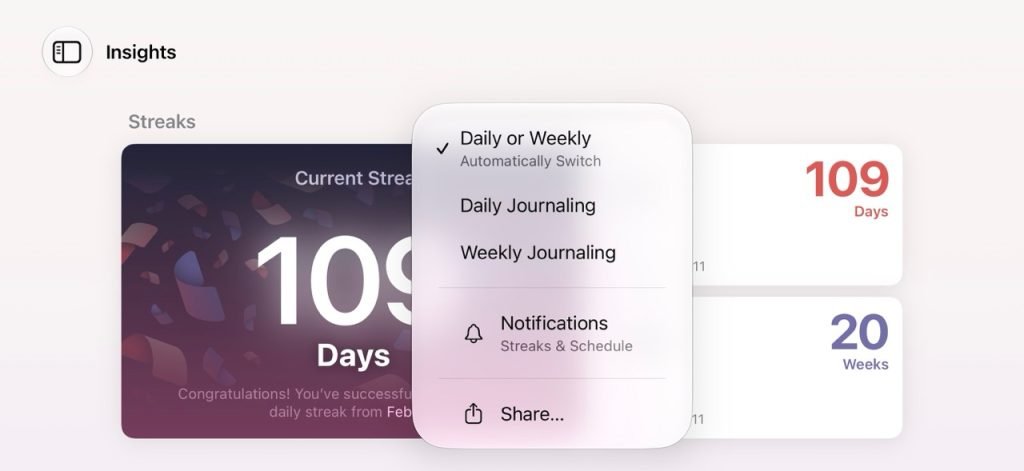
Insights have been a central part of Journal since the beginning, and streaks are the most visible piece of that. Previously the app decided how to count your streak. In the OS 27 update, you can manually switch the streak indicator between daily, weekly, and an automatic mode that picks daily or weekly for you.
This matters more than it sounds. A daily streak punishes anyone who journals deliberately a few times a week, and the all-or-nothing pressure tends to push people away from the app rather than into it. Letting the user pick the cadence that matches their actual habit is a small change with an outsized effect on whether the streak feels motivating or guilt-inducing.
Visible iCloud sync status
The expansion to iPad and Mac brought iCloud Sync between devices, but the sync state was often unclear. You would make an entry on one device and have no reliable signal about whether it had propagated to the others.
iOS 27 adds a visual iCloud sync status for Journal entries. It briefly appears, when sync is active, in the part of the interface that displays the number of entries within a journal. Apple also says sync is generally more reliable in this release, separate from the new indicator.
If you have worked with CloudKit-backed apps, you know the hard part is not moving the data, it is communicating state to the user without making them anxious. A transient indicator tied to the entry count is a reasonable design choice: present when it is relevant, invisible the rest of the time. It tells you something is happening without turning every save into a status screen.
Higher attachment limits and entry time stamps
Journal raises the number of attachments each entry can hold. The previous cap was a real pain point for users who wanted to build richer multimedia entries, so the increased limit is a direct response to that complaint.
The app also surfaces time stamps for entries, meaning the time of day an entry was created. This is one of those features that some people will lean on heavily and others will ignore. If you create your own manual time stamps inside an entry and update them through the day, the automatic value is a nice-to-have rather than a workflow change. If you do not, it adds context to your archive for free.

Dynamic writing prompts
The first launch of Journal in iOS 27 highlights two features in particular. The first, Create Richer Entries, ties together the higher attachment limits, edge-to-edge photos, and the new time of day detail. The second, Reflect With Writing Prompts, is the more interesting one.
The writing prompts are dynamic and can be generated based on what you have already written. Instead of a generic question, the app can encourage you to expand on a specific detail you jotted down in an earlier entry. That moves prompting from a static list toward something that reacts to your own content, which is exactly the sort of on-device personalization Apple has been building toward across its apps.
Migration and availability
There is nothing here that requires planning for users or developers building alongside Journal. The data model is unchanged, sync is backward compatible with the existing iCloud store, and the new streak settings default sensibly. The main thing to be aware of is that the visible sync indicator changes user expectations: people will start to expect feedback when entries are propagating, so reliability complaints will be more specific from here on.
iOS 27 is currently available in developer beta. A public beta is expected in July, with the official release this fall alongside iPadOS 27 and macOS 27. If you maintain a journaling or note-style app on Apple platforms, the streak configurability and the way Apple is exposing sync state are both worth studying as patterns, regardless of whether you compete with Journal directly.
Comments
Please log in or register to join the discussion